


NVIDIA's RTX Spark chips landed in laptops on October 16, and HP's OmniBook Ultra 16 was among the first wave of PCs delivering advanced local AI performance.
It's an "exceptionally well-built RTX Spark laptop," according to Editor-in-Chief Daniel Rubino, who highlights the "gorgeous 3K OLED display, excellent keyboard and haptic touchpad, strong battery life, and superb performance" in his OmniBook Ultra review.
It's undeniably one of the most impressive Windows laptops we've yet tested, and it's available now at Best Buy. Is it for you? Let's find out.
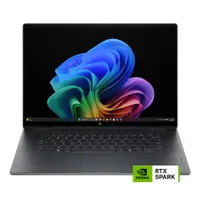
Who is the OmniBook Ultra made for?

Is HP's OmniBook Ultra 16 the right laptop for everyone? No; it's a specialized mobile workstation that takes AI out of the cloud and puts it into the heart of the PC, improving reliability, privacy, and mobility.
That's all thanks to the NVIDIA RTX Spark chip inside, which includes a beefy Blackwell integrated GPU wth up to 6,144 cores. This is where the AI magic takes place, aided by up to 128GB of unified LPDDR5x RAM.
The HP OmniBook Ultra 16 is an exceptionally well-built RTX Spark laptop with a gorgeous 3K OLED display, excellent keyboard and haptic touchpad, strong battery life, and superb performance.
Daniel Rubino, Windows Central Editor-in-Chief
The NVIDIA GPU is also quite good at gaming, hitting triple-digit frame rates in demanding games like Cyberpunk 2077 with multi-frame gen and ray tracing enabled.
Everything looks stunning on a 3K OLED touchscreen with a 2.8K resolution, 120Hz variable refresh rate, and up to 1,100 nits of brightness. The keyboard and haptic touchpad are comfortable and easy to use, the audio is loud and full, and we reliably got about 11 hours of battery life in real-world, light-to-medium usage.
Bottom line? If you're an AI pro who likes to have some fun, or if you're simply someone who wants one of the latest and greatest Windows PCs, the OmniBook Ultra 16 makes a great choice.
FAQs
What is RTX Spark?
RTX Spark N1X is NVIDIA's new SoC featuring up to a 20-core Grace CPU, 6144-core Blackwell GPU, and 128GB of unified RAM that's shared between the system and the GPU. It's designed for specialized AI workloads, but it also has some decent gaming chops.
How much RAM do I need for local AI?
The short answer is that more RAM is better for AI, but it really depends on your workload. We've had success running local AI models with as little as 32GB of RAM, but of course, performance generally improves as you add memory.

Join us on Reddit at r/WindowsCentral to share your insights and discuss our latest news, reviews, and more.

