Microsoft has started rolling out its overhauled context menus for Windows 11 as part of this month's non-security feature update that was made available today. The update, known as KB5127936, is now generally available as an optional release.
"This update introduces an updated context menu that is faster, simpler, and more customizable," Microsoft says. "The updated menu opens more quickly, reduces clutter, and gives you more control over the commands and app extensions that appear when you right-click."
These improvements are part of the company's ongoing "Windows K2" effort, which focuses on making core OS improvements that address complaints and issues from users. For a long time, context menus of Windows 11 have been slow, cluttered, and confusing, but today's update changes that.
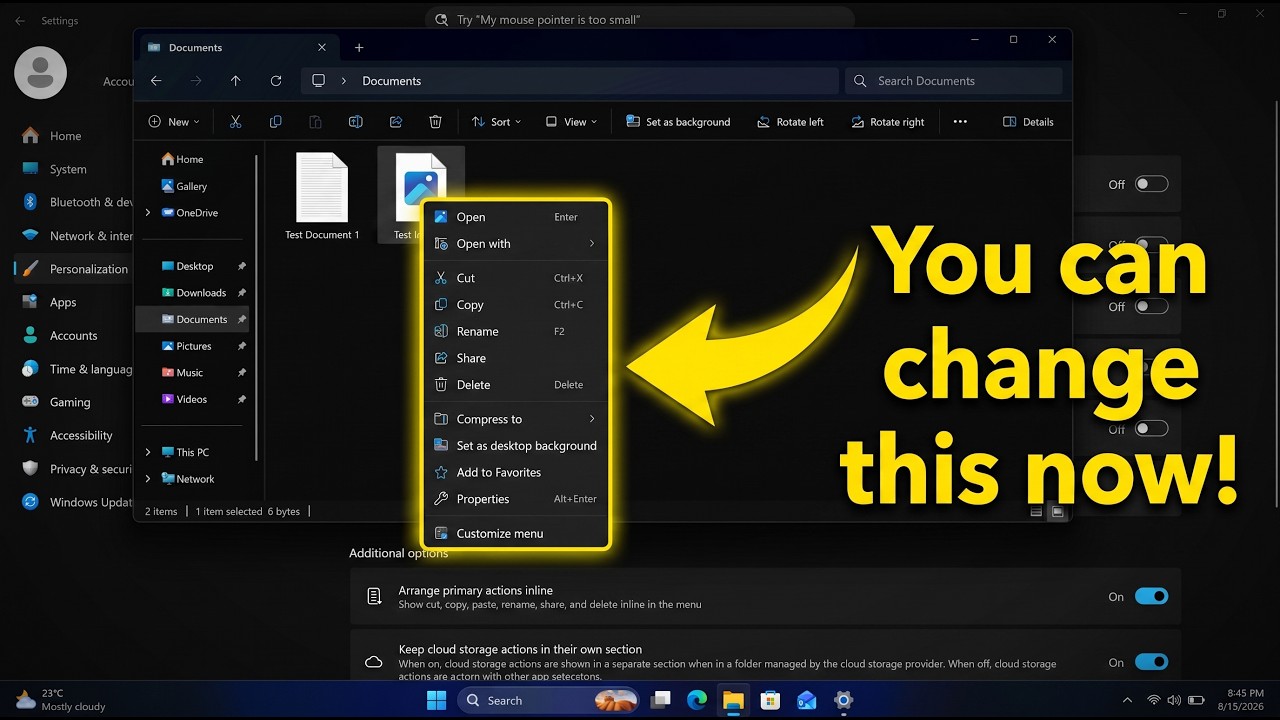
Now, context menus open instantly, and they can also be customized by the user. Microsoft outlines the following customization options being added to Windows 11 with this new update:
- Turn built-in Windows commands, such as Send to and Create shortcut, on or off.
- Add commands such as Print to the context menu.
- Choose which app extensions appear in the main menu or a submenu or hide the app extensions submenu.
- Display Cut, Copy, Paste, Rename, Delete, and Share directly in the menu instead of as a row of icons.
- Move Properties to the bottom of the context menu.
These new context menus also appeal to Windows 10 users, as they enable the ability to restore common actions such as cut, copy, and paste in the vertical list view instead of horizontally along the top of the menu. You can also turn off apps that might appear within the context menu.
Today's update includes more than just an overhauled context menu system, too. The new Xbox task view interface is also rolling out, along with updates to File Explorer and Windows Settings. Be sure to check out the changelog for the full list of changes.
Unfortunately, all of these new features are rolling out gradually, which means you likely won't see them right away. You need to ensure the "Get the latest updates as soon as they're available" toggle is enabled in Windows Settings to get them quicker, but you'll still have to wait before they appear.

Join us on Reddit at r/WindowsCentral to share your insights and discuss our latest news, reviews, and more.