Microsoft has today announced a set of major improvements coming to the context menus that appear in File Explorer and the desktop on Windows 11 that are designed to make the right-click experience faster, less cluttered, and more customizable.
I first revealed Microsoft's plans to overhaul the context-menu system on Windows 11 last month, and now the company has confirmed those plans. In fact, it's already rolling out preview builds with the new context menu system in place, ready for Windows Insiders to begin testing and provide feedback on.
Microsoft says that it knows the context menu system on Windows 11 today is not in a good place. "The menu became cluttered and sluggish, and we recognized the need to dramatically reduce the time between right-clicking and having a menu that’s fully ready to use," says Microsoft engineer Michael Novak in a blog post published today.
"Today, we’re excited to announce an updated context menu that delivers a faster, simpler, and more customizable experience. The new design reduces top-level clutter, keeps commonly used actions easy to access, and introduces a new Settings experience that gives you more control over what appears in the menu."
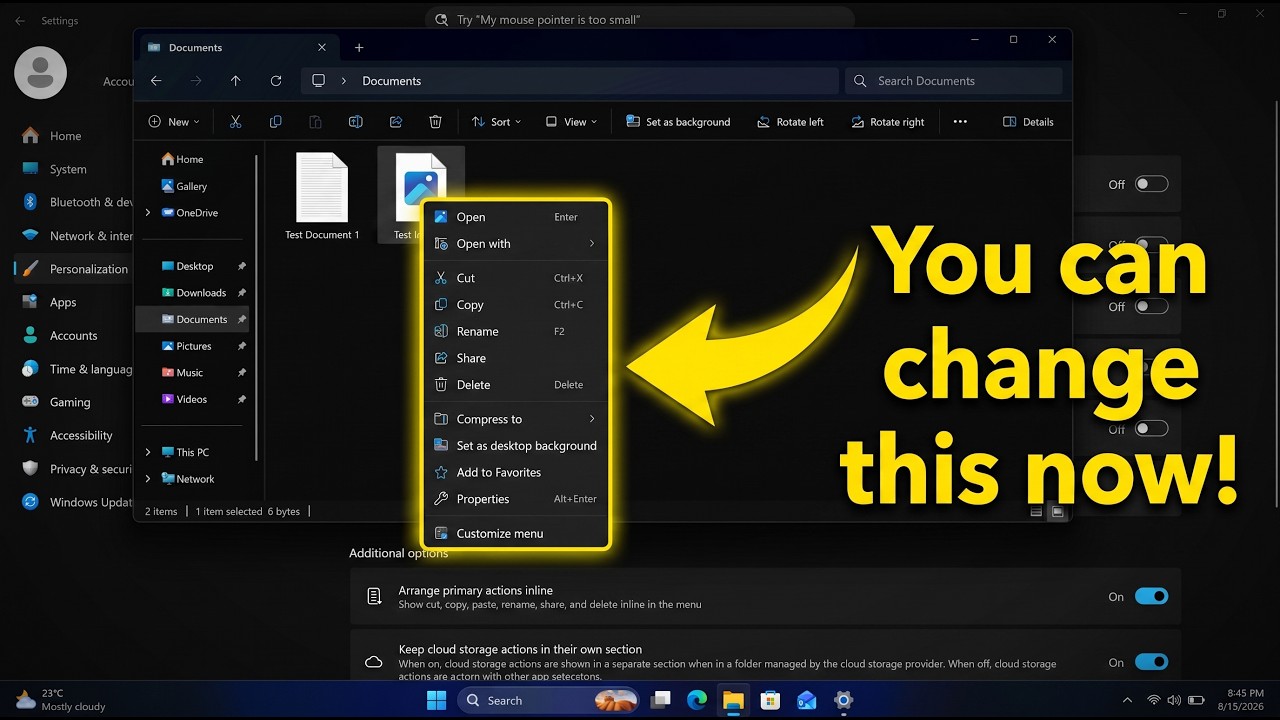
I went hands-on with the new context menu system over the weekend, and I can confirm that the new right-click experience is a major improvement over what is shipping on Windows 11 currently. The new default layout is much less cluttered, with less actions immediately presented to the user in exchange for a much faster response time.
Microsoft is finally letting users customize the context menus too. You can now enable and disable whichever actions you want, as well as show or hide app extensions from third-party apps. This is great for when an app installs itself into your context menus without permission, as you can now hide them from view.
It's even going so far as to allow users to restore the Windows 10 context menu layout within the modern Windows 11 context menu system. Until now, Windows 11's context menu has placed "primary actions" such as cut, copy, and paste into a horizontal view along the top of the menu. Windows 10's context menu placed those actions vertically alongside everything else, and now Windows 11 is letting users restore that layout for users that want it.
"We know many people have years of muscle memory from the Windows 10 menu, so we’ve added options to bring that feel back. You can list the main commands (Cut, Copy, Paste, Rename, Delete, and Share) inline directly in the menu instead of as a row of icons, and you can move Properties down to the very bottom."
These are genuinely good quality of life improvements coming to Windows 11, and Windows Insiders can download the latest Windows 11 preview builds to begin testing them today. Given that they only just entered preview, I expect we won't see them begin shipping to everyone until later in the fall.

Join us on Reddit at r/WindowsCentral to share your insights and discuss our latest news, reviews, and more.