Last month, I revealed that Microsoft was hard at work on a redesigned context menu system for Windows 11 that's designed to make them faster and more customizable. Now, we've got our first look at the new context menu customization features, discovered hidden in the latest Windows 11 preview builds, and I've been trying them out!
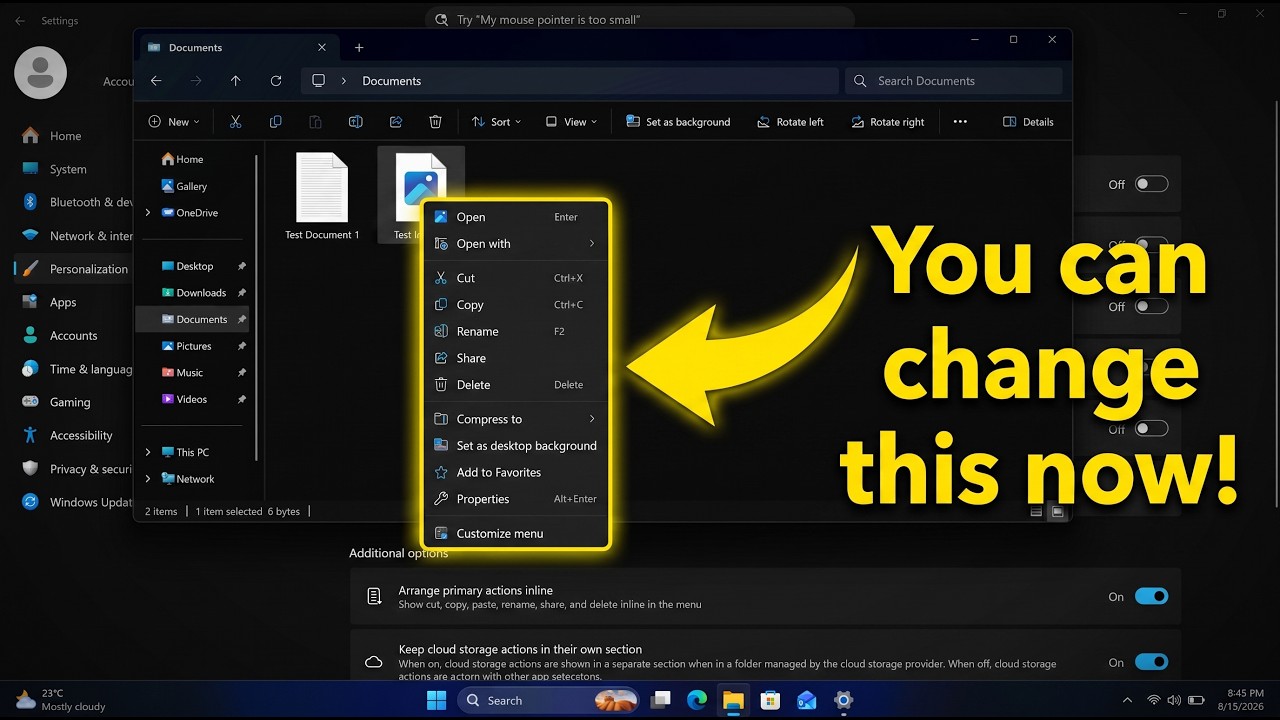
Soon, you'll see a new customize menu option appear at the bottom of the context menu. When selected, you'll be taken into the Windows Settings app where you'll see a wide array of new options that allow you to configure the layout and actions that appear within the context menu.
The toggleable actions presented to the user are:
- Send to
- Prin
- Create shortcut
- Copy as path
- Rotate image
- App extensions
- Arrange primary actions inline
- Keep cloud storage actions in their own section
These options allow users to hide certain actions that they might not often use, speeding up the context menu in the process. Additionally, Microsoft is adding an option that lets you change how actions like cut, copy, and paste appear within the menu.
By default, these primary actions appear at the top of the menu in a horizontal layout. This new option will let users restore how they used to appear on Windows 10 and older, where they are listed vertically alongside the other actions within the menu.
It's also worth noting that by default, the context menu has most actions disabled automatically. That means the context menu will be fast for users automatically when these changes roll out, and you'll have to head into the customization options to add back any actions you find useful.


These new customization options are really great to see, and show that Microsoft is finally listening to feedback when it comes to common UI surface such as the context menu.
The legacy Windows context menu is also still present, and while it no longer appears as an option in the context menu by default, you can still go in and enable that action if that's something you find yourself using. Notably, there's still no option to set the legacy context menu to be the default experience.
In the meantime, we know the new customizable context menu options are imminent, with an announcement from Microsoft expected in the next week or two.
Thanks to phantomofearth for discovering and helping me enable the feature to try out!

Join us on Reddit at r/WindowsCentral to share your insights and discuss our latest news, reviews, and more.