


Windows Central Verdict
ASUS eased my OLED fears with this ROG Strix monitor, thanks to its built-in proximity sensor and other sensible settings in its straightforward OSD menu. It's bright enough, looks incredible at 4K with tremendous motion clarity at 240Hz, and you can push for more if you can handle 1080p. It's a shame the lack of an upstream USB cable makes the hub a paywalled extra, but I'm impressed with this "TrueBlack Glossy" panel.
Reasons to buy
- +
Glossy panel helps display deep blacks with OLED contrast
- +
UHD @ 240Hz / FHD @ 480Hz switch is easy, if you want it
- +
Proximity sensor helps protect the screen from burn-in
Reasons to avoid
- -
USB ports need a separate upstream hub cable
Why you can trust Windows Central Our expert reviewers spend hours testing and comparing products and services so you can choose the best for you. Find out more about how we test.
The ROG Strix OLED XG32UQWMS gaming monitor is planned for release in September 2026. ASUS provided a sample, but the company had no input on the article nor saw its contents before publishing.
OLED gaming monitors have been around for a while, but concerns about text clarity and burn-in left me less excited to buy something like the ASUS ROG Strix OLED XG32UQWMS. Given the chance to test an upcoming model from its range shown at Computex earlier this year, I couldn't resist, and my review could be the moment that helps me overcome my apprehension. Here's what I learned.

I'm a long-term believer that 1440p @ 144Hz is the sweet spot for gaming monitors, but I've always stuck to IPS panels. Extremely high refresh rates might not tempt me, but OLED certainly does after decades of PC gaming.
How much does the 32-inch Strix OLED cost?

The ROG Strix XG32UQWMS is targeting a September launch for $899, with specific US retailers to be confirmed. In the United Kingdom, that converts to £819, with planned third-party resellers including Amazon UK, Currys, and Very. In the meantime, you can sign up for availability notifications on the monitor's official ASUS listing for your region.
Component |
Spec |
|---|---|
Display type |
WOLED |
Resolution |
UHD (3840 x 2160) |
Refresh rate |
240 Hz (UHD) |
Brightness |
330 cd/m² (typical) |
Viewing angle |
178°/ 178° (vertical/horizontal) |
Response |
0.03 ms (Gray-to-Gray) |
Dimensions |
28.27" x 22.13" x 7.40" (71.8 x 56.2 x 18.8 cm) |
Weight |
10.64 – 14.46 lbs |
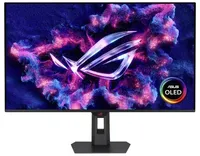
Is the 32-inch Strix OLED easy to set up?


I'm a big fan of toolless setups wherever they appear, and ASUS ROG wins points for delivering a straightforward process here. Everything hinged on a push-button release mechanism that either gripped the stand or the VESA mount; I used the former and attached the footplate with a simple thumbscrew.
I'm a big fan of toolless setups wherever they appear, and ASUS ROG wins points for delivering a straightforward process here.
The display alone weighs 9.92 lbs (4.5 kg), and adding the VESA mount brings the total to 10.64 lbs (4.83 kg) in a mounted setup. Otherwise, the foot plate and strut together weigh 4.54 lbs (2.06 kg), controlling height with a sturdy but not overly stiff response. On my desk, the monitor is 14.46 lbs (6.56 kg) overall.


Attaching the stand gave me a clear view of the ports and navigation via the multi-function button (MFB) located behind the bottom-mounted ASUS ROG logo and its accompanying "Neo" proximity sensor. It's a pretty standard affair that matches rival brands, and its controls should feel familiar to most people.
While there are two HDMI 2.1 ports, a pair of USB-A 3.2 Gen 1 with a hub port, and a headphone jack, there's only a single DisplayPort cable in the box for its matching DP 1.4 port, along with the AC cord. Bundling a free USB-B cable shouldn't be too expensive, and I'm disappointed to see it missing here.
Does the 32-inch Strix OLED look good?

Moving from a 27-inch IPS Alienware monitor to an OLED panel made its benefits immediately obvious, with an experience similar to the one I get from my LG C2 TV in the living room. High contrast, deep blacks, and crisp visuals come with its 4K resolution and that smooth 240Hz refresh rate. Windows 11 adjusted my settings accordingly, and the monitor looks great out of the box.
The UHD @ 240Hz mode looks fantastic, and I'm left wondering who would ever want to switch to 1080p for the sake of 480Hz on a 32-inch display.
In motion, the UHD @ 240Hz mode looks fantastic, and I'm left wondering who would ever want to switch to 1080p for the sake of 480Hz on a 32-inch display. I know it has its place in ultra-competitive shooters like Counter-Strike 2 and its many rivals, but 240Hz still feels like plenty to me. If you're the target audience, I think you'll be happy, because FHD gameplay still looks quite good.


Up close, the clarity of on-screen text looks fine; nothing particularly groundbreaking, but nothing looks noticeably fringed when I sit at a comfortable distance in UHD mode. Adjusting ClearType in Windows 11 might give results that better suit you, but I didn't feel like anything looked out of place during my usual daily work and gaming.
The OSD is at least easy to navigate, and I could install the DisplayWidget Center if I really wanted to use a mouse to tweak several settings at once. Otherwise, the "TrueBlack Glossy" panel looks significantly darker at a glance than the other screens in my office, which certainly helps with the deep blacks OLED is famous for, and I found the visible room reflections were tolerable.
Testing the display

Out of the box, the XG32UQWMS defaults to "Racing mode", hitting 99% of the DCI-P3 color gamut as advertised, and sRGB accuracy earns a perfect score, while Adobe RGB maxes out at 93%. Without changing settings, a 100% brightness level reached around 306 to 311 nits, so getting it to 330 nits will require a bit of tweaking. On the whole, I'm satisfied with its stock settings.
Should you buy the 32-inch Strix OLED?

You should buy this if ...
✅ You want an OLED monitor built for preventing burn-in
✅ You're a competitive gamer who thrives on high refresh rates
You should not buy this if ...
❌ You want an out-of-the-box USB hub monitor
A built-in presence sensor probably sets off alarm bells for some gamers, but the proximity detection is literally there to help protect this OLED panel by switching off when you walk away. That, along with adjustments to uniform brightness and pixel-cleaning settings, helps prevent burn-in, which was my biggest concern with monitors like these. ASUS definitely could have thrown in a free upstream USB cable for its hub, but the display itself is solid, so it still wins praise.

Due for release in September 2026, this OLED gaming monitor should be at the top of your considerations if you're shopping around.

