


Valve has finally officially revealed its new Steam Controller, putting an end to the past week of leaks. But while the announcement confirms much of what we already knew, not everyone is sold, especially when it comes to the $99 price (be sure to vote in the poll below and let me know where you land on it).
In the meantime, for many of my colleagues and me, the controller has a much bigger problem.

Price isn't the issue, but compatibility is.
At first glance, the price doesn't seem unreasonable, given the haptic feedback and mousepad abilities. Additionally, you should get some longevity out of this, with Valve confirming that parts will be available through iFixit (via PC Gamer). However, once you start comparing it to other controllers, the concerns become a little easier to understand, at least if you play PC games outside of Steam's platform.
For PC Game Pass users, you’re out of luck. Valve’s Steam Controller reportedly only officially works with devices running Steam. That limitation is already proving to be a dealbreaker for some. As my colleague Richard Devine puts it, “this definitely kills it for me.”
Currently, Valve’s Steam Controller, like its predecessor, lacks standard drivers for Windows, Linux, and Mac, meaning you have to rely on Steam itself to actually use the controller. This isn't something you have to consider when purchasing other third-party (and cheaper) controllers.
With the original Steam Controller at least, the community stepped in and worked around this, creating tools that let it function properly across your entire PC rather than being locked to Steam.
For a controller that costs $99, though, you’d expect that level of flexibility out of the box.
It’s also worth noting that, in testing from PCMag, they do say this is more of a Microsoft-side issue than Valve’s, and users have pointed out that tools like SISR could help resolve it.
Being a big fan of PC Game Pass and someone who was genuinely interested in Valve's second go at a controller, this creates an immediate problem, despite the aforementioned community-created tools that fix it. Do I want to rely on workarounds for a $99 device?
For me, my Xbox Elite Series Controller is quite literally disintegrating more and more after every use, and after nearly a decade of play, I'm not surprised. Due to this, I am actively looking for a replacement, and that replacement could be a $99 Steam Controller, or it very well could not.
Why is Valve releasing the controller without the Steam Machine?

The compatibility issue wouldn't be as big a deal if this were releasing alongside the Steam Machine, you know, the device marketed to work with this controller.
However, due to the massive global shortage of high-end memory and storage modules — gobbled up by the insatiable demand for AI data centers, Valve has been forced to push the Steam Machine and the Steam Frame VR headset back into late 2026.
As Valve's hardware engineer pointed out during an interview, “this doesn’t have RAM in it, and it’s not as complicated to start getting out the door for us.”
Since the controller doesn't rely on those scarce components, Valve is moving ahead with a standalone release, leaving the rest of its hardware ecosystem in production limbo for now. Valve is still aiming for a 2026 release, but no date has been announced yet... and we wait with bated breath on what the price will be, given the RAM pressures.
An alternative, and cheaper controller for PC Game Pass players

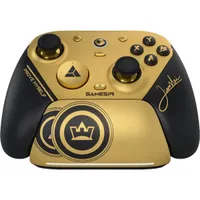
If you’ll indulge me for a second, I'd like to turn to another controller on the market, the GameSir G7 Pro 8K.
It offers a useful point of comparison. It doesn’t have trackpads like the Steam Controller, which, unfortunately, is Valve's killer feature, but it does have an 8,000Hz polling rate. This is significantly higher than the Steam Controller’s rated 250Hz and is worth taking into consideration. If you shop at Best Buy, the Gamesir G7 Pro 8K is actually cheaper than the release price of the Steam Controller.
Now, I know higher polling rates don’t always translate directly into smoother gameplay, and they can sometimes be more marketing than meaningful improvement. Still, when you look at early impressions of the Steam Controller, there’s a consistent theme that for FPS games, it’s just okay at best, and for some players, that might not be enough, and I think for who this controller targets, that’s okay.
Over on our r/WindowsCentral subreddit, people had a lot to say about the Steam Controller. One user suggested people just “connect your current PC to your TV with an HDMI cable and use an Xbox controller via Bluetooth for half the price,” which is a fair point given the $99 cost.
That said, not everyone agrees; value is in the eye of the beholder, of course, and what's worth spending $99 on from one gamer to the next will differ wildly. Polling rates and other technical specs aside, everyone wants value for their money. If you play primarily on Steam anyway, this controller will probably be a day-one purchase. I just wish those of us on other launchers could join in!
For me at least, it comes down to compatibility. The Steam Controller is built for PC primarily, and most PC gamers do use Steam. While it does support Bluetooth, that doesn’t help if you want to use it on an Xbox either. Though that part isn't Valve's problem to fix.
The Steam Controller doesn’t have to be everything to everyone, it just needs to be enough for most of us at that $99 price point
As Xbox continues its effort to integrate into PC gaming with Project Helix, I’d love to see more openness around controller support on consoles, but realistically, we could be waiting a long time for these developments. Recently, Asha Sharma, Xbox CEO, has expressed her own concerns around RAM shortages impacting the rollout of the next-generation console. A console we are hoping breaks down the PC/Console boundaries.
The Steam Controller doesn’t have to be everything to everyone; it just needs to be enough for most of us at that $99 price point. On paper, it’s almost there. But after looking into the reviews, I just can’t justify it for my purposes. Especially knowing the potential headache with my Game Pass library. It’s a pass from me (pun intended) for now, and I suspect a lot of other Game Pass players will feel the same.
What about you? Am I being too harsh here, or is the lack of native Windows support a total non-starter? Hit the comments and don’t forget to weigh in on the poll!

Join us on Reddit at r/WindowsCentral to share your insights and discuss our latest news, reviews, and more.

