


The Xbox Ally range is getting some big enhancements today.
Rolling out now, Microsoft is enabling Auto Super Resolution (AutoSR) for the Xbox Ally X, alongside a variety of big enhancements to the way the Xbox Ally range (and other devices) show up on TVs and external displays.
The Nintendo Switch pioneered the "docked handheld" experience, but Microsoft's own PC gaming handheld efforts on Windows 11 massively lag behind. Today's range of updates is designed to begin plugging away at that gap in a big way.
Here's everything that's new.
The big enhancements hitting your Xbox Ally

Here's everything coming to your Xbox Ally and Xbox Ally X in the near term. Most of these enhancements will also be rolling out more broadly to any Windows 11 device, making the concept of a "console PC" based on Windows 11 for TVs a more realistic proposition than ever.
- Finally, docking your Xbox Ally automatically configures your external display. The Xbox Game Bar now also has a display widget options menu.
Out of the box, the Xbox Ally has the very irritating Windows external display configuration flow. It previously asked for a mouse to navigate and configure effectively, but Microsoft has now moved many of the display options into the Xbox Game Bar. Furthermore, when detecting an external display, the Xbox Ally will automatically target that display and disable its internal display.
Additionally, the Xbox Game Bar will support changing resolution, refresh rate, and other display features, eliminating the need to grab a mouse or navigate tiny Windows desktop settings screens. - Automatic "Game Mode" enhancements on compatible TVs, Super Wideband Stereo Voice.
If you have a modern TV from the likes of Samsung, you might have noticed the display automatically switching to a low-latency gaming mode when your Xbox turns on. Now, the Xbox Ally will benefit from this as well. However, Microsoft says the automated mode is limited to ASUS docking products (for now), with a broader rollout planned later. So, for now, you may still have to manually switch your display to gaming mode when docking the Xbox Ally. Microsoft has also added support for super wideband stereo voice for headsets that support Bluetooth LE audio, which should improve the voice chat experience without degrading overall sound quality. - Improved controller pairing when docked, in addition to joystick cursor mode.
Another irritating part of the Xbox Ally docking flow pertained to gamepads and inputs. Previously, you'd have to manually switch between inputs using the Game Bar, if indeed your Xbox Ally would detect an external controller at all. Microsoft now says these features have been improved and should provide a far more seamless Nintendo Switch-like experience when docked with an external controller.
On top, there's now the option of navigating Windows settings menus without a mouse. You can now switch your joystick to a mouse cursor, enabling you to tweak more esoteric Windows features from the comfort of your sofa. Microsoft has also improved vibration and haptics on PC as well, bringing them more in line with modern Xbox console games. - You can now add apps and games to the library from outside of the Xbox PC app by hitting the + button.
This is already live for testers, but now rolling out more broadly. You can click on the "+" symbol in your library section to add games and apps that aren't available natively through the Xbox PC app. This makes it easier to add things like Netflix, Spotify, and other tools you might want to use from your sofa.
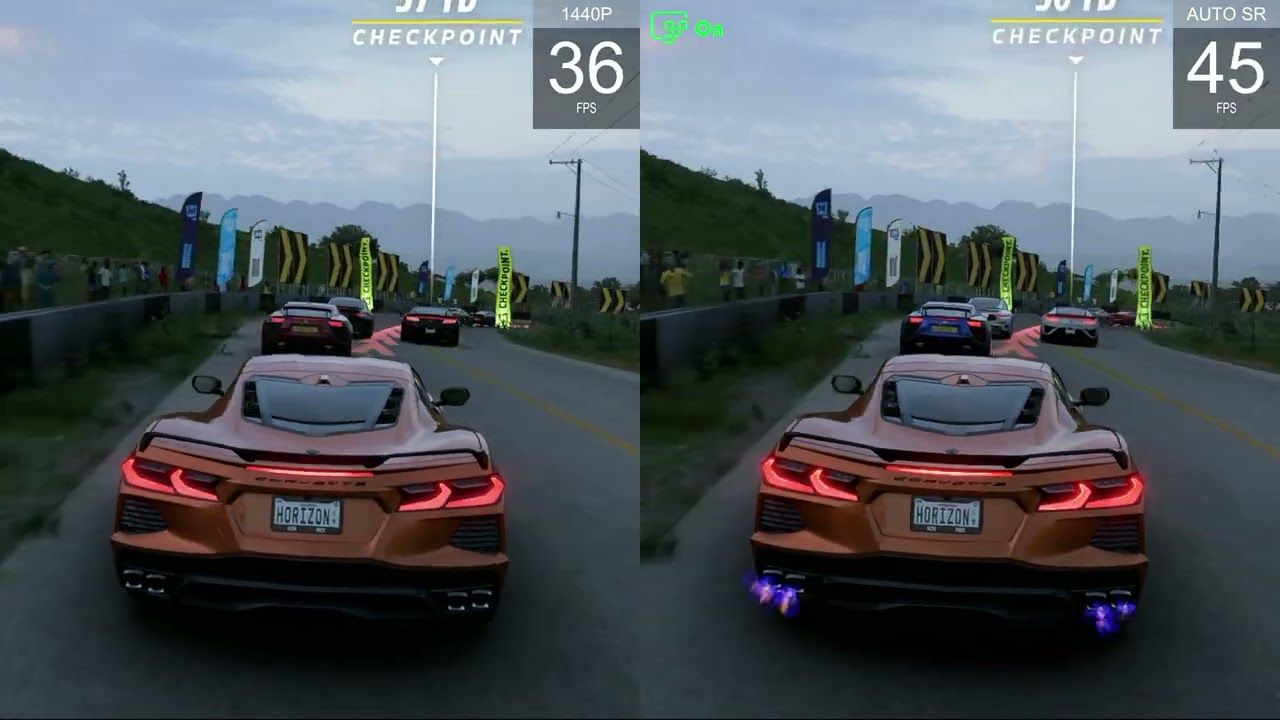
- Perhaps the big one: AutoSR (Preview) is now available on the Xbox Ally X.
Promised since launch, Auto Super Resolution (AutoSR) is now available in testing on the Xbox Ally X. Microsoft shared the above video to demonstrate how it can enhance games, although there are some pretty big restrictions, sadly.
Only when docked to an external TV or display, AutoSR uses the NPU on the Xbox Ally X to upscale game visuals to "1440p-like" fidelity while natively running at a lower resolution. In the above example, we can see the Xbox Ally X getting anywhere up to a 10 FPS boost when using AutoSR without sacrificing quality.
Microsoft sources tell me that the firm is exploring how and when to implement AutoSR on the Xbox Ally X when it's in portable mode. My guess is that it requires a decent chunk of electricity to run through the NPU, and thus prefers to be docked to a compatible 65w+ charger.
The Xbox Ally docked experience is already SO MUCH better

Just dabbling with the Xbox Ally's new docked features already reveals a huge leap in usability. When I initially did our reviews last year, docking the Xbox Ally would require messing with the Windows 11 display settings, which aren't even navigable without a mouse. Now, you can do everything from the Xbox Game Bar. My Razer Wolverine V3 Pro controller connected up immediately without issue or complaint, and switching between the Xbox Ally display and the TV display was simple and very fast.
My dock didn't detect my TV's auto game mode features, but that is coming later via updates, according to Microsoft. As of writing, it doesn't seem like AutoSR (Preview) supports all games, but it might be rolling out on a per-game basis. I'll try to figure out which supports it, but at the very least, it seems Forza Horizon 5 does for now.
RELATED: Best docks for the Xbox Ally / X
The reason the Xbox Ally update experience is so compelling is because it informs us what the Xbox Helix "PC-Console" hybrid might look like. Microsoft's next first-party Xbox is going to be a Windows 11 full PC-style device, albeit with compatibility for existing Xbox console games on top of the full-scale openness of a regular Windows PC. For Xbox gamers who prefer a simple "console-style" experience, Microsoft still has its work cut out towards making Windows 11 feel that way. But we're definitely heading in the right direction. The Xbox Ally is now closer in polish to the Nintendo Switch than ever, while simultaneously being orders of magnitude more powerful and open.

Join us on Reddit at r/WindowsCentral to share your insights and discuss our latest news, reviews, and more.

