


With so many games and so little free time, I find those such as Microsoft Flight Simulator 2024 that can require a significant time investment often get left to one side.
But after the recent Xbox Showcase and the reveal of World Update 22, something in my brain said "you should finally try this." Maybe it was the idea of flying along the Grand Canyon, one of the most impressive places I've ever been to in real life.
So I jumped in; after all, it's on Xbox Game Pass, so I didn't need to fork out any extra to buy it. I first played Microsoft Flight Simulator about 30 years ago, but it's been probably 20 or so since I actually put any time into it.
So I'm almost a complete beginner. One thing has come to light pretty quickly, though; I know why people buy one of the best flight sticks they can, and I'm getting one as soon as possible.
You don't NEED a flight stick, but I feel like it's a worthwhile investment

Right now I'm using a controller after the initial attempt to just muddle by with a keyboard and mouse turned into an absolute disaster.
Maneuvering a plane is a delicate operation, and a keyboard switch is either on or off, not leaving much room for precision.
A controller has been much better, making it so there's actually some level of finesse to steering a plane. Steering isn't so much the issue for me, though; it's everything else you have to also do while concentrating on not barreling out of the sky.
One of the things I'm really struggling with is the throttle. Using a controller, you can increase and decrease with a button press, but it's hard. I'm finding that jabbing at a button is either doing too much or not enough, and I'm getting distracted trying to balance the throttle properly and taking my eye off the ball.

It's the throttle management that first made me look into a flight stick, or HOTAS, to have a better time. A physical throttle with finer control will certainly relieve one of my pain points so far.
The other thing I'm finding is that because generally I'm holding a controller in two hands, it's a little cumbersome trying to look around the cockpit to find things such as the trim wheel.
The rudder is another pain point, and in this instance I think it's just how my brain has been wired from years of playing racing games with a controller. Using the left and right triggers for the rudder goes completely against my muscle memory. I'm not using it when I should, and I'm using it accidentally when I shouldn't.
It's perfectly playable with a controller, and I'm not saying it's horrible by any stretch. But I want to get better and do more, and I feel like sticking to a controller isn't giving me the fine control I need.
Enter the Thrustmaster T-Flight Hotas One

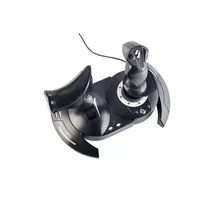
The next step I'm going to take is with a Thrustmaster T-Flight Hotas One. This particular system seems perfect for a beginner such as myself looking to take the next step.
Not only does it come recommended by my colleague, Ben Wilson, rating it as the best budget pick on our roundup of the best flight sticks for Microsoft Flight Simulator 2024, it's not too complicated and it's affordable.
I'd have preferred the stick to be on the left so I still have my right hand free all the time for the mouse without having to switch, but otherwise, it ticks the main boxes I'm looking for.
Obviously there's the stick for finer control of the aircraft, but it also has two options for rudder control — either a twist or a dedicated rocker on the back of the throttle — and, of course, that manual throttle control. Being compatible with PC and Xbox Series X|S is a handy bonus, too.

For me it's less about adding realism — though this is definitely a more realistic way to play — and more about having a tool for the job. I'm committed to trying to learn Microsoft Flight Simulator 2024, so in the same way I use a controller with rear paddles for shooters, using a HOTAS seems like a logical step.
I totally get it, though, already. I can already see why folks spend hundreds and thousands of dollars on equipment for flight sims. I'm more familiar with racing, myself, but it's the same principle. You want to get better, and having specialist control equipment is part of it.
So I'm jumping in. I'll be back in a couple of months, perhaps to update on how it's gone.
If you have any tips for a newbie Microsoft Flight Simulator 2024 pilot, be sure to drop them into the comments below!

Join us on Reddit at r/WindowsCentral to share your insights and discuss our latest news, reviews, and more.

