Windows Central Verdict
The HP OmniBook 5 2026 is an incredible, affordable laptop with a great OLED display, high-quality aluminum chassis, and a best-in-class keyboard and trackpad. For $200 less than a MacBook Neo on Black Friday, it's simply a no-brainer.
Reasons to buy
- +
High-quality design
- +
Great keyboard
- +
Large trackpad
- +
Excellent OLED touch display
Reasons to avoid
- -
Only two USB-C ports
- -
Webcam is just okay
- -
Not a very bright screen
Why you can trust Windows Central Our expert reviewers spend hours testing and comparing products and services so you can choose the best for you. Find out more about how we test.
HP is throwing its hat into the ring with another Windows laptop built from the ground up to compete with Apple's MacBook Neo. Joining the likes of the Dell XPS, Acer Swift 14 Air, and ASUS ZenBook 14, the new HP OmniBook 5 is a $699 computer that makes strategic trade-offs to feel premium without being too costly.
And for Black Friday, the HP OmniBook 5 is actually just $499 if you get it in Starlit Blue from the HP Store. At $499, you don't need to read the rest of this review. This is the best deal in computing, and everyone should jump at this if you need a computer for day-to-day productivity workflows.
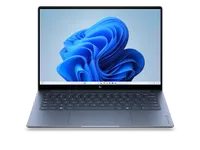
That deal is limited-time, so if you are on the fence, now is the time to move. If you do want to know more about the HP OmniBook 5, I've been testing it over the last month, and below you'll find my full review. Spoiler alert: Even at $699, this is probably one of, if not the best laptop you can buy in this price range right now.
This review was made possible thanks to a review unit supplied by HP. The company had no editorial input and did not see the contents of this review prior to publication.
HP OmniBook 5: Price & availability

The HP OmniBook 5 2026 starts at $699 and can be found directly from HP's online store or third-party retailers like Best Buy. However, as it's Black Friday right now, the OmniBook 5 is actually just $499(!) at the HP Store. That's an incredible price for a laptop this good. In fact, I'd argue this is the best deal in computing right now, and everyone interested in this laptop should jump at this while it's this affordable.
The base configuration comes with an Intel Core 5 320 chip, with 8GB RAM and 256GB SSD storage. This can be upgraded with more RAM and storage if necessary, but the base configuration should be enough for most people needing a computer for basic productivity workflows.
It's also available in 4 colors: Blue, pink, silver, and honeydew.
Specification |
Details |
|---|---|
Model / Product Number |
HP OmniBook 5 Laptop AI 14-mh0513nr (E48Z4UA#ABA) |
Operating System |
Windows 11 Home |
Processor |
Intel® Core™ 5 320 |
Graphics |
Intel® Graphics |
Memory (RAM) |
8 GB (onboard) |
Storage |
256 GB SSD |
Display |
14" diagonal, 2K (1920 x 1200), OLED, multitouch-enabled, 16:10, 300 nits, 100% DCI-P3 |
Camera |
1080p IR camera with Windows Hello support |
Keyboard |
Backlit keyboard |
Ports |
2x USB-C, 1x HDMI, 1x headphone/microphone combo jack |
Power Supply |
65W USB-C GaN power adapter |
Dimensions & Weight |
0.46" thin; 2.6 lbs (180-degree hinge) |
Color |
Starlit Blue |
Warranty |
1-Year Standard Warranty |
HP OmniBook 5: What's good

Kicking things off, let's talk about the OmniBook 5's design. In short, it's great. It looks and feels the part, with a thin and light chassis made out of a high-quality aluminum that is cold to the touch and feels great in the hand.
And the laptop really is thin at 11.7mm. It's thinner than the MacBook Neo and Dell XPS 13, which are both a millimeter thicker. It's not something you'll notice, but you will notice the reduced weight of the HP OmniBook 5 at 2.6 lbs.
Available in an array of colors, the laptop simply looks great open or closed on a desk. One change HP has made with this model is that they've opted to use the higher-end stylish HP logo on the lid, instead of the older, circular HP logo that you often find on their more affordable PCs.
This change really elevates the overall look of the laptop to a class much higher than it actually is. I'd argue this laptop looks just as good, if not better, than my $2,500 HP OmniBook Ultra, which is HP's top-of-the-line flagship laptop for 2026.

Opening the laptop up, we're greeted with a great-looking keyboard deck and a similarly great-looking glossy 16:10 OLED touch display with thin bezels. The display features rich contrast, and colors pop thanks to that OLED technology, and the glossy screen on top makes text and images crisp on this 14-inch panel.
It is a 1920 x 1200 resolution screen, which roughly equates to around 1080p (not 2K like HP seems to imply on its website). It's good enough for most people, but not the highest resolution you'll find at $699. The MacBook Neo's display is higher resolution, for example, but that isn't OLED, which I think makes a bigger difference at this screen size.
The display is also touchscreen, which is awesome to see. Apple is only just getting around to adding touch to their highest-end laptops; meanwhile, HP is here adding it to a laptop that can be found cheaper than the MacBook Neo. Pretty impressive!

As for the keyboard and trackpad, I have no real complaints. The keyboard is backlit, unlike on MacBook Neo, and it's also great to type on, with a satisfying key travel that isn't tiresome to use, and tactile feedback that is also quiet in operation. The trackpad is nice and large, and feels great to click and use.
The only "issue" I have with the trackpad is that, for some reason, the surface of the trackpad is a little rough. It's not smooth like other glass touchpads, which results in a slightly sticky feeling when moving your finger around. It's not bad, so to speak, just a bit different. You might not even notice it.
Battery life and performance are also very good for the price. The Intel Core 5 320 powering things under the hood is more than adequate for day-to-day productivity tasks such as web browsing, email, Teams/Slack calls, and a bit of photo editing and music/video streaming.

With workloads like this, you can expect to get through a day with no sweat. The battery life on here is very good, lasting around 16 hours in our tests thanks to that 60 Wh battery, which is on the larger side for a laptop in this price range.
The OmniBook 5 is available in either 8GB or 16GB RAM configs, with 8GB being the base. For the workload outlined above, 8GB RAM should be enough for most people. But it's nice to have the option to upgrade to 16GB RAM for a bit of future-proofing and headroom.
Another awesome thing to see on a laptop this affordable is Windows Hello. Specifically, this laptop has Windows Hello Face Unlock, which beats a fingerprint reader any day and is fast and secure at logging you in whenever you open the lid.
HP OmniBook 5: What's bad

There's really not much to dislike about the HP OmniBook 5, especially at $499 when on sale. I will nitpick about a few things, however, including the fact that I find the selection of useful ports to be somewhat lacking. We have just two USB-C ports, only on the left side of the device, paired with a full-sized HDMI port. There's also a 3.5mm audio jack on the right.
I'd have loved to have seen at least one USB-A, but more importantly, I wish they had put one of the USB-C ports on the other side. Having two USB-C ports on the same side is annoying when you want to charge your laptop and the outlet/cable is on the wrong side.
The webcam is also nothing special on this laptop, with quality that is just fine enough for video calls on MS Teams or Slack, but not for a professionally produced presentation or livestream.

Lastly, I want to shine a light on the fact that HP says this laptop has a 2K screen, when it simply doesn't. For whatever reason, HP is calling a 1920 x 1200 resolution screen 2K, when in reality that resolution is almost exactly 1080p. 2560 x 1440 is much closer to what I'd consider to be a 2K screen, but this laptop is not available with that resolution. So the fact that HP calls this a 2K display is a bit shady, if you ask me.
The only other issue with the display is that it doesn't get very bright, topping out at around 300 nits in our testing. Not quite bright enough for outdoor usage in sunlight, but more than fine for indoor usage.
HP OmniBook 5: Conclusion

The HP OmniBook 5 is probably the best $699 Windows laptop I've tested yet. Compared to the ASUS Zenbook 14 and Acer Swift 14 Air, I think it beats both comfortably from a design perspective alone. But the OmniBook 5's display, keyboard, and trackpad are leaps and bounds better than the Swift 14 Air.
And right now, for Black Friday, the OmniBook 5 is just $499. For that price, it's the best deal in computing right now. You simply won't find a better laptop with a design, screen, keyboard, and trackpad this good at $499. Not even the MacBook Neo comes close.
HP has nailed it with the OmniBook 5, and I have no issue recommending it to anyone who needs a basic thin-and-light laptop for day-to-day productivity tasks and workflows.


Available in four great colors, the HP OmniBook 5 for 2026 is the best deal in computing at $499 for Black Friday. It features an Intel Core 5, 8GB RAM, 256GB SSD, and a 14-inch touchscreen OLED with Windows Hello face unlock, a great keyboard and trackpad, all day battery life, and a thin premium chassis.
Pros
- High-quality design
- Great keyboard
- Large trackpad
- Excellent OLED touch display
Cons
- Only two USB-C ports
- Webcam is just okay
- Not very bright screen