I have an embarrassing amount of money tied up in high-end gaming mice, including the excellent Razer Basilisk V4 Pro. But when I'm spending eight or more hours working at my PC rather than playing games, I've started wanting something very different.
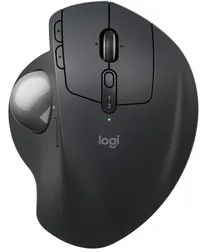
Enter the Logitech MX Ergo S, a thumb-controlled wireless trackball that I've been testing for the last couple of days. It's normally $119.99, but Amazon currently has it for $90.24, saving you $29.75, or about 25%. That's not bad, considering Black Friday hasn't started.
According to the price history, that's the lowest price it's hit all year apart from a single day in June, when it briefly reached the same $90.24 price.
Why I'm becoming a trackball convert


My daily setup is somewhat ridiculous. I use Dell's enormous 52-inch 6K UltraSharp monitor, and I frequently have apps double or triple-stacked across that massive desktop.
Then there's my job. In any given hour, I'm bouncing between Slack, Microsoft Word, Telegram, X, Google Meet, our publishing tools, and photo editing. That's a tremendous amount of traditional mousing.
With the MX Ergo S, the mouse itself stays put. Cursor movement comes from rolling the large trackball with my thumb, so I'm already moving my arm substantially less. After a couple of days, my arm genuinely feels better.
The hardware itself feels appropriately premium for its $120 MSRP, too. Buttons have a satisfying click, the trackball is smooth, and Logitech's Options+ software makes configuring the customizable buttons straightforward. Logitech says the mouse has six customizable buttons and can tilt up to 20 degrees for a more natural forearm position.

There is a learning curve, although I've found it surprisingly forgiving. I'm comfortable navigating Windows and doing most everyday work now. Photo editing is where my muscle memory still betrays me, so my Razer Basilisk V4 Pro remains nearby while I adjust.
My other complaint involves the included Logi Bolt USB receiver. My desk is basically an RF nightmare with the amount of hardware I have connected, and I've experienced some interference. Bluetooth, however, has been rock solid for me. The MX Ergo S supports both connection methods.
I'm also hardly alone in converting. My friend and Windows Central colleague Cale Hunt is already on his second MX Ergo after wearing out his first.
At $119.99, buying a trackball when you're unsure whether you'll enjoy using one is a bit of a commitment. At $90.24 on Amazon, this is the price that would get me to take the chance.
And, apparently, become the kind of weirdo who evangelizes trackballs.

Join us on Reddit at r/WindowsCentral to share your insights and discuss our latest news, reviews, and more.