


The Surface Laptop Ultra costs less to start, but it lacks pen support, its mini-LED isn't as impressive, it's thicker and heavier, and it lacks some features compared to the ASUS ProArt P16. Regardless, many will appreciate its speedy SSD, its superior webcam, its smaller footprint, and its magnetic USB-C port.
Pros
- Smaller footprint, less fan noise
- Superior webcam
- Magnetic USB-C port should be on every laptop
- Comfty keyboard and massive haptic touchpad
- Faster 1TB/2TB SSDs
- Costs less to start
Cons
- No pen support
- Mini-LED display not as impressive as OLED
- Thicker and heavier
- No presence detection

The ASUS ProArt P16 scored higher in our review thanks to its OLED display, deeper key travel, outstanding audio, cooler thermals, and thinner/lighter design. It does cost more to start, and it has louder fans, but these are easy trade-offs for those who don't mind spending a little bit more.
Pros
- Gorgeous OLED display with inking support
- Deeper 1.7mm key travel and haptic touchpad
- Top-firing speakers
- Cooler thermals
- Oleophobic coating and anti-glare 4K display finish
Cons
- Slower 1TB/2TB SSDs
- Costs more to start
- Louder fans
The Windows Central team has had time to digest some of the new NVIDIA RTX Spark laptops that recently launched, and thanks to our in-depth reviews, I'm here to offer some insights as to which PC might be best for you.
I'm looking at Microsoft's flagship Surface Laptop Ultra — the first RTX Spark PC we reviewed — and the ASUS ProArt P16, a slightly larger option that we actually rated higher than the Surface.
Here's why the ProArt PC gained a bit of extra score over the Surface Laptop Ultra (and why that doesn't necessarily mean it's the right RTX Spark laptop for you).
Surface Laptop Ultra vs. ASUS ProArt P16: Specifications
Before I get too deep into my comparison between the Surface Laptop Ultra and ASUS ProArt P16, I put together this table for easy reference.
Standout differences at this point should be the display size and type, the port selection, and the dimensions, which I cover and explain in more depth below.
| Row 0 - Cell 0 | Surface Laptop Ultra |
ASUS ProArt P16 |
CPU |
NVIDIA N1X |
NVIDIA N1X |
GPU |
NVIDIA RTX |
NVIDIA RTX |
RAM |
24GB, 32GB, 48GB, 64GB, 128GB LPDDR5X unified |
24GB, 32GB, 48GB, 64GB, 128GB LPDDR5X unified |
Storage |
512GB M.2 PCIe 4.0 NVMe SSD |
512GB, 1TB, 2TB M.2 PCIe 4.0 NVMe SSD |
Display |
15 inches, 3270x2180, mini-LED, 3:2 aspect ratio, 120Hz VRR, touch, Dolby Vision IQ |
16 inches, 3840x2400 or 2880x1800, OLED, 16:10 aspect ratio, 120Hz VRR, touch |
Wireless |
Wi-Fi 7 |
Wi-Fi 7 |
Camera |
FHD with IR |
FHD with IR |
Audio |
4x Omnisonic speakers (Dolby Atmos) |
4x speakers (Dolby Atmos) |
Battery |
92Wh |
99.9Wh |
Ports |
2x USB4, 1x USB4 with Magnetic Connect, 1x HDMI 2.1b, 1x USB-A 3.1, SD card reader, 3.5mm audio |
3x USB4, 1x USB-A 3.2 (Gen 2), HDMI 2.1, SD card reader, 3.5mm audio |
Dimensions |
12.95 x 9.40 x 0.71-0.75 inches (328.8mm x 238.7mm x 17.99-19.16mm) |
13.94 x 9.57 x 0.51-0.63 inches |
Weight |
4.41 pounds (2kg) |
3.9 pounds (1.77kg) |
Colors |
Platinum, Nightfall |
Nano Black, Neo White |
Pro-grade designs and features available in both laptops
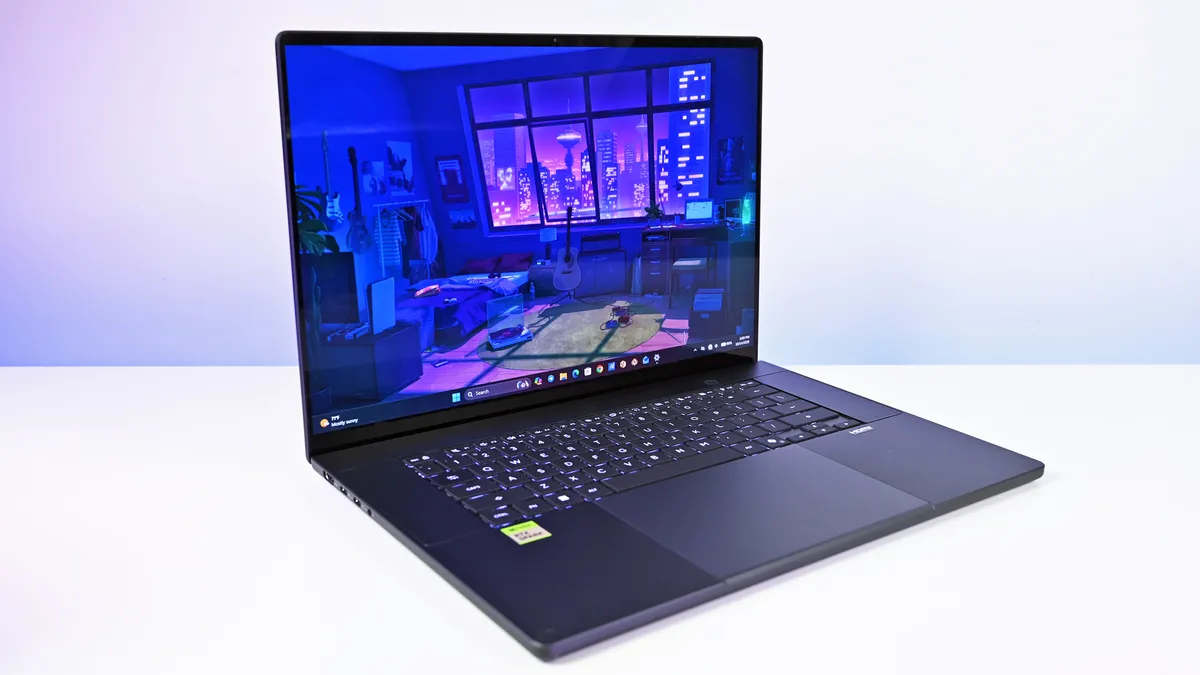
The ProArt P16 is larger than the Surface Laptop Ultra. That's a given considering it has a larger 16-inch display. The overall footprint is a bit larger, but otherwise, the ProArt P16 comes out ahead.
The P16 weighs just 3.9 pounds (1.77kg) compared to the Surface Laptop Ultra's 4.41 pounds (2kg), and it's also quite a bit thinner, starting at 0.51 inches (12.9mm) compared to 0.71 inches (17.9mm).
The neat thing is that ASUS really doesn't make you regret that upsizing. As Windows Central Editor-in-Chief Daniel Rubino says in his ProArt P16 review:
Thermals are even more impressive. Under sustained heavy workloads, my thermal camera recorded around 105°F across the keyboard deck and approximately 120°F near the rear exhaust. That's a few degrees cooler than both the Surface Laptop Ultra and HP OmniBook Ultra 16 RTX Spark in my testing. Fan noise never exceeded 50dB under extreme workloads.
Rubino does give Surface a nod for its "pure premium feel," although I'm sure some will love the ProArt P16's fingerprint-resistant coating that reduces smudges.
Which laptop offers better ports?
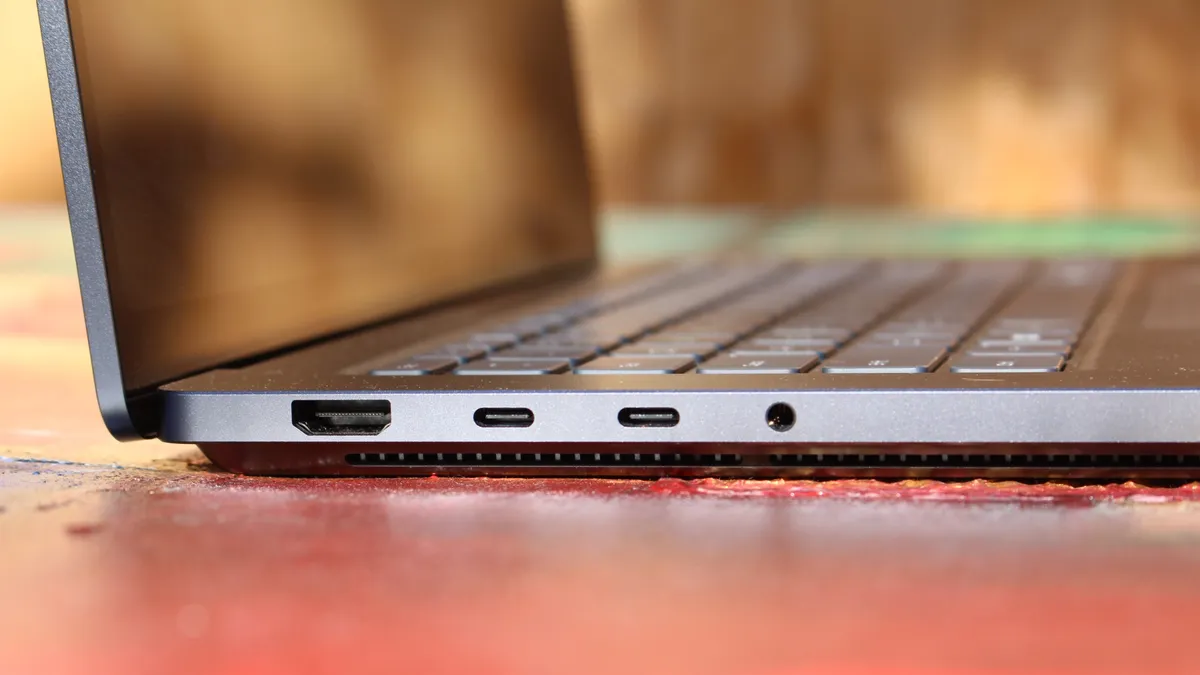


This first wave of RTX Spark laptops is fairly unified across brands in terms of port selection. Both laptops offer three USB4 hookups (using the USB-C form factor), but only the Surface Laptop Ultra has the nifty Magnetic Connect feature on one of them.
Magnetic Connect allows a connected USB-C cable to pull away from the PC instead of dragging it off a table, much like Apple's MagSafe. It's a great feature to have, especially with a laptop at this price.
You're otherwise getting USB-A, HDMI, an SD card reader, and a 3.5mm audio jack across both PCs.
Is the keyboard and touchpad different across PCs?


Speaking on the Surface Laptop Ultra's keyboard and touchpad, Windows Central Senior Editor Zac Bowden said, "This is probably the best keyboard and trackpad experience I've ever had on a Windows laptop to date."
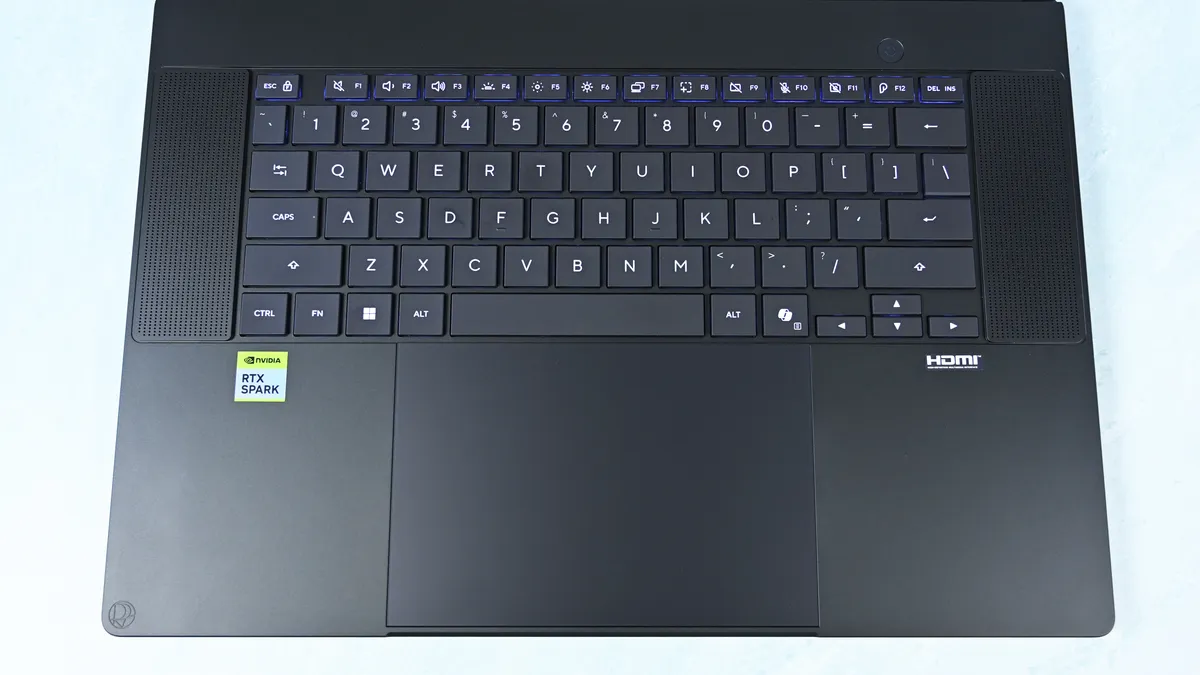
Digging into that statement, Bowden clearly appreciated the 1.4mm tactile key travel that he called "incredibly satisfying and not at all fatiguing." The Surface's haptic touchpad is the largest ever in Microsoft's lineup, and Bowden says it "makes a huge difference in how easy it is to use."
Not to be outdone, the ASUS ProArt P16 offers deeper 1.7mm key travel and an equally enormous haptic touchpad.
Which laptop has a better webcam and speakers?
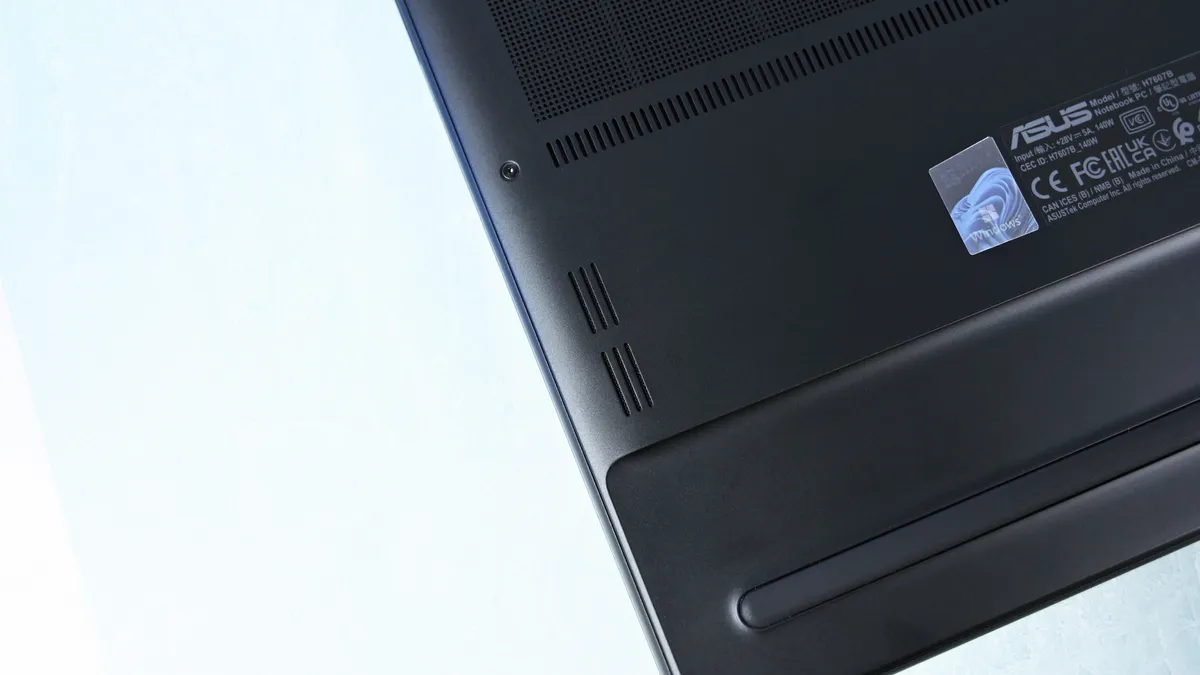
On the spec sheet, both laptops offer an FHD (1080p) front-facing webcam with IR capabilities for facial recognition.
Rubino states that "Microsoft still wins this category with Surface" and notes how HP's OmniBook Ultra with a 5MP webcam trumps both ASUS and Microsoft.
The big deal? The ProArt P16 includes human presence detection for increased security and convenience, whereas the Surface Laptop Ultra does not.
As for audio, each laptop comes with four speakers and Dolby Atmos support. Both laptops deliver some of the best sound we've ever heard, but only the ProArt P16 has top-firing speakers flanking the keyboard.
Mini-LED or OLED? Our reviewers prefer the latter

Display tech is where these two laptops really show a difference. Most noticeable is the Surface's taller 3:2 aspect ratio compared to the P16's 16:10 aspect ratio. The differences don't stop here.
The Surface Laptop Ultra has a 15-inch mini-LED screen at a 3270x2180 resolution, with 1,344 dimming zones, 1000-nit SDR brightness, and 2000-nit HDR peak brightness. It packs in a 120Hz dynamic refresh rate and Dolby Vision IQ support.
Though it's brighter than the ProArt's screen, Bowden says the mini-LED tech results in "a bit of blooming around bright elements on a dark background."
He adds that the backlight doesn't always keep up with what's on your screen, causing a slight ghosting effect in dark mode.

The ProArt P16 has a larger 16-inch OLED screen with a 120Hz dynamic refresh rate, and it's available in either a 3840x2400 (4K) or 2880x1800 (2.8K) resolution.
The 4K version is the primary option for models with 128GB of RAM, though Best Buy seems to offer a 4K version with 32GB of RAM. Despite a lower resolution, you still get 500 nits of SDR brightness and 1,100 nits of peak HDR brightness.
The 4K version hits 700-nit peak SDR brightness, climbing to 1,600 nits with HDR. An anti-reflective coating is included.
None of the mini-LED issues discovered in the Surface Laptop Ultra's mini-LED screen are apparent here, and you get the standard OLED perks of perfect contrast and vivid color no matter how you're using it.
It's worth noting that the P16 display offers pen support for inking. The Surface Laptop Ultra has no pen support.
NVIDIA's RTX Spark chip keeps performance close

A neat aspect we're discovering as we test RTX Spark laptops is how performance is quite similar. That's not surprising. These laptops use the same NVIDIA N1X chips in either 18- or 20-core CPU and 5120- or 6144-core GPU configs.
We tested both with the 20-core CPU and 6144-core GPU, and the Surface Laptop Ultra and ProArt P16 trade blows across benchmarks. For example, CPU performance is close enough that I wouldn't spend much time worrying about it.
The Laptop Ultra does great in lighter graphics benchmarks, though the ProArt P16 takes over in more demanding tests. Considering the ASUS laptop is thinner and lighter than the Laptop Ultra, that's a real achievement.
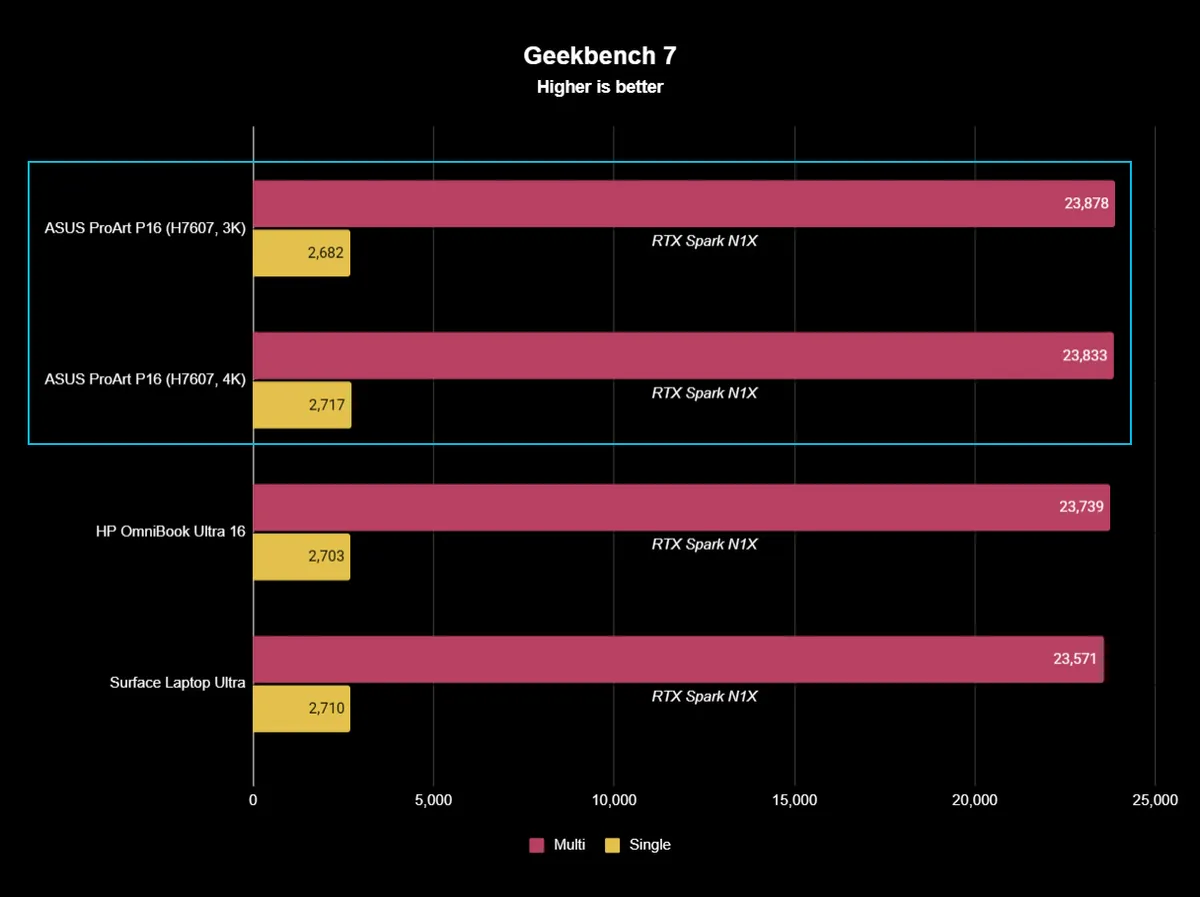


One area where the Surface Laptop Ultra pulls ahead is with its 1TB and 2TB M.2 PCIe 5.0 NVMe SSDs that are way faster than the PCIe 4.0 options in the ProArt P16. Microsoft does drop back to PCIe 4.0 with a 512GB capacity.
Which laptop has better battery life?

The ProArt P16 has a larger 99.9Wh battery capacity compared to the Laptop Ultra's 92Wh, but that matters less than you might expect.
Both Rubino and Bowden were able to get around 10 hours of real-world use when not leaning heavily on the GPU. Both the ProArt P16 and Laptop Ultra struggle to put up strong efficiency numbers when that GPU is in demand, and in both cases, an AC charger should be kept nearby.

As for heat and noise, the Surface Laptop Ultra hit about 123 degrees Fahrenheit just above the keyboard. That's very hot, but at least the fans don't exceed 42 decibels.
Using the same FLIR imaging, we measured 105 degrees Fahrenheit in the same spot on the ProArt P16. That's quite a bit cooler, although the fans did climb closer to 50 decibels.
Surface Laptop Ultra vs. ASUS ProArt P16: Which should you buy?

Microsoft's Surface Laptop Ultra starts at $2,599.99 for a model with an 18-core CPU, 24GB of RAM, and a 512GB SSD. The ASUS ProArt P16 starts at $2,799.99 for a model with an 18-core CPU, 24GB of RAM, and a 512GB SSD.
If they're so similar, why the price difference?
I'm pointing to the ProArt P16's superior OLED display with pen support, its thinner and lighter design, its cooler thermals, its deeper key travel, its human presence detection, its top-firing speakers, and its larger battery.
These are all noticeable benefits, and whether or not they're worth a $200 upcharge (to start) is really up to you.
I can confidently say that the Surface Laptop Ultra is a great PC regardless of how well ASUS put together its ProArt P16, and perks like a smaller footprint, a better FHD webcam, a cheaper starting price, a magnetic USB-C port, and quieter fans could weigh heavier on your shopping list.
It's worth noting that ASUS also makes a 14-inch ProArt P14 with many of the same benefits, all in a more portable package. Starting at $2,599, it might be the perfect third option for shoppers.
The Surface Laptop Ultra costs less to start, but it lacks pen support, its mini-LED isn't as impressive, it's thicker and heavier, and it lacks some features compared to the ASUS ProArt P16. Regardless, many will appreciate its speedy SSD, its superior webcam, its smaller footprint, and its magnetic USB-C port.
The ASUS ProArt P16 scored higher in our review thanks to its OLED display, deeper key travel, outstanding audio, cooler thermals, and thinner/lighter design. It does cost more to start, and it has louder fans, but these are easy trade-offs for those who don't mind spending a little bit more.

Join us on Reddit at r/WindowsCentral to share your insights and discuss our latest news, reviews, and more.

