


Just days ago, Microsoft unveiled Surface Laptop Ultra, its most powerful and capable Surface PC yet, powered by NVIDIA's new RTX Spark superchip and Windows on Arm. It's a feat of engineering, featuring the most ports, the best display, and the largest trackpad ever fitted to a Surface.
I was able to get my hands on an early sample unit at Computex 2026, and to say I was impressed would be an understatement. Of course, the star of the show is the RTX Spark, which I was shown plenty of demos of showcasing its raw power. But we'll get to that later.
First up, let's talk about the design. Surface Laptop Ultra is basically a beefed-up Surface Laptop 8 15-inch. It's both thicker and heavier to accommodate the more powerful RTX Spark SoC, but this results in a device that feels incredible. It's chunky and hefty, but in a good way, just like the 16-inch MacBook Pro.
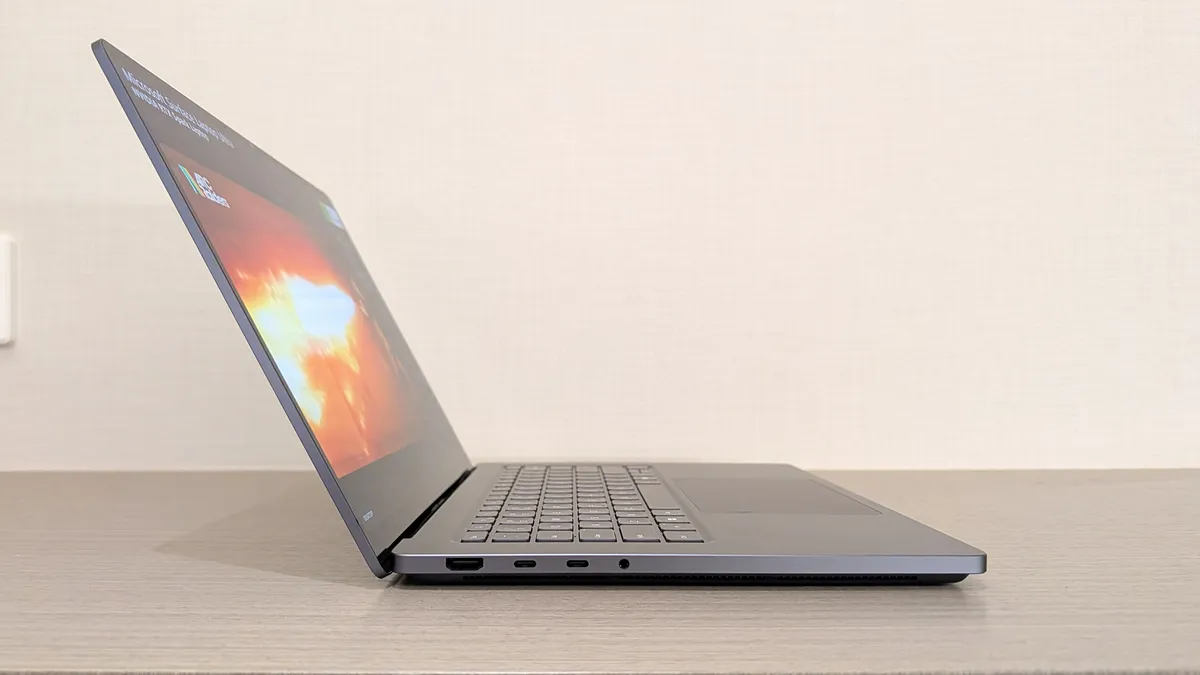


And "just like the 16-inch MacBook Pro" is the theme of this device. It's very clear to me that Microsoft is going after the high-end MacBook Pro crowd with Surface Laptop Ultra. While the device is very Surface, there's no denying that it also heavily resembles a MacBook Pro, right down to the port selection.
Surface Laptop Ultra features a full-sized HDMI port and two USB-C ports on the left, and one USB-C port, a USB-A port, and a full-sized SD card reader on the right. The USB-C port on the right is special, however. It's larger than a normal USB-C port and takes normal USB-C cables, but Microsoft wasn't willing to tell me why the port is larger.
Many Surface fans immediately noticed that Microsoft's Surface Connect port appears to be missing on Surface Laptop Ultra, but it seems that may not be entirely true. While the proprietary magnetic Surface Connect port is gone, I believe that Microsoft may have engineered the world's first breakaway USB-C port that maintains what made Surface Connect so special.


Of course, the company didn't confirm this to me, but it's clear that the right USB-C port is different for some reason. The company said it would have more to share about specific features of the Surface Laptop Ultra later this year, so we'll have to see. For now, I'm of the belief that this USB-C port features a breakaway design, perhaps even magnetic for easier alignment? Time will tell.
Moving onto the trackpad, which is the largest ever fitted to a Surface. It feels fantastic, and supports Windows 11's new haptic signals system that provides subtle feedback when you interact with certain parts of the Windows UI and apps. I've already done a full hands-on with this experience, but it elevates the Windows UX in a way similar to what haptics can do to phones. Everyone loves iPhone haptics, and Surface Laptop Ultra has a very similar feature.
The keyboard is also incredible, just like on the Surface Laptop 8. I'd argue that Surface has the best keyboard and trackpad in the business, matching or perhaps even surpassing that of the MacBook Pro. I had no complaints typing or mousing around on Surface Laptop Ultra. Windows felt very smooth and easy to use.


That's also helped by the 15-inch mini-LED screen, which is 120Hz and looks fantastic. I do wish it were an OLED display panel, but it's still incredibly crisp with great color contrast. Of course, Microsoft didn't share specific details on the display panel or color optimizations, but it looks great.
I wasn't able to test audio performance, but I'm assured that the speakers built into the device will rival the MacBook Pro 16-inch, which many consider to be the best speakers in a laptop you can buy.
Of course, it's what's under the hood that's making waves in the tech industry right now. This is Microsoft's first RTX Spark device, and its design was influenced by the raw power of RTX Spark. Surface Laptop Ultra is thicker to accommodate RTX Spark's thermal output, featuring the largest fans ever put in a Surface PC to keep the chip cool.

That means the device can get loud under max load. In a number of the demos I was shown, the Surface Laptop Ultra's fans were running at full blast, and I could hear them from a few feet away. With that said, under normal use, the device was essentially completely silent. I understand that the fans only spin up to max when under sustained load for long periods, which many of the demo units had been.
On RTX Spark performance, yeah, this is the real deal. It's an Arm SoC, meaning it relies on Microsoft's Prism emulation layer to run x86 apps that haven't been built natively for Windows on Arm yet. That's basically most video games and a number of obscure or less popular Windows apps, and in my hands-on time, I simply couldn't tell the difference.
Many of the games I was shown were running under emulation, but they were all running incredibly well with smooth framerates. NVIDIA and Microsoft weren't willing to show me FPS stats or any nitty-gritty details, but in my demo time, the games ran as if they were native, and that's no small feat for Windows on Arm. NVIDIA is essentially brute-forcing a native-feeling experience through its powerful chip.


Neither Microsoft nor NVIDIA, nor any other Windows OEMs for that matter, are marketing this first wave of RTX Spark devices as gaming machines, but it's very clear that they can game, should the user want to. That's not something you've really been able to say about Windows on Arm PCs up until now.
I was not allowed to run any benchmarks, likely for obvious reasons. All of the devices I was shown are running pre-release software, drivers, and firmware, in pre-production chassis and thermal envelopes. There's likely a lot of fine-tuning that still needs to take place before Microsoft or NVIDIA are ready to let us benchmark these properly.
App developers will also be able to make specific changes to their software to make them run better on RTX Spark. Adobe is one such company that is working to rearchitect its Premiere Pro and Photoshop apps for RTX Spark, and I was shown a demo that compared standard Premiere Pro and Premiere Pro enhanced for RTX Spark, which was able to render a scene much faster as a result.

Microsoft had already confirmed that Surface Laptop Ultra ships with 128GB of unified memory, but I was able to confirm that there will be more configurations available at various prices. That means you'll likely be able to get it with less RAM and storage, for those that do or do not need it.
Of course, Microsoft was not able to comment on pricing for those different configurations or battery life. No Windows OEMs are sharing that information currently, but all of them are targeting a fall 2026 release window, including Microsoft and Surface Laptop Ultra. That means we should hear more about specs, pricing, and availability in the next few months.
Surface Laptop Ultra is the best Surface PC that Microsoft has ever made, but that doesn't mean it's the best Surface PC for everyone. This is clearly a device designed for developers, creators, and professionals, utilizing on-device AI models, video or photo creation and editing, and data crunching. For the majority of us who only need a PC for light computing or productivity tasks, you'd be better served with a Surface Laptop 8 or equivalent PC.
Obviously, we haven't yet had a chance to live with Surface Laptop Ultra, so this isn't an endorsement just yet. But first impressions are incredibly strong. Hopefully, Microsoft can deliver with the final product later this year.

Join us on Reddit at r/WindowsCentral to share your insights and discuss our latest news, reviews, and more.

