


I was at Computex last week, and one of the biggest announcements of the show was the new Dell XPS 13.
Starting at $599 for students and $699 for everyone else, it's nothing but prime competition for the MacBook Neo, and it's aimed straight at students searching out an affordable-but-premium device.

What I'm working on this week: I'm recovering from last week's Computex marathon in Taipei, writing all of the coverage I didn't get around to while away. Meanwhile, I'm enjoying LEGO Batman: Legacy of the Dark Knight.
In fact, I put together an XPS 13 vs. MacBook Neo comparison shortly after returning home from Taiwan. Unsurprisingly, the most common argument against the XPS 13's perceived value is its baseline 8GB of RAM.
But wait, the MacBook Neo also has 8GB of RAM, and no option to upgrade either, unlike the XPS 13. Well, the argument here is that macOS doesn't require as much memory as Windows 11, making the 8GB maximum a non-issue. That's an argument for another day; this is Windows Central, where we focus on Windows PCs.
It's been quite a while since I used Windows 11 with anything less than 16GB of RAM, so I thought I should test it out. Here's what I found out.
How I tested Windows 11 on 8GB of RAM
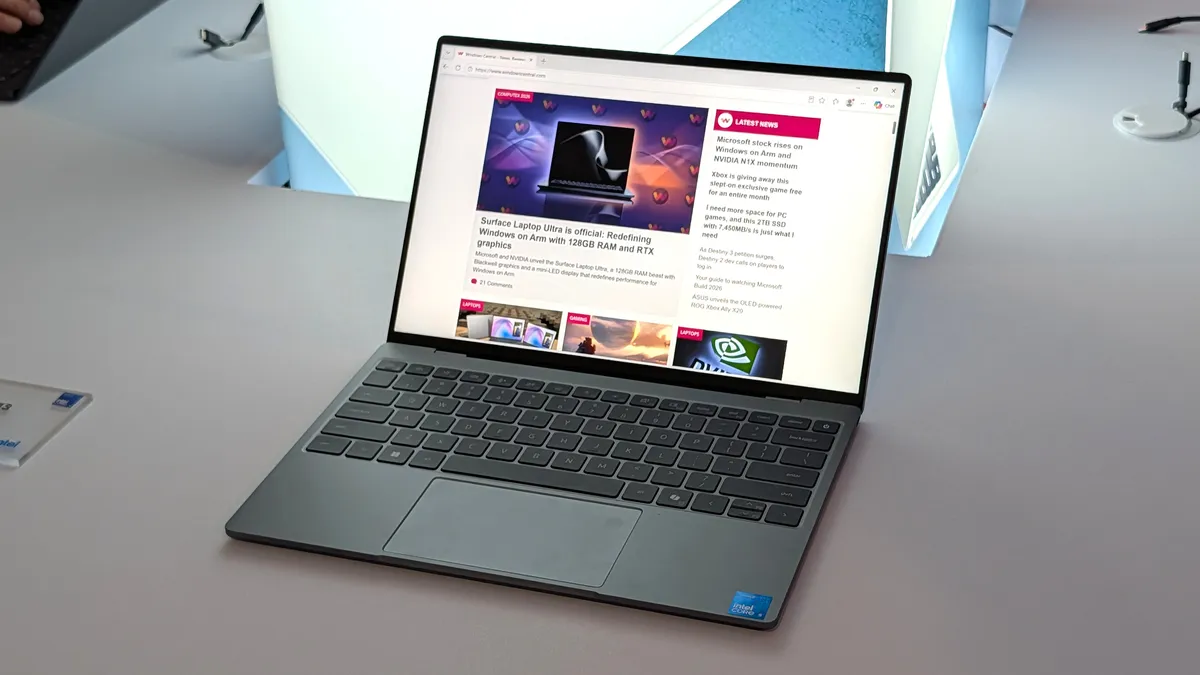
For this test, ideally, I'd like to have a modern system with an Intel Core Series 3 chip and integrated LPDDR5x memory, just like the new XPS 13 (launching June 16, 2026) or the new $699 Acer Swift Air 14, also announced at Computex.
Instead, I ripped one stick out of an older Windows 11 desktop I had lying around, leaving 8GB of single-channel (and relatively slow) DDR4-2666MT/s RAM paired with an Intel Core i5-10400 CPU.

This is about as bad as it gets compared to something like the new XPS 13's System-on-Chip (SoC) with speedy integrated LPDDR5x RAM and 60GB/s memory bandwidth. For comparison, the DDR4 RAM in the desktop I'm using for comparison shows only 10.6GB/s bandwidth.
In any case, I'm more interested in how quickly 8GB of RAM fills up when going about the tasks a student would regularly tackle. Note that this PC has been in use for some time now; it's not a fresh Windows 11 install, so that should give a better idea of real-world use.
Heavy browser usage with 8GB of RAM

The first test I performed involved heavy web browsing. I opened 10 tabs in Edge: 4K YouTube streaming, Netflix, Gmail, Reddit, Airtable, our CMS, and general webpages.
Memory usage didn't climb above 6.6GB with all these webpages open. Closing the 4K video stream YouTube tab, memory usage fell to 5.7GB.
Poking around with these tabs open (sans 4K stream), memory use fluctuated between the 5.7GB low and 6.0GB. So far so good.
Adding more apps alongside heavy browser usage

I know that students aren't just using a browser, so I added in the GIMP app for photo editing, Spotify for music streaming, and Microsoft Word for writing. All with the same ten tabs open, including YouTube streaming at 4K.
Memory usage pushed up to 7.2GB under these conditions, but the system showed no signs of slowing down. The 4K video stream did get choppy, but that falls on the older CPU/GPU.
I was able to resize and edit images without delay, and switching apps was just as snappy as ever.
Moving my workload to a PC with 8GB of RAM

I was so impressed with the PC's performance on 8GB of RAM that I finished out the rest of my workday on the system, determined to find the breaking point.
I'd say that I'm handling the same type of work that a student might tackle: writing, heavy web browsing, photo editing, streaming, etc. I didn't try heavy gaming or any specialized apps that are known to chew up RAM. These aren't tasks that $699 Windows laptops are made for.
Surprise? Maybe not, but the PC ran fine under my needs. The only time I found the breaking point was when I opened a huge article in our CMS, a task that regularly bricks my main work PC with 32GB of RAM. No difference there, really.
Is 8GB of RAM enough for a smooth Windows 11 experience?

I honestly wasn't expecting these tests to go as smoothly as they did. Having used PCs with 16GB, 32GB, and 64GB RAM for so long, I thought surely 8GB would immediately pose problems.
That's just not the case. Within reason, running Windows 11 on 8GB of RAM is not only viable but quite enjoyable. Assuming you're not attempting to run some specialized design software or a demanding game, there's quite a bit of memory runway to work with.
An idle system might sit at around 3.8GB of RAM usage, but the remaining 4GB or so is apparently more than enough for general productivity, multitasking, streaming, and photo editing.

Dell's strategy with its new XPS 13 is to hook fresh users (especially students) with a low introductory price, premium design and features, long battery life, and snappy performance.
Just like the MacBook Neo, the baseline XPS 13 isn't intended to run every single app and game out there. Just like Apple, Dell has plenty of other XPS devices (or even an XPS 13 with more RAM) that can fill those advanced needs.

Considering the biggest argument I've seen so far against the XPS 13 is that Windows 11 doesn't run well on 8GB, those detractors will soon have to find a different avenue of attack.
Is macOS still more efficient than Windows? Probably. Does that mean Windows 11 is useless on 8GB of RAM? Evidently not.
Haven't we seen this before?

My tests with an 8GB Windows 11 system remind me of the time our Editor-in-Chief, Daniel Rubino, trolled everyone by running games on an "8GB" version of the original Surface Go from 2018.
After showing how smoothly the games were running, it was revealed that the video was shot using the 4GB RAM model as a test bed.
I could have probably done something similar here; after all, 4GB Windows 11 laptops are still being sold at some retailers. Instead, I'll save that sort of trickery for another day.
The bottom line: Windows 11 runs better than I expected on 8GB of RAM

Dell's new XPS 13 launches on June 16, and the new Acer Swift Air 14 is expected to arrive in NA markets in August 2026. I'm hoping we get our hands on 8GB models to test the Windows 11 experience directly.
In any case, I expect these laptops to be wildly popular not only for students, but also for general users who are fed up with Windows PCs that live up to their "cheap" pricing in all the wrong ways.
The bottom line? Windows 11 ran a lot better than I expected on 8GB of RAM, even when multitasking with multiple browser tabs, video streams, a photo editor, music, and more.

Join us on Reddit at r/WindowsCentral to share your insights and discuss our latest news, reviews, and more.

