


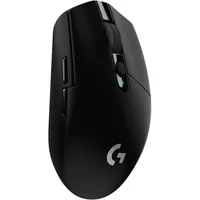
I've tested some extremely high-end PC gaming accessories over the years, but Logitech's $26.99 G305 LIGHTSPEED wireless option has outlasted them all. Not only that, but it sits alongside the (technically outdated) MX Master 2S, a productivity equivalent from the same brand, so kudos to Logitech for the near-total domination of my home office.
I won't sit here and act like it's loaded with secretly cutting-edge technology, or even egregiously label it as a "hidden gem" — because it's not — but I will tell you that it's served me well for over five years. A single AA battery and a USB-A dongle are all it needs, and I can't remember the last time I changed that for a fresh one. At this price, you could find a lot worse.
Honestly, I'm torn between a low-profile keyboard from Keychron and Logitech's own MX Mechanical Mini (without macOS keys), just to go all-out like some brand-loyal weirdo. We'll see. Either way, the LIGHTSPEED G305 stays on my desk next to that $70 MX Master 2S I mentioned — though the $100 MX Master 3S and $120 MX Master 4 have since replaced it in an official capacity.
Is the Logitech G305 a good gaming mouse?

TL;DR: Yes, it is. You get high enough specs on the intricate internal stuff that it passes as a gaming mouse, without being too overblown or loaded up with RGB to the point it becomes cringey. Just underneath the scroll wheel is a quick-select button dedicated to DPI settings profiles, but you can change that with Logitech's G HUB desktop app anyway.
Spec |
G305 LIGHTSPEED |
|---|---|
Battery life |
Up to 250 hours |
Resolution |
200 - 12,000 DPI |
Report rate |
1,000Hz (1ms) |
Max. speed |
400 IPS |
Max. acceleration |
40G |
Weight |
3.49oz (99g) |
Common questions
Can you use the G305 LIGHTSPEED with a USB cable?
No, I'm afraid not. There's no USB port on this mouse, so it's entirely wireless-only. However, I've never noticed any latency, and a single AA battery keeps it running for longer than it would matter.
How long does the Logitech G305 last on battery power?
The official word from Logitech is "up to 250 hours", which certainly feels true enough, but I can't remember the last time its little LED changed red, and I needed to swap out the battery. Your mileage may vary with battery brands. I use Duracell.
Is this a Bluetooth mouse?
No, you'll need a free USB-A port on your desktop PC or laptop to use the G305 LIGHTSPEED, since it doesn't have built-in Bluetooth. It's the dongle or nothing.
Does it suffer from accidental double-clicks?
I've used the Logitech G305 LIGHTSPEED for over 5 years, and I haven't encountered any double-clicking. If I had, I would have thrown it away by now. Naturally, I can't guarantee that your variant is immune, but the verdict seems clear enough.

Join us on Reddit at r/WindowsCentral to share your insights and discuss our latest news, reviews, and more.

