Windows Central Verdict
The Razer Soma Pro takes the comfortable Soma Chroma to the next level with haptic motors, THX speakers, improved armrests, and full Chroma lighting. At $999, it’s pricey but delivers a standout gaming experience. Minor setup quirks and less adjustable lumbar support than the Iskur V2 are small drawbacks.
Reasons to buy
- +
Haptics genuinely add to gaming immersion
- +
Excellent built-in THX Spatial Audio
- +
Extremely comfortable fabric seat
- +
Great Synapse integration and customization
- +
Surprisingly easy assembly
Reasons to avoid
- -
$999 is still a lot of money
- -
Lumbar support isn’t adjustable
- -
Connecting the seat haptics is unnecessarily fiddly
Why you can trust Windows Central Our expert reviewers spend hours testing and comparing products and services so you can choose the best for you. Find out more about how we test.
Well, they finally did it. Gaming chairs have been more or less the same idea for years: make them comfortable, make them adjustable, slap some suitably aggressive styling on them, and call it a day. Razer has been teasing something considerably more ambitious for years, culminating in Project Madison at CES 2026 in January. The concept was basically a chair that became part of the game itself, combining haptics, surround sound, and RGB lighting into one ridiculous-looking package.
Now that concept is something you can actually buy. The $999 Razer Soma Pro takes everything I liked about the recent Soma Chroma and crams six Sensa HD haptic motors, integrated THX Spatial Audio, Chroma RGB, and some genuinely useful hardware upgrades into it.
After using it for games, movies, music, and even my daily Google Meet calls, I'm kind of amazed Razer actually pulled this thing off. Even more surprising? I thought it would cost a lot more.

I've been part of Windows Central since 2007, having reviewed and covered many keyboards, gaming accessories, laptops, and PCs from all sorts of companies from the perspective of a Windows enthusiast and unabashed PC lover. I also run this site and have seen a lot in nearly 20 years here!
Razer had no input, nor did it see the contents of this review, prior to publication.
Razer Soma Pro: Pricing and setup

Let’s get the obvious thing out of the way: Yes, the Razer Soma Pro costs $999.
That is a lot of money for a gaming chair. But before my briefing, we were guessing internally that this thing would land somewhere around $1,400. When Razer revealed that it was squeezing under $1,000, my reaction was basically, “Oh, that’s actually not bad.”
Hear me out.
Razer’s Freyja haptic cushion (see our review) costs $299 by itself. The Soma Chroma is $499. Now add integrated THX Spatial Audio speakers, Chroma RGB, six haptic motors, 4D armrests, a powder-coated aluminum alloy wheelbase, and a few other upgrades. Understanding that, $999 starts to make a lot more sense.
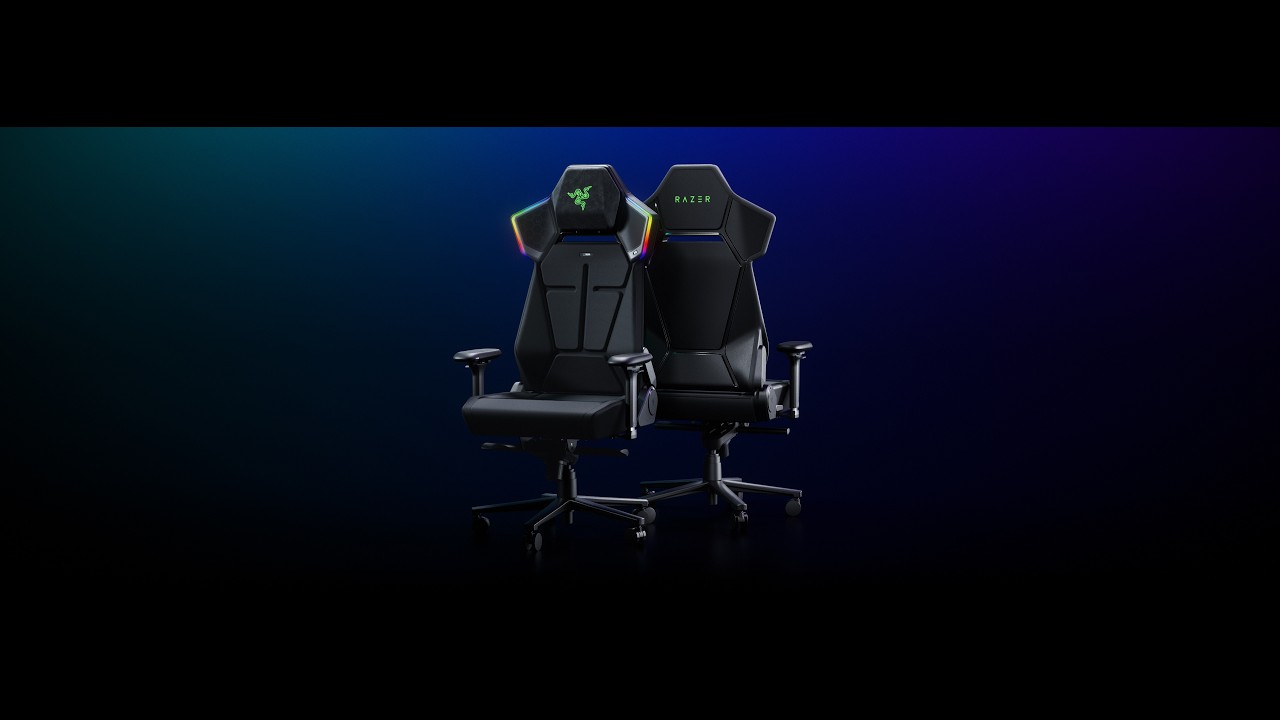
Assembly was also shockingly painless. It took me about 25 minutes, with screws conveniently pre-installed halfway and everything packaged and presented extremely well. Razer even includes its little cloth installation gloves, which are unnecessary but always a nice touch.
You can watch the video above, which I didn't have access to during my review, so you're lucky you.
My sole complaint was connecting the haptics in the seat to the upper chair. The instructions basically show two wires connecting (drawing). Unfortunately, one cable is hidden inside the rear pouch, and the tiny four-pin connector needs to line up just right. That part took far more swearing than building the rest of the chair.
Still, a chair this complex and it's easy to set up? A win for Razer's engineers.
Razer Soma Pro: This is what Soma was building toward

Physically, the Soma Pro should look familiar if you read my Soma Chroma review. And that’s a good thing.
The fabric-covered chair uses the same dual-density, cold-cured foam concept it is extremely comfortable for long gaming and working sessions.
I still prefer the Razer Iskur V2’s excellent adjustable lumbar system, though. The Soma Pro uses a fixed built-in lumbar arch, likely because stuffing haptic hardware throughout the backrest complicates matters. It works, but I miss the Iskur’s flexibility.
Everything else feels like Soma turned up another level. You get 4D armrests instead of 2D, a nicer aluminum alloy base (vs. steel), a frog tilt mechanism (vs. butterfly), and my favorite small improvement: a magnetic head cushion.
It’s genius. There’s no ugly strap. You just stick it to the chair and slide it up or down. Done. Why has no one done this before?
The Soma Pro is hefty at 63.3 pounds, although I managed to take mine from the garage up the stairs in my split-level house without destroying a wall or pulling my back, so make what you will of that.
Razer Soma Pro: The haptics are the star

The easiest way to describe the Soma Pro is that Razer basically built Freyja into Soma.
Six Sensa HD haptic motors are spread across four zones, with four actuators behind your back and another two underneath your thighs. You can adjust each zone independently in Synapse or change everything together.

I mostly ignored the fine-tuning and set the overall intensity to five out of six.
Let me tell you: this thing is a real butt rumbler.
The difference with native Sensa HD games is that effects can be deliberately mapped to what's happening. During my testing, Marvel Rivals demonstrated how these directional effects can move around the chair rather than feeling like somebody simply bolted a giant rumble motor underneath you.

But Audio-to-Haptics might be my favorite feature because it dramatically expands what you can use the hardware with. The system analyzes regular audio and translates appropriate moments into physical feedback. Movies, trailers, music, and games without native Sensa support can all make the chair react.

I spent time playing Deep Rock Galactic: Survivor, which certainly wasn't the carefully prepared demo environment Razer used to sell me on the technology. It didn't matter. Between the audio, haptics, and the rest of my Chroma gear flashing along around me, I was just sitting there thinking: This freaking rules.
Razer Soma Pro: Wait, the speakers are actually great

The biggest surprise might be the speakers.
The RGB “wings” from Soma Chroma make considerably more sense on the Pro because they now house the THX Spatial Audio system. Used by themselves, the speakers are almost like wearing really good open-ear headphones. Audio sits around you without isolating you from the room.
They’re good enough that I’ve even been using them for my daily Google Meet calls, which is a bit hilarious.
Things get seriously interesting when you already have desktop speakers. Synapse lets the Soma Pro work as the rear portion of a larger surround setup, with your existing speakers handling the front channels.

You can independently adjust front and rear volume, EQ, balance, and delay to synchronize everything. Pair the chair with something like Razer’s Nommo V2 Pro or Leviathan V2 Pro, and the combination of front sound, rear THX audio, and physical haptic feedback creates an absolutely fantastic gaming environment.
Synapse deserves a shoutout here, too. Considering how many things this chair does, the software is remarkably easy to understand. The controls are logically broken out across sound, surround, haptics, lighting, and power, and I rarely felt like I needed instructions to figure something out.
Razer Soma Pro: Power, RGB, and everything else

Like the Soma Chroma, the Pro can run from any generic external USB-C power bank (not included) or remain plugged in using its included braided extension cable. You'll need at least a 45W PD 2.0-capable power source.
For Soma Chroma, wireless power makes the chair feel magically cordless. With the Soma Pro, I'm more inclined to leave it plugged in. Speakers plus six haptic motors and RGB make uninterrupted power considerably more useful.
The Chroma side remains exactly as gloriously excessive as you'd expect. My Reclusa Mini 65%, Basilisk V4 Pro, Firefly V2 Pro, and Soma Pro can all react together, turning my desk into a magnificent symphony of light.
None of this is necessary in life, but damn if it ain't awesome.
Should you buy the Razer Soma Pro?

You should buy this if...
✅You want one of the most immersive PC gaming setups currently possible
✅You already own Razer Chroma or Razer audio hardware
✅You want haptics without adding a separate Freyja cushion
✅You want a genuinely comfortable premium gaming chair
You should not buy this if...
❌$999 for a gaming chair is beyond your budget
❌Adjustable lumbar support matters more to you than haptics
❌You have no interest in RGB, spatial audio, or tactile gaming
I wasn't expecting the Soma Pro to win me over this completely.
This is an incredible gaming chair in every sense. The haptics aren’t just a novelty you forget about after a few uses. The speakers deliver real, immersive sound. And beneath all the tech, it remains a genuinely comfortable chair.
Razer also deserves credit for making the Soma lineup modular around different budgets. If you only want RGB, there's the $499 Soma Chroma. The $569 Soma Sensa HD Haptics focuses on tactile feedback. The $999 Soma Pro throws basically everything Razer knows about gaming immersion into one chair.
After living with it, I wouldn't take any of the electronics out.
The Soma Pro is one of the coolest gaming gadgets I've tested in a long time. It's fun, extraordinarily well thought-out, comfortable, and unlike anything else sitting in my gaming setup.
And yes, apparently I now have very strong opinions about whether my gaming chair should shake my butt.


The Razer Soma Pro combines the company’s excellent Soma gaming chair with Sensa HD Haptics, THX Spatial Audio, and Chroma RGB for one of the most immersive gaming experiences I’ve tried. At $999, it’s undeniably expensive, but considering everything Razer packed into it, I’m actually surprised it doesn’t cost more.

Join us on Reddit at r/WindowsCentral to share your insights and discuss our latest news, reviews, and more.