In the past, gamers had to choose between getting a gaming monitor that prioritized resolution quality over responsive refresh rates, and vice versa, or settle for monitors that had a compromising middle ground.
Thankfully, we now live in a world where gaming monitors that can achieve both 4K resolutions and 240Hz refresh rates simultaneously, such as the ASUS ROG Swift OLED 32-inch, which is now on sale for $887.98 at Amazon.
Fri, Dec. 22 @ 5:49 AM ET: I have confirmed the ASUS ROG Swift 32-inch OLED Gaming Monitor is still in stock and its discounted price of $899.00 at Amazon has been updated to $887.98. However, its alternative discount offering at Walmart has expired. I have added a section for Amazon E-Gift Christmas cards. ~ Alexander Cope, Contributor — Gaming
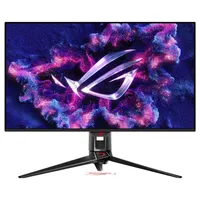
Why buy this OLED Gaming Monitor?

The ASUS ROG Swift OLED 32-inch gaming monitor is packed with many premium features to help bring out the best performance out of your favorite Xbox and PC titles. Its QD-OLED panel display is capable of rendering images in 4K (3840x2160) with superb details, along with vibrant colors and contrast.
The ASUS ROG Swift OLED 32-inch is able to achieve this without sacrificing refresh rates as they can reach up to 240Hz. Combine this factor with a 0.3ms response time, along with NVIDIA G-SYNC, AMD FreeSync, and VESA Adaptive Sync support, and you have a gaming monitor that will fully protect your controller from suffering input delay.
This will ensure that your controller inputs remain consistently instantly responsive, so you don't die any cheap deaths trying to dodge attacks in reaction-heavy games like Clair Obscur: Expedition 33 or Call of Duty Black Ops 7.
Aside from minor issues detailed in our review, ASUS' ROG Swift OLED 32-inch gaming monitor's biggest complaint is that it's usually priced at a high MSRP of $1,299.99.
Fortunately, this steep price point has been temporarily slashed by 31% for Christmas as it's now on sale for $887.98 at Amazon, making this an ideal time to get yourself or your gaming buddies a premium gaming monitor for the holidays.
Alternative discounts
Should Amazon's stock run out, or if you prefer different retailers, here is an alternative discount offering to consider as a back-up option:
- $949.99 at Best Buy (was $1,299.99).
FAQ
What are refresh rates?
Refresh rates are the times a monitor can update with a new image per second, measured in Hertz (Hz). They're an essential component of monitors as they provide smoother motions and make video games more responsive to play.
Can this OLED Gaming monitor suffer from burn-in?
Yes, the ASUS ROG Swift 32-Inch can suffer from burn-in, an issue where permanent discoloration or a ghostly "shadow" image appears on-screen from prolonged display elements.
However, this gaming monitor has a few precautionary measures built in to prevent it, like Pixel Cleaning, Pixel Shift, Static Logo Detection, and a 3-year warranty from ASUS.
Does it have built-in speakers?
No, the ASUS ROG Swift 32-Inch does not have built-in speakers, so you will need to either plug in a headset through its 3.5mm audio jack or use external speakers.
How can I get my most desired colors and brightness settings with HDR?
To achieve your personal desired color and brightness settings, you will need to update this gaming monitor with the latest firmware, fiddle with the Windows HDR Calibration tool, choose between either "Console HDR" or "Display 400 True Black" GameVisual modes, and toggle "Uniform Brightness" off and on to correct gamma problems.
Arrives after Christmas and need a gift sooner?
If your item won't arrive in time for Christmas or you're looking for a quick and easy add on, buying an Amazon eGift Card is a fast, flexible way to give purchasing power now—send instantly or schedule delivery by email or text, choose any amount from $5 to $2,000, and the balance never expires, making it ideal when a deal’s item won’t ship until after the holidays.
Amazon eGift Cards let you pick a design, set a custom amount, add a personal message, and choose delivery by email or SMS with the option to schedule the exact delivery date—including immediate delivery or a future date up to a year ahead. There are no fees, and gift card balances never expire, so recipients can redeem the code and apply the funds to their Amazon account whenever they’re ready, across millions of eligible items.


Follow Windows Central on Google News to keep our latest news, insights, and features at the top of your feeds!