


All-in-One (AIO for short) PCs are extremely convenient for people who want to save space on their desk while being able to work on their daily tasks or creative projects with decent performance.
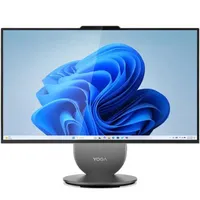
Out of all the AIO PCs we've covered on this site, one stands as the cream of the digital crops for its convenience, performance, and design: the Lenovo Yoga AIO 27", which is now on sale for $849.99.
Why buy the Lenovo Yoga AIO 27" PC?

The Lenovo Yoga AIO 27" is packed to the brim with so much convenient, well-done tech that we named it the "Best All-in-One PC" in our best PC Desktops list for 2026.
For starters, it comes with a rotating 27-inch display that renders images with crisp 2560x1440p, QHD resolutions with 120Hz refresh rates, 99% sRGB color reproduction, and 400 nits of max brightness.
On top of that, the Lenovo Yoga AIO 27"'s Intel Core Ultra 5 125H processor, integrated Intel Arc graphics, 16GB RAM (LPDDR5X), and 512GB SSD empower it with strong performance for clearing out a day's worth of assignments and digital art projects.
Other notable features include a swivel with a built-in wireless phone charger, a plethora of USB and HDMI ports, display settings that automatically adjust with the screen's orientation, and a bonus mouse and keyboard packaged with it.
Aside from a washed-out and grainy camera and a display that's set too high at its lowest height, the Lenovo Yoga AIO 27" is practically perfect.
So, if you want to reduce cable management and avoid lugging around a giant PC tower everywhere for work, then the Lenovo Yoga AIO 27" is for you.
As a bonus, if you buy it from Lenovo's website, you will gain three months of PC Game Pass so you can play light games like Minecraft while on break.
Alternative discount
If Lenovo's stock of the Yoga AIO 27" PC runs out or its $849.99 discount expires, there's an alternative discount you can use at Best Buy for $1199.99.
FAQ
How upgradeable is the Lenovo Yoga AIO 27"?
The Lenovo Yoga AIO 27" has limited upgradeability as its CPU, RAM, and GPU cannot be removed with larger ones. However, it does feature an M.2 NVMe slot, which will allow you to insert an SSD with more storage space.
Is the Lenovo Yoga AIO 27" good for gaming?
No, as its integrated Intel Arc Graphics card can only handle light games like Minecraft, not demanding AAA titles like Cyberpunk 2077.
Can the Lenovo Yoga AIO 27" be used as a secondary monitor for a laptop?
Yes, it can, as the Lenovo Yoga AIO 27" has an HDMI-in port for you to plug the laptop in when the Yoga's computer components are not being used.

Join us on Reddit at r/WindowsCentral to share your insights and discuss our latest news, reviews, and more.

