


Mini-PCs are all the rage these days as a cheaper and viable alternative to pre-built rigs that will help a user complete workplace tasks while preserving desk space and their budget.
One of the best mini-PCs that we've found that exemplifies this type of hardware is the Geekom IT13, and it's $849.99 has been discounted by 33% to $569.99 at Amazon.
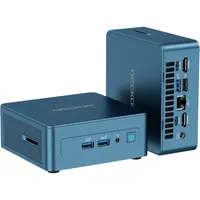
What makes the Geekom IT13 special?

There's plenty to love about Geekom's IT13 Mini-PC if you're the kind of guy who wants a reliable workhorse PC that doesn't take up desk real estate.
For starters, this mini-PC rocks a solid performance rate for productivity tasks as it's built with a 13th Gen Intel i5-13600H CPU that has 12 cores, 16 threads, and a max turbo frequency of 4.8 GHz clock speeds.
It also has 16GB of RAM (DDR4) to boost its performance further and a 1TB SSD to store plenty of personal or professional files. Its RAM and SSD can also be upgraded with larger ones to boost its efficiency and storage space.
Other notable features include lots of USB4-C, USB-A, and HDMI ports (which can support up to four 4K monitors at once), a well-done cooling system to keep it from throttling under extreme heat, Wi-Fi 6E & Bluetooth 5.2 connectivity, and an Intel Iris Xe GPU (6 cores) so it can play light games like Minecraft, and a bundled VESA mount so you can stick it on your wall or desk.
The only real sticking points of the Geekom IT13 are its outdated usage of DDR4 RAM (which isn't as good performance-wise as DDR5 RAM) and its frankly overpriced MSRP of $849.00.
With the Amazon Spring Sale, however, that price tag is no longer a factor as the Geekom IT13 is now available for $569.99 at Amazon, giving users a chance to own one of the best mini-PCs we've ever used for a more modest fee.
FAQ
How long will the Amazon Spring Sale last?
The Amazon Spring Sale will end on March 31, 2026.
How good is Geekom IT13 for gaming?
Its specs are primarily designed for workplace productivity, so it shouldn't be used for intensive AAA PC games. However, it can handle extremely light games like Minecraft on low settings decently.
Can its RAM and SSD be upgraded?
The Geekom IT13 Mini-PC's RAM and SSD can be upgraded to a maximum size of 64GB of RAM and 2TB of SSD storage.
How easy is it upgrade its SSD and RAM?
All you have to do is open Geekrom IT13's case to access its SO-DIMM RAM and M.2 NVMe SSD slots in order to upgrade them.
Can I use an external GPU (eGPU) with this mini-PC?
The Geekom IT13's two USB4 ports do allow for eGPU docking stations to help boost its performance for gaming.

Join us on Reddit at r/WindowsCentral to share your insights and discuss our latest news, reviews, and more.

