


The Xbox Ally X still has a long way to go, at least based on my experience with the device (see our full review of the Xbox Ally X for another take).
That said, Xbox is clearly trying to smooth out the experience, and its latest update tackles a few long-standing issues with some much-needed quality-of-life changes. With that said, let’s take a quick look at what’s being added.
Here’s what the Xbox app update actually changes
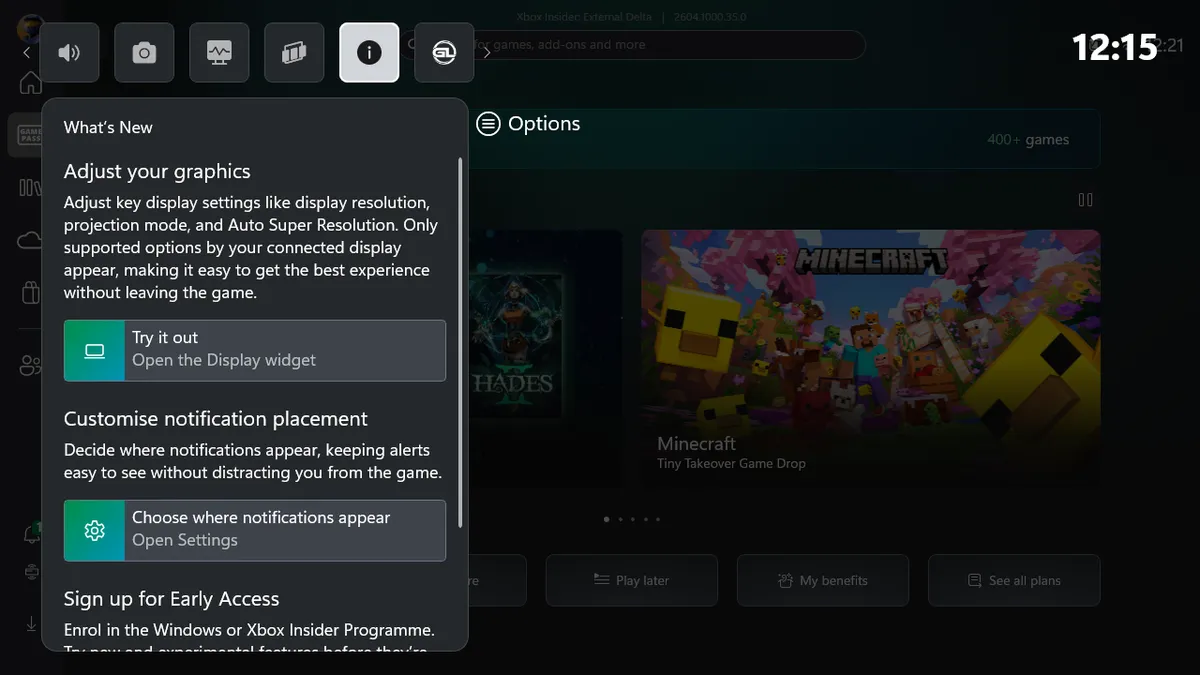


Users who update the Xbox app for Windows can expect a handful of genuinely useful features.
First, users can now customize where notifications appear, giving more control over how alerts show up on screen. These settings can be found within the Xbox Game Bar.
Next, users can directly adjust graphics settings without leaving their game, which is a much-needed quality-of-life improvement.
The new Display Widget, available through the Xbox Game Bar overlay, allows users to change display resolution, switch projection modes, and access Auto Super Resolution, which is set to release in April 2026.
ROG Xbox Ally X | Xbox App Update• Display widget shows- display resolution- projection mode- Auto Super Resolution settings• New notification placement controls (letting you decide where alerts appear on screen)via: RogAllyLifehttps://t.co/3yLrHn5hl4 pic.twitter.com/ZPoC5Uo0E3March 31, 2026
That is all for now. With Auto Super Resolution right around the corner, I would expect more updates to arrive soon, and if you want early access to these features, Xbox now advertises sign-ups through a “What’s New” panel within the Xbox Game bar.
Having heard about these updates thanks to RogAllyLife, who also covered it, I decided to boot up my Xbox Ally X and install them myself to grab some photos for this article, but when I went to the Microsoft Store, I was hit with a “Something went wrong” error while trying to update my apps, and was also reminded that everything from Notepad to Windows Media Player needed updating, leaving me sat here for half an hour waiting while everything installs, unable to actually access the latest updates.
Regardless of my never-ending list of complaints for the device, I do actually enjoy using it daily, but over to you, have you found these updates useful? Let me know in the comments, and make sure to take part in our poll below:

Join us on Reddit at r/WindowsCentral to share your insights and discuss our latest news, reviews, and more.

