What you need to know
- YouTuber Mark Spurrell turned his Samsung Galaxy Z Fold 4 into a Windows Phone for a recent video.
- He completed the transformation by using two launchers running side-by-side.
- The phone still runs Android, but it looks like a Windows Phone when closed and a Windows PC when open.
The Samsung Galaxy Z Fold 4 is one of the hottest mobile devices around. How do you make a flagship foldable even better? Make it into a Windows Phone, of course. That's exactly what YouTuber Mark Spurrell did with his Galaxy Z Fold 4.
Now, as you likely suspected, Spurrell didn't hack Windows Phone onto a Samsung Galaxy Z Fold 4. Instead, the device runs a highly customized launcher on top of Android. In fact, he actually uses two launchers to complete the look. The outside screen uses Square Home, which creates a Metro-inspired interface. The larger folding display uses Win-X Launcher.
Those that don't own a foldable phone may not be aware that the devices normally can't use two separate launchers. Spurrell overcame this limitation with a Bixby Routine.
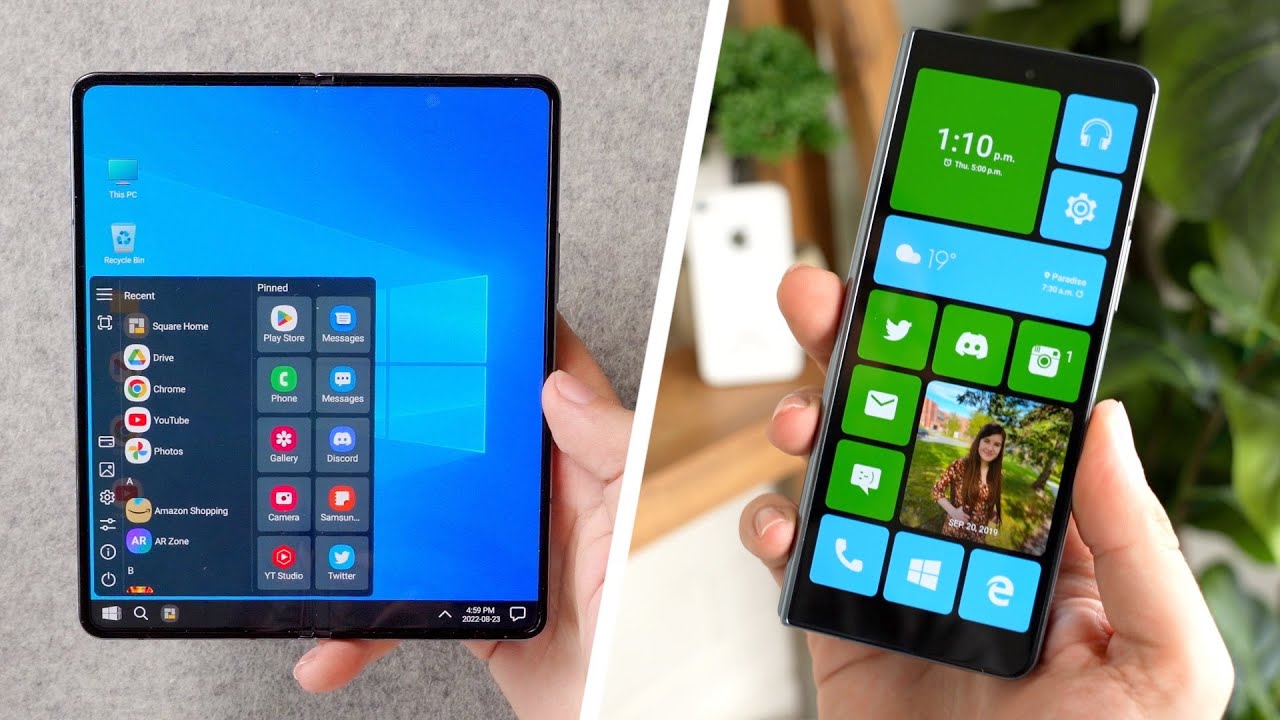
The completed setup looks better than one might expect. The outside display looks like a device running Windows Phone 8.1, Metro theme and all. The icons are reminiscent of the Windows Phone days, and there's even functionality similar to Live Tiles. Spurrell shows off the power of Square Home launcher, which supports swiping on an icon to perform a task like opening the camera app.
When opened, the Windows 11-inspired launcher has a Start menu, taskbar, and desktop icons. It has a full notifications and quick settings panel as well, much like Windows 11 on a PC.
While it's not a revival of Windows Phone, it's the closest anyone has come in a long time.