


Every once in a while, there comes a laptop packed with strong performance rates, a gorgeous display, and other useful features, but it is sadly ignored by the public due to having intimidating retail price tags just begging to go on sale.
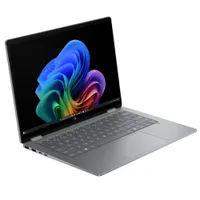
One such laptop is the HP Omnibook X Flip 14, a great mid-range 2-in-1 laptop that has had its high $1,049.99 MSRP cut down to a more affordable $699.99 at Best Buy.
Why buy the HP OmniBook X Flip 14?

HP's OmniBook X Flip 14 offers a fair amount of enticing features for people looking for a reliable mid-range laptop that can get productivity tasks and creative works done with no fuss.
It features strong processing power when running apps from Microsoft Office, checking emails, browsing the internet, and viewing media, thanks to its Intel Core Ultra 7 Series 2 processor.
Plus, it can run AI PC and Copilot+ PC programs like Paint Cocreator reliably fast, thanks to being outfitted with a Neural Processing Unit NPU with 47 TOPS, which is slightly higher than the minimum requirement for AI laptops to perform AI-related tasks effectively.
Another standout feature of the HP OmniBook X Flip 14 is its OLED Touchscreen display. It can render images in 2.8K resolutions with smooth, consistent frame rates thanks having 120Hz refresh rates, and outstanding color accuracy.
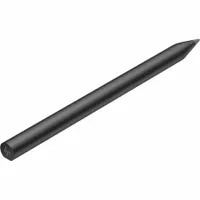
On top of that, it's compatible with stylus pens (sold separately) so people who prefer drawing digital art with them instead of a regular mouse can do so.

To round out its selling points, the HP Omni Book X Flip 14 also has a sturdy 2-in-1 design with an aluminum shell and dual 360-degree hinges to support it, a modest battery life of 22 hours, and it's portable friendly due in weighing in 3lbs and measuring between 11.4mm and 17mm.
So, if you're looking for a high-quality mid-range laptop fit for creating digital art, ploughing through digital paperwork in the office, then the HP OmniBook X Flip 14 is a safe bet now that it's on sale for $699.99 at Best Buy.
While you're at it, you can use the money saved up from this bargain to buy yourself a compatible HP Rechargeable MPP 2.0 Tilt Pen that's also on sale at Best Buy for $59.99 (was originally $82.99)
FAQ
Is it compatible with stylus pens?
Yes, the HP OmniBook X Flip 14 is compatible with stylus pens, but you will need to buy them separately as this laptop doesn't come bundled with one.
How is comparable to the AMD version?
The HP OmniBook X Flip 14 can be bought either an AMD or Intel processor.
The AMD version has fairly more raw computing power to CPU-heavy workloads at the cost of a shorter battery life. Meanwhile the Intel version has a longer battery life at the cost of having less computing power.
What are refresh rates and why are they important?
Refresh rates (denoted in Hertz or Hz for short) measure how fast your PC or laptop can load and refresh an image on-screen. If a computer/laptop has high refresh rates, it will render images with smoother motions, reduce distracting motion blurs, and improve the input responsive when playing video games, editing videos, or drawing digital art.

Follow Windows Central on Google News to keep our latest news, insights, and features at the top of your feeds!

