


ASUS has made its fair share of high-quality laptops over the years, and the Zenbook 14 is definitely no exception.
This is a slim but formidable laptop that doesn't compromise horsepower for portability as it's packing a gorgeous 14" OLED display, 512GB SSD, 16GB of RAM, and much more for the discounted price of $699.99 at Best Buy.
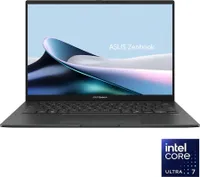
Why buy the ASUS Zenbook 14?

This laptop includes an Intel Core Ultra 7 (Lunar Lake) 255H processor (16 Cores, 2. Ghz base clock speed, 5.1 GHz max clock speed), 512GB SSD (which can be upgraded), and 16GB of RAM.
With these specs, the ASUS Zenbook 14 can easily complete everyday tasks that require the use of Microsoft Office, browsing the internet, or communicating with others via video meetings at high loading speeds and with little to no hiccups in its performance.
In addition, the ASUS Zenbook 14 boasts a 14-inch FHD+ OLED touchscreen display with a 60Hz refresh rate, 100% DCI-P3 color, 500 Nits of max brightness, and a 1900x1200 screen resolution. In layman's terms, this display will ensure that you can see what you're working on with crystal-clear clarity while providing a visual treat for your eyes with a vibrant gamut of colors.

On top of that, it has a gorgeous-looking outer chassis with a sleek design that's also quite sturdy for its size, so you won't have to worry about accidentally breaking its hinges when opening/closing the lid.
The only drawbacks the ASUS Zenbook 14 has are its muffled built-in speakers and its (relatively) moderate battery life of roughly 9 hours, depending on content.
Also, due to using an Intel Core Ultra Series 2 processor, this laptop's Wi-FI and integrated graphics will be outdated compared to modern tech. Not to mention its extremely low NPU of 14 TOPS (26 below the industry standard of 40 TOPS) is not ideal for AI-empowered tasks.
Despite these nitpicks, the ASUS Zenbook 14 is a solid laptop that we favorably recommend now that it's $699.99 at Best Buy, which is a pretty good price for a touchscreen OLED Windows laptop with 16GB of RAM and a 512GB SSD, as they tend to run much higher.
FAQ
Is the ASUS Zenbook 14 upgradeable?
It's 16GB RAM is soldered into the ASUS Zenbook 14's motherboard so it can't be removed. It's 512GB SSD, on the other hand, can be removed and replaced with a larger SSD up to 2TB.
Is it good for gaming?
The ASUS Zenbook 14's Intel Arc graphics are capable of running light games like Minecraft at low settings. However, it should never be used for intensive AAA PC games, as this laptop was never designed as a dedicated PC gaming laptop.
Can this laptop get hot?
It can when put under heavy workloads for long periods without a break or while it's plugged into a charger. It can potentially reach 90°C to 100°C under such conditions, but its processors, thankfully, can withstand these temperatures and still operate safely.

Join us on Reddit at r/WindowsCentral to share your insights and discuss our latest news, reviews, and more.

