The harsh reality of heading back to school is the exam prep work. I've been there. Strict deadlines, heavy revision, and pressure on your shoulders. It can be intense when you don't have anything to help manage all of your work.
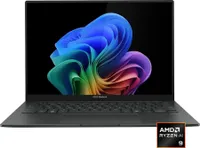
Luckily, a laptop to help you write and catalog all your studies beforehand for any exams with high performance is currently discounted to $899.99 at Best Buy — the ASUS ZenBook 14, featuring a vibrant 2K OLED display.
Why buy the ASUS Zenbook 14?

This specific UM3405GA-ZB_70 model of the ASUS ZenBook 14 laptop is a major upgrade from the UX3402ZA predecessor we reviewed four years ago, at least performance-wise.
With the new model's AMD Ryzen AI 9 465 2026 processor, 16GB of RAM, and Integrated AMD Radeon graphics, the ZenBook 14 will deliver fast performance in documents and spreadsheets, editing media, and browsing online without slowdowns, even when you have multiple apps or browser tabs open.
Additionally, it features an NPU rated for up to 50 TOPs so you can use its Copilot+ integrated functions to run AI-empowered programs like Windows Recall to see snapshots of your past activity or conjure quick art images with Cocreator.
Other notable features include a 512GB SSD to store files, a portable-friendly ultra-thin design, a 1080p Full-HD IR webcam with swift face login, and a 14-inch 2K OLED Touchscreen display so it can render images with crystal-clear clarity at a traditional 60Hz refresh rate, 2K resolution, and 500 nits of max brightness with HDR support and 100% accuracy of the DCI-P3 color gamut.
So if you need a powerful laptop in the mid-range area to save you from getting an 'F' on your exams or help you clear deadlines faster, then the ASUS ZenBook 14 that's now 25% off could be your savior.
FAQ
This is laptop upgradeable?
The ASUS ZenBook 14 (UM3405GA-ZB_70)'s default 512GB storage unit can be upgraded with a larger SSD (up to 2TB) by inserting it into the laptop's M.2 2280 PCIe slot. Its RAM, however, can't be upgraded.
What is the battery life on this laptop?
The ASUS ZenBook 14 (UM3405GA-ZB_70) has a 75Wh battery that lasts for around 18 to 19 hours before needing to recharge, depending on system workloads, display settings, and what kind of apps you run on it.
Is it good for gaming?
Not really. The ASUS ZenBook 14 (UM3405GA-ZB_70) laptop was built for productivity tasks rather than gaming, as evidenced by its lack of a dedicated GPU, hardware, and cooling system required for running hardcore 3D PC titles like Cyberpunk 2077.

Join us on Reddit at r/WindowsCentral to share your insights and discuss our latest news, reviews, and more.