


Windows Central Verdict
At a glance, it might feel like the Zenbook A14 didn't change at all, but upgrading to the Snapdragon X2 Elite gave it a massive CPU performance bump, and Wi-Fi 7 is a nice upgrade if you own compatible hardware. Nevertheless, this laptop still has to compete with its previous-generation model since they're otherwise so similar — making this a higher-performance variant for those who crave it. Plus, the more powerful Zenbook A16 isn't much more expensive, so choose wisely.
Reasons to buy
- +
Still one of the best-looking, ultra-light Windows laptops around
- +
Generous port selection with traditional USB-A and HDMI
- +
Great battery life with cool and quiet performance
Reasons to avoid
- -
An expensive option when the previous model is still available
- -
16-inch Zenbook A16 with X2 Elite Extreme will be tempting, too
Why you can trust Windows Central Our expert reviewers spend hours testing and comparing products and services so you can choose the best for you. Find out more about how we test.
ASUS' Snapdragon-based Zenbook became immediately iconic when its first A14 iteration was revealed at CES 2025, and it still won us over after an unfortunate $100 price increase when we tested a real-world sample for our Zenbook A14 (2025) review. Well, now it's back again, and it's packing the latest Snapdragon X2 Elite processor in yet another premium (but compact) Windows on ARM laptop. So, is it worth $2,000, or should you stick with the previous generation?

I've always opted for 14-inch laptops when I can, and I maintain that it's the perfect form factor when I'm traveling to conferences and events.
How much does the Zenbook A14 cost?

ASUS lists the Zenbook A14 (UX3407) on its official storefront for $1,999.99, with a Snapdragon X2 Elite (X2E-88-100) processor, 32GB of LPDDR5X-9523 RAM, and a 1TB SSD. The 14-inch non-touch OLED display runs at 1920 x 1200 resolution with a maximum refresh rate of 60Hz, in a 16:10 aspect ratio. Depending on when you buy, it'll come pre-installed with at least Windows 11 26H1, built exclusively for Qualcomm's processors.
Better yet, you can pick up the Zenbook A14 for just $1,349.99 at Best Buy with 16GB of RAM and a 512GB SSD, or for $1,799.99 at Best Buy with the same 32GB of RAM and 1TB SSD as the ASUS store configuration. Naturally, if you're looking for the best deal, Best Buy currently offers the best value for money and, at the time of writing, better availability. Also consider the $1,699.99 Zenbook A16.
Component |
Spec |
|---|---|
CPU |
Qualcomm Snapdragon X2 Elite X2E-88-100 |
RAM |
32GB LPDDR5X-9523MT/s |
GPU |
Qualcomm Adreno (Integrated) |
Display |
14" 16:10 WUXGA (1920 x 1200) non-touch |
Storage |
1TB M.2 NVMe PCIe 4.0 SSD |
Battery / Charger |
70WHrs / 100W USB-C |
Weight |
2.18 lbs (0.99 kg) |
Is the Zenbook A14 a good laptop?


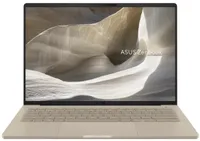
Above all, the most astonishing reaction I had when first unboxing the Zenbook A14 was its weight. ASUS lists the laptop at 2.18 lbs (0.99 kg), and my own scales showed it flicker between that and a perfect kilogram, so its "light as air" marketing tagline is legit, even if it is marginally heavier than last year's Zenbook A14 (2.16 lbs). For comparison, a 13-inch MacBook Air (M5) is 2.7 lbs.
ASUS still uses a "Ceraluminum" (ceramic-aluminum) coating on its Zenbook chassis, and to great effect. There can be some mild flex in the ultra-skinny screen, but the laptop's body is firm and sturdy, keeping the subtle 'Zabriskie Beige' color with a reflective logo on its lid. Its 1200p display maxes out at 60Hz, but the Lumina OLED panel looks as great as ever.


Testing the display with a colorimeter showed a maximum full-screen brightness of 407 nits, while ASUS maintains it'll reach a "peak" brightness of 600 nits in portions of the screen. Color accuracy is superb, covering 100% of the sRGB and P3 gamuts, while Adobe RGB hits 94%, making the Zenbook A14 a great choice for creators concerned with accurate color representation.
Port selection hasn't changed this year, so I still have access to dual Type-C USB4 ports alongside HDMI 2.1 and a 3.5 combo audio jack on the left side, plus a full-size USB-A 3.2 Gen 2 port on the right. The keyboard feels serviceable with a 1.3 mm travel distance, just as it did on the Zenbook A16 I tested recently, and it pairs with a satisfyingly smooth glass mechanical touchpad.
Does the Zenbook A14 have any issues?

ASUS still preloads some apps into its Windows 11 image on Zenbook laptops, including advertisements for Adobe and Dropbox that are automatically pinned to your Start menu. Both are easy to remove via the right-click context menu and are largely overshadowed by the useful MyASUS companion app. So, while it isn't totally clean, I can give the Zenbook A14 a passing grade here.
Qualcomm's latest Snapdragon X2 Elite processor offers its Hexagon NPU rated at up to 80 TOPS. However, aside from Microsoft's excellent Click To Do and a handful of other Copilot+ PC features, the Zenbook A14 doesn't offer much for stock local AI beyond media management with ASUS StoryCube. If you already use NPU-supported apps, then you'll benefit here. If you don't, then you won't.
[The speakers are] still better than many other laptops I've tried, as ASUS keeps winning my general praise for its audio efforts.
However, the webcam is decent, even if it understandably drains the battery faster during video meetings. Windows Studio Effects is one of the few features that uses the NPU, and HPD (Human Presence Detection) can dim the screen when I'm not looking. An IR sensor also lets the camera use Windows Hello for fast, secure face-based logins, and it works quickly when I open the lid.
The speakers in the new Zenbook A14 are decent, but they don't seem to produce as much bass as its larger Zenbook A16 sibling, for obvious reasons. They're still better than many other laptops I've tried, as ASUS keeps winning my general praise for its audio efforts. I wouldn't rely on them for everything, but it's a passable experience for streaming videos.
How fast is the Zenbook A14?


The new Zenbook A14 opts for Qualcomm's impressive Snapdragon X2 Elite (X2E-88-100) processor, and it benefits greatly from it. Burst CPU performance tests in Geekbench 6 show it outperforming Apple's M5 chip in the 14-inch MacBook Pro, and even edging slightly ahead of Lenovo's fantastic Lenovo Yoga Slim 7x (Gen 11) with the same SoC.
Comparatively, the 2026 model shreds its 2025 Zenbook A14 predecessor and the first-generation Snapdragon X (X1-26-100) it used, and the generational improvement is still evident in the extended Cinebench 2024 CPU stress tests. It even outpaces Intel's Panther Lake chips in the Surface Laptop 8 for Business and holds its own against the gaming-centric ROG Flow Z13.
Battery life

ASUS claims the Zenbook A14 can deliver "over 33 hours of uninterrupted use" (in a 1080p video playback scenario under controlled conditions), but the highest I could reach was 23 hours and 38 minutes in PCMark 10's equivalent test. It still has the same-sized 70Whr battery as last year's model, and after using the 2026 model for a week or so, generating a Windows Battery Report estimates 17 hours of use after a full charge.
Should you buy the Zenbook A14?

You should buy this if ...
✅ You need a lightweight, compact Windows laptop
✅ You rely on CPU-heavy apps and workflows
You should not buy this if ...
❌ You can go bigger — try the Zenbook A16
This 2026 revision builds on everything the Zenbook A14 achieved last year, making the CPU even better and adding Wi-Fi 7 for good measure. Sure, I'd have liked a brighter high-end on its OLED panel, but the cost-saving measures here are meant to keep this 14-inch laptop appealing in a category full of strong competitors — though the sharp generational cost increase still stings.
It's a Windows on ARM laptop with an ARM64 processor, and there is still a (mostly undeserved) stigma around software compatibility. If you're reliant on an old printer or scanner, double-check your drivers before buying; but otherwise, you have nothing to worry about. If you can hold out for a sale, as we recommended for its previous model, the new A14 is a stellar option.

An ultra-compact variation of its stellar 16-inch sibling, the new Zenbook A14 is a premium but portable Windows laptop.

Join us on Reddit at r/WindowsCentral to share your insights and discuss our latest news, reviews, and more.
