


Windows Central Verdict
ASUS is having incredible success with its Snapdragon X-based Zenbook range, and the A16 is a stellar example of how Windows laptops can answer to Apple's MacBook Air without resorting to ridiculous pricing. At $1,699 (not the expected $1,599), the Zenbook A16 still offers great value, with a practically perfect PC that showcases all the terrific advancements of Windows on ARM64. It's an absolute stunner that steals the spotlight from Microsoft's Surface Laptop.
Reasons to buy
- +
Incredibly lightweight at only 2.6 – 2.8 lbs, depending on touchscreen
- +
High-end specs in a gorgeous "Ceraluminum" chassis
- +
Snapdragon X2 offers the best Windows on ARM64 performance
Reasons to avoid
- -
No haptic touchpad
- -
Surprise post-launch $100 increase at Best Buy slightly dampened value
Why you can trust Windows Central Our expert reviewers spend hours testing and comparing products and services so you can choose the best for you. Find out more about how we test.
Wednesday, April 8: Reaching out to ASUS for comment on the Zenbook A16's pricing, it said: "Best Buy that an error was made on their end when sharing pricing information for the new Zenbook A series". In that, adjustments have been made to the previous analysis of its expected $1,599 price point, with notes.
ASUS already demonstrated the appeal of Qualcomm's Snapdragon X processors with last year's beloved Zenbook A14, and it remains one of our most highly-recommended Windows laptops for its all-around quality. Well, it's back again, and this time, it's bringing a 16-inch Zenbook A16 variant that promises to be even better.
Powered by the all-new Snapdragon X2 Elite Extreme and alternatives with a lower-spec Snapdragon X chip, Qualcomm's "fastest and most efficient processors" promise to supercharge ASUS' flagship laptop. That, and you'll get Windows 11 26H1 pre-installed with Microsoft's modern features, so it should stand out as an attractive, flagship-grade PC. Here's what I think.

I've traveled the globe with Windows laptops of all shapes and sizes, so I know which features of a portable PC make or break the experience. The Zenbook range is quickly becoming my absolute favorite.
How much does the Zenbook A16 cost?

The ASUS Zenbook A16 (UX3607OA) starts at $1,599 $1,699 at Best Buy (ASUS points to Best Buy pricing errors for its unexpected $100 increase) as an exclusive touch screen model. You can pick up a non-touch Zenbook A16 for $1,999 at ASUS' eShop, though it uses the same Snapdragon X2 Elite Extreme X2E-94-100 processor and 48GB of LPDDR5X-9600 memory (RAM).
In the United Kingdom, the non-touch Zenbook A16 starts at £2,099.99 at the respective ASUS eShop. Wherever you buy the X2 Elite Extreme models, you'll always get a 16-inch OLED panel with a 3K (2880 x 1880) display at a 16:10 aspect ratio that can switch between 60Hz and 120Hz.
All models include Wi-Fi 7 and Bluetooth 5.4 for wireless networking and devices, along with 2x USB-C 4.0 ports that support display output and power delivery. Plus, a single USB-A 3.2 Gen 2 port handles common dongles and drives, while HDMI-out 2.1 connects to more traditional external monitors, and a full-size SD card reader handles common memory cards.
Finally, a built-in 1080p (FHD) webcam supports Windows Hello for secure face logins with a microphone for voice calls, all within a "Zabriskie Beige" chassis coated in ASUS' custom Ceraluminum (magnesium-aluminum) material, weighing 2.87 lbs (1.30 kg) with the touchscreen or 2.64 lbs (1.20 kg) without.
What about Windows 11?
Our sample with an X2 Elite Extreme X2E-94-100 chip comes with Windows 11 Home for ARM64 in both the US and the UK. However, a more powerful Zenbook A16 can be configured for $1,999.99 (not yet listed post-launch) is expected to appear at the ASUS eShop, with a bump to the X2 Elite Extreme X2E-96-100, which should offer around a 300 MHz increase in its boost frequency, and comes with Windows 11 Pro.
Category |
Zenbook A16 (UX3607OA) |
|---|---|
CPU |
Snapdragon X2 Elite Extreme (X2E-96) |
RAM |
48GB LPDDR5x |
GPU |
Adreno, integrated |
NPU |
Hexagon, up to 80 TOPS |
SSD |
1TB |
Camera |
1080p, IR for Windows Hello |
Audio |
Six speakers |
Displays |
16", OLED, 2880x1800, 120Hz, 500 nits (1,100 nits HDR), 100% DCI-P3, VESA DisplayHDR True Black 1000, touch or non-touch |
Ports |
2x USB4, USB-A 3.2 (Gen 2), HDMI 2.1, SD 4.0 card reader, 3.5mm audio |
Wireless |
Wi-Fi 7, Bluetooth 5.4 |
Battery |
70Wh |
Dimensions |
13.92 x 9.54 x 0.54-0.65 inches ( 35.35cm x 24.24cm x 1.38-1.65cm) |
Weight |
2.65 lbs / 1.2 kg (no touch) |
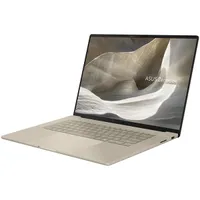
For this review, we tested two Zenbook A16 (UX3607OA) models: one US-built touchscreen model (photographed) and one UK-built, non-touch model (described). ASUS provided both samples, though it had no input, nor saw the contents of this review prior to publication.
Is the Zenbook A16 well made?

After testing a collection of 14-inch laptops, I was convinced it was the perfect form factor. That's generally because it comes with a certain weight expectation, and a 16-inch laptop is often so much heavier that it can feel almost inconvenient when I have to throw one in a bag and travel.
There's a fine line between reasonable and lightweight, and many casual onlookers see Apple's 15-inch MacBook at 1.51 kg as the benchmark. In that, ASUS went even further and somehow managed to make my 16-inch Zenbook A16 weigh just 1.2 kg. Make no mistake, that's firmly in the lightweight category.
Natural skepticism has many, myself included, initially thinking that ASUS must have made some cuts to the Zenbook's internals to make it the same weight as the excellent Intel Lunar Lake-based Zenbook S 14 I've traveled with until now. On the contrary, I couldn't find anything detrimental about its featherweight chassis, one coated in ASUS' lavish and unique Ceraluminum material.

You can expect the same quality from the Lumina OLED display in the Zenbook A16 as you would with any other that uses the same panel, though the HDR-capable screen still looks great when I enable the feature for the first time. ASUS claims a peak brightness of 1,100 nits, and colorimeter testing showed a maximum of around 500 nits without HDR.
Otherwise, an automatic switch between 60Hz and 120Hz happens when you switch between AC and battery power, but you can permanently force the smoother option with a tweak in Settings if you want to. The bundled MyASUS app includes color profiles for creators, but the "Normal" setting scored 100% accuracy for sRGB and Display P3 anyway, so I never feel the urge to switch.
Does the Zenbook A16 have a good keyboard?


The Zenbook A16's backlit keyboard feels good, with a respectable 1.3 mm key travel distance and otherwise unremarkable design. It's mostly a sharp-edged, square affair that matches the rest of the laptop, and the function keys are mostly pedestrian. Exceptions include MyASUS on F11 and ASUS' "ScreenXpert" monitor management app on F12. No numberpad, but zero complaints.
Despite not being a haptic touchpad, it's still a satisfying option that never caused any annoyances.
An 18 cm glass-covered touchpad dominates the lower portion of the laptop, with invisible gesture points to control functions like volume and screen brightness. Despite not being a haptic touchpad, it's still a satisfying option that never caused any annoyances during my time with it. Defined physical edges also keep the Zenbook away from the "invisible" touchpads I always disliked.
How fast is the Snapdragon X2 Elite Extreme?


Improvements in the availability of native ARM64-based Windows apps mean that even benchmarking apps can skip Microsoft's Prism x86-64 translation layer to show off some proper scores. We already knew that the Snapdragon X2 Elite Extreme was dominating its competitors in pre-release testing, but it's another thing to see the results firsthand.
Per-app tests and gaming experiments with Qualcomm's Adreno GPU can come later, using post-launch driver updates to provide a more realistic view of what consumers can expect. Still, synthetic CPU testing is hard to resist, and comparing the Zenbook A16 against the M5-based 15-inch MacBook Air and M4 Pro-based 16-inch MacBook Pro tested by Tom's Guide shows exciting numbers.
Sure enough, Qualcomm's Snapdragon X2 Elite Extreme just edges past Apple's M4 Pro in multi-core testing, and flies past the standard M5 chip.
It's one thing to see a new Windows laptop predictably outrank another, but sure enough, Qualcomm's Snapdragon X2 Elite Extreme just edges past Apple's M4 Pro in multi-core testing, and flies past the standard M5 chip. Then again, it's admirable to see the Zenbook A16 pull ahead of Intel's latest "Panther Lake" Core Ultra X9 388H CPU, appearing in ASUS' recent Zenbook Duo.
Comparing the scores of first-generation Snapdragon X Elite processors in Microsoft's Surface Laptop 7 and, to a lesser extent, the Surface Pro 11, shows how much of an incredible jump the new X2 Elite Extreme provides. A Cinebench 2024 test even has the Zenbook A16 passing HP's "insanely powerful" ZBook Ultra 14 with AMD's Strix Halo chip, the Ryzen AI Max+ PRO 395. Impressive.
Does the Zenbook A16 have good speakers?


For such a skinny laptop, the audio quality is surprisingly great. There's a six-speaker array inside, with two tweeters for high-end sounds and four woofers to cover the lower frequencies of bass. Without getting into the weeds, I can attest that I happily had Spotify playing throughout my day and enjoyed a few YouTube videos in my downtime. It all sounds great, and I'm left captivated. Great speakers.
The built-in webcam and microphone are decent, too. I've paid a lot of money for external cameras and mics over the years, even if only to avoid the usually lackluster options on laptops. Windows Studio Effects handles portrait blur better than Google Meet, and the pairing generally looks better than some creator-centric laptops that I've tried in the past.


Besides, if I wanted to use a dedicated replacement, I'm hardly struggling with connectivity. Two USB-C 4.0 ports on the left side and a single USB-A 3.2 Gen 2 on the right cover common dongles for mice and keyboards at the very least. Plus, HDMI-out 2.1 means my older monitors still work, and a full-size SD card is there for whoever needs that. Good news for photographers.
There's a 3.5mm combo audio jack if you want to get really old-school with wired headphones, or you can lean on Bluetooth 5.4 for wireless options. This variant of the Zenbook A16 also supports Wi-Fi 7, if you have a compatible router at home. I'm still using Wi-Fi 6E, but I'll never turn my nose up at future-proofing because I'll upgrade my mesh system at some point.
So, to ASUS' credit, it's implementing all the modern technologies on offer with Qualcomm's Snapdragon X2 chips, like USB 4 and Wi-Fi 7, without cutting out long-standing necessities like a USB-A port or opting for a proprietary charger. A beefy 130W charging brick is included, but the business end is still USB-C, so you could fall back on a lower-powered alternative if you accidentally traveled without it.
Does the Zenbook A16 have good battery life?


Once it's fully charged, ASUS claims around 21 hours of battery life with constant, offline video playback, or around 12 hours of constant web browsing. My workflow is certainly closer to the latter, and a Windows 11 battery report estimates I could expect around 16 hours. I ran experiments, and PCMark 10's local video playback test saw the Zenbook A16 last for 20 hours and 30 minutes.
While 21 hours is certainly possible, the Zenbook A16 still realistically hit around 10 – 16 hours of battery life in my usual workflow.
After a full charge, a constant 4K video stream from YouTube with the screen at 65% (around 200 nits) and the volume at 10% delivered 14 hours and 13 minutes of battery life before it switched off, and that's without energy-saving mode. So, while 21 hours is certainly possible, the Zenbook A16 still realistically hit around 10 – 16 hours of battery life in my usual workflow at 60Hz.
Should you buy the ASUS Zenbook A16?

You should buy this if ...
✅ You want one of the best Windows laptops around
✅ You need something lightweight and portable
You should not buy this if ...
❌ You only need a basic web browsing machine
ASUS is on a winning streak with its latest Zenbook range, and Qualcomm's Snapdragon X2 processors are an absolutely perfect pairing. Just like the A14 before it, the A16 will stand as one of the absolute best Windows laptops you can buy. Any apprehension about Windows on ARM64 is a low-effort excuse, especially when the raw horsepower behind the X2 Elite Extreme would effortlessly run traditional x86-64 apps under Microsoft's Prism.

Powered by Qualcomm's latest Snapdragon X2 Elite Extreme processor, the Zenbook A16 does it all, and ASUS somehow keeps it all in a gorgeously featherweight chassis.

Join us on Reddit at r/WindowsCentral to share your insights and discuss our latest news, reviews, and more.
