


Windows Central Verdict
It might not have all the same high-end features found in expensive alternatives, but the $349 Alienware AW2726DM QD-OLED gaming monitor is an easy recommendation for anyone who doesn't want to overspend on superb color, contrast, and overall performance.
Reasons to buy
- +
$349 smashes usual OLED prices
- +
Outstanding color and contrast
- +
240Hz refresh rate, 0.3ms response time
- +
Clean design, ergonomic stand, and compatible with VESA
- +
Three-year warranty covering OLED burn-in
Reasons to avoid
- -
No built-in speakers
- -
No RGB lighting
- -
Lower brightness than some slightly more expensive competitors
- -
Could use some USB ports
Why you can trust Windows Central Our expert reviewers spend hours testing and comparing products and services so you can choose the best for you. Find out more about how we test.
When Alienware announced a $349 QD-OLED gaming monitor earlier this year, I noted that it would almost certainly become one of the most popular options out there, assuming it met its budget promises. Until the AW2726DM, most OLED gaming monitors were somewhere around $500 when not on sale.
Eager to test it out myself, I got hold of a review unit that's now been front and center on my desk for nearly a month. I've been using it for gaming, of course, but also for some photo editing and general work during the day.
Here's what you need to know about the Alienware AW2726DM before you buy it yourself.

I've been a PC gamer for as long as I can remember, and with a decade of experience reviewing hardware for Windows Central, I have a good idea of what's good and what's best left behind.
How much does the Alienware AW2726DM cost?
The biggest draw to the Alienware AW2726DM is the thin $349.99 price tag. No deals or discounts are required to land that price, and it's not out of the realm of possibility that it could one day drop lower.
For comparison sake, the HyperX OMEN OLED 27q, which uses the same Samsung panel as the Alienware, normally costs about $500 but often drops to $400.
The next most affordable QD-OLED gaming monitor at Dell, the Alienware AW2725D, costs $500.
Here's how the two Alienware monitors compare to help give you an idea of what you're working with.
| Row 0 - Cell 0 | Alienware AW2726DM |
Alienware AW2725D |
Size |
26.7 inches |
26.7 inches |
Panel |
QD-OLED, anti-reflective |
QD-OLED, anti-reflective |
Resolution |
2560 x 1440 (QHD) |
2560 x 1440 (QHD) |
Refresh rate / Response time |
240Hz / 0.03ms |
280Hz / 0.03ms |
Adaptive sync |
AMD FreeSync Premium, VESA AdaptiveSync, G-Sync compatible |
AMD FreeSync Premium Pro, NVIDIA G-Sync compatible, VESA AdaptiveSync |
Brightness |
200 nits (SDR) / 400 nits (HDR) |
250 nits (SDR) / 1,000 nits (HDR) |
Ports |
2x HDMI 2.1, 1x DisplayPort 1.4, 3.5mm audio out, lock slot |
2x HDMI 2.1, 1x DisplayPort 1.4, USB-B up, USB-A down, USB-C down, lock slot |
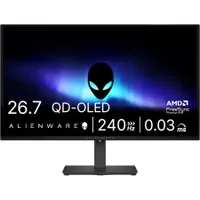
Dell supplied Windows Central with a review unit of its Alienware AW2726DM. It had no input, nor saw the contents of this review, prior to publication.
A sleek, straightforward design to match the budget pricing
Unboxing the Alienware AW2726DM, I was immediately impressed with how thin and light it is. It's just 1.65 inches at its thickest point, which is gathered toward the middle of the display's venting and stand/VESA mount base.
The stand attaches to the monitor with included screws, a clunkier approach to the usual clip-in method I'm used to. The stand is fairly basic, but it does have decent swivel, tilt, height, and rotation abilities.
After testing the stand, I attached the monitor to my VESA 100x100mm desk mount without issue.

It's a sleek monitor for sure, but that's partly due to a lack of a few features you often find in more premium monitors.
For one, there are no built-in speakers. Instead, there's a 3.5mm audio jack easily reached on the bottom of the display. I don't know anyone who uses built-in monitor speakers when gaming anyway, but I do miss them a bit for work purposes.

The other missing element is RGB lighting. The back of the monitor has just a plain Alienware logo; no throbbing light ringing the stand, no underglow. You get it. It might feel plain for some gamers who need a lot of light, but I appreciate that it can fit into a professional setting.
One missing feature I think more people will miss is a USB hub. I'm not talking about a full-blown Thunderbolt dock like some premium monitors include. Instead, the Alienware AW2726DM offers just two HDMI 2.1 ports and one DisplayPort 1.4.
The monitor arrives with AMD FreeSync Premium and VESA AdaptiveSync. Although it's not officially certified for NVIDIA G-Sync, it is compatible, and I had no issues using it with my RTX GPU.
HDMI 2.1 and DP 1.4 capabilities in the Alienware AW2726DM

The monitor's HDMI 2.1 ports support up to 120Hz VRR on consoles, and they include HDCP 1.4/2.3 protection standards. It also supports HDR.
For PC gamers, you'll want to stick with DisplayPort 1.4 (also with HDCP 1.4/2.3 protection standards). It delivers support for the full 240Hz refresh rate, and it includes HDR support and Display Stream Compression (DSC).
All monitor controls stem from one joystick

The AW2726DM doesn't come with a remote or a ton of buttons on the monitor itself. Everything is controlled from one joystick on the rear right side of the panel.
On-screen display quick settings are straightforward. You can quickly adjust brightness and contrast, as well as volume for the 3.5mm audio jack. A Game Enhance mode can be toggled for extra on-screen overlays, and you can choose from 10 different picture presets.
Dell offers a respectable three-year warranty covering burn-in.
Inside the full menu are a few more customization options, allowing you to change what each shortcut on the joystick does.
In terms of OLED care — always important when there's a risk of burn-in — the monitor has a Pixel Refresh feature that's enabled by default.
A gorgeous QD-OLED picture for a lower cost than the rest

Alienware's AW2726DM is using a Quantum Dot (QD) OLED panel made by Samsung, and judging by TFT Central's ever-useful QD-OLED generation chart, it's from the 2024 era.
Is that a bad thing? Not really, especially at the asking price. Though you might miss out on higher HDR True Black ratings and higher refresh rates, what the Alienware AW2726DM actually delivers is more than enough for the average gamer.
What input lag might exist is not noticeable.
A 2560x1440 (QHD) resolution covers more GPUs than 4K, and it has a sizzling 240Hz refresh rate to keep up with more powerful performance hardware. As usual with OLED, the screen offers a speedy 0.03ms gray-to-gray response time.
I don't have a tool that can accurately measure input lag, but I can say that after many hours of fast-paced FPS gameplay, what input lag might exist is not noticeable.
Does the Alienware AW2726DM have good color and contrast?


OLED displays are notoriously good at delivering deep contrast. At a 1,500,000:1 contrast ratio, the AW2726DM is no different. Blacks are actually black, whites are actually white, and there's no backlight bleed to spoil the picture.
I tested stock color reproduction using my SpyderX Pro colorimeter and found 100% sRGB, 95% AdobeRGB, and 98% P3, all excellent results that will come in handy, especially if you're using the monitor for work during the day.
Is the Alienware AW2726DM bright enough?
Dell advertises 200 nits maximum brightness with SDR content, and measuring with my colorimeter, I found that the value checks out at 215.2 nits. That's slightly lower than other OLED panels from the same generation, but again, you need to keep cost in mind.
HDR10 support is included despite the monitor not having any HDR certification, and the monitor climbs to roughly 400 nits when enabled.
The AW2726DM sets a new standard for affordable QD-OLED gaming monitors
Is it bright enough for use in an office? Absolutely. An anti-reflective finish does a lot of lifting when the sun is behind me, but I don't find it too distracting even when gaming.
Burn-in is always a scary possibility when you're dealing with OLED. As I mentioned, the monitor has a Pixel Refresh feature enabled by default, and Dell offers a respectable three-year warranty covering burn-in.
Should you buy the Alienware AW2726DM?

You should buy this if ...
✅ You currently have a VA or IPS gaming monitor and want to upgrade to OLED without overspending.
✅ You have a gaming PC powerful enough to take advantage of a QHD resolution and 240Hz refresh rate.
You should not buy this if ...
❌ You already have an OLED gaming monitor you're mostly happy with.
❌ You have extra money to spend and want to grab some of the high-end features missing from the AW2726DM.

If you have $350 set aside for a new 27-inch gaming monitor, my easy recommendation is the Alienware AW2726DM. I don't know of any other QD-OLED display selling at this price, and although the AW2726DM isn't perfect, it's going to absolutely rock your world if you're coming from IPS or VA.
Color and contrast are superb, the QHD resolution works for a lot of gamers, and a 240Hz refresh rate is good for competitive titles or casual gaming.
I've got to hand it to Alienware; the AW2726DM sets a new standard for affordable QD-OLED gaming monitors, and as long as you're OK with some of the drawbacks, you'll have a great time.

It might not have all the same high-end features found in expensive alternatives, but the $349 Alienware AW2726DM QD-OLED gaming monitor is an easy recommendation for anyone who doesn't want to overspend on superb color, contrast, and overall performance.

Join us on Reddit at r/WindowsCentral to share your insights and discuss our latest news, reviews, and more.

