Trying to find the right PC gaming monitor can be difficult. Some may offer high resolutions but low refresh rates that make inputs feel sluggish, while others may offer high refresh rates but low resolutions that will make games look too crushed.
However, the ASUS ROG Swift 32” 4K OLED Gaming Monitor (PG32UCDP) that's on offer for $899.99 at Amazon is the best of both worlds, as it features high resolutions, refresh rates, and much more to make your favorite PC games more fun to play
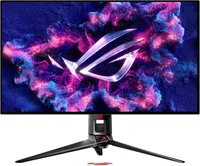
Why buy the ASUS ROG Swift 32” 4K OLED Gaming Monitor (PG32UCDP)?

Let's start with the ASUS ROG Swift 32" 4K OLED Gaming Monitor (PG32UCDP)'s best feature: Dual Mode. With the press of a hotkey, you can switch between two modes that will either give you 4K resolution at 240Hz or FHD 1080p at 480Hz.
The 4K @ 240Hz mode is best used for cinematic single-player games like Senua's Saga: Hellblade II, so all the astonishing graphics, detailed character models, and stunning environments are rendered to their full artistic potential.
FHD 1080p @ 480Hz mode, meanwhile, is best for fast-paced action games like Ninja Gaiden 4 or competitive multiplayer titles like Overwatch and Call of Duty. In exchange for 4K visuals, you gain insanely high refresh rates that will ensure your controller inputs do not suffer any frustrating lag that will get you killed in firefights.
This monitor's gameplay-enhancing features don't stop there, as the ASUS ROG Swift 32" 4K OLED Gaming Monitor (PG32UCDP) also has compatibility with NVIDIA G-Sync and AMD FreeSync Premium Pro to boost its visuals further by removing stuttering and screen-tearing while minimizing input lag more.
The ASUS ROG Swift 32" 4K OLED Gaming Monitor (PG32UCDP) even includes built-in AI programs to help a player in-game, like AI Sniper and MOBA Map Helper.
Other highlights of the ASUS ROG Swift 32" 4K OLED Gaming Monitor (PG32UCDP) include a matte coating that severely reduces glare, exceptional vibrant colors (up to 99% DCI-P3 color gamut coverage) and brightness (up to 1,300 nits), and a sleek design with sturdy build quality.
With tech like this, it's no wonder that our friends at sister site Tom's Hardware gave this monitor a perfect score of 5/5 Stars. Plus, with this 31% discount, taking its $1,299.99 MSRP down to $899.99 at Amazon, it's a much more affordable option right now compared to the best gaming monitors with similar retail prices, like the HP Omen Transcend 32.
Alternative discounts
If Amazon's discount expires or if it runs out of stock, here are some alternative back-up options to consider:
- $899.99 at Best Buy (was $1,299.99)
- $1,092.00 at Newegg (was $1,193.00)
- $1,195.00 at Walmart (was $1,299.99)
FAQ
How do I switch to 1920x1080 @ 480Hz mode?
To activate 1920x1080 @ 480Hz mode, use the Frame Rate Boost feature by pressing its corresponding physical hotkey on the monitor or select it within the OSD menu under Gaming settings.
What is the best way to avoid burn-in?
To avoid burn-in (a "ghost" image or discoloration caused by uneven degradation of pixels from displaying static content), use this monitor's built-in ASUS OLED Care features like Pixel Shift, Screen Saver and Logo Brightness.
Other options include reducing SDR brightness, enabling dark mode, using a black wallpaper background, autohiding the taskbar and setting the display to automatically turn off after 3-5 minutes of idleness.
How does its WOLED panel compare to QD-OLED?
The ASUS ROG Swift 32" (PG32UCDP)'s WOLED panel offers a higher white brightness and greater reduced direct glare (thanks to its matte coating) but less saturated colors when compared to monitors that use QD-OLED panels.

Join us on Reddit at r/WindowsCentral to share your insights and discuss our latest news, reviews, and more.