


Windows Central Verdict
Impressive engineering, two gorgeous OLED displays, a quality keyboard, superb audio, and capable cooling are the ROG Zephyrus Duo's highlights. I love to see this type of experimentation outside of the laptop world's usual boundaries, even if it's not meant for mainstream buyers. If you have the budget and want to try something new, it's hard not to love this unique gaming laptop ASUS has created.
Reasons to buy
- +
Undeniable premium quality throughout
- +
Detachable keyboard has RGB and 1.7mm key travel
- +
Beautiful dual 16-inch OLED touch displays with accurate color
- +
Superb audio from six speakers
- +
CPU efficiency seems excellent (so far)
Reasons to avoid
- -
No Ethernet or Thunderbolt 5
- -
Camera could be higher-res
- -
Crazy expensive, RTX 5090 model overkill
- -
Heavier than your average laptop
- -
Fans get loud under heavy load
Why you can trust Windows Central Our expert reviewers spend hours testing and comparing products and services so you can choose the best for you. Find out more about how we test.
ASUS has been a key player in advancing dual-screen laptops with its Zenbook Duo, but many don't know that a gaming-focused Zephyrus Duo actually came first.
No, older models from the early 2020s weren't a "true" dual-screen laptop, with their 1.5 displays and embedded keyboard, but they clearly inspired the new ROG Zephyrus Duo that ASUS unveiled at CES 2026.
I got my hands on the new dual-screen RTX 5090 mobile gaming laptop a few days before its initial launch. Here's what I discovered.

I've been testing and reviewing gaming laptops for more than a decade, and I've also tested the latest dual-screen PCs from ASUS and Lenovo. This experience allows me to offer insights and opinions you might not find anywhere else.
How much does the ASUS ROG Zephyrus Duo cost?
ASUS offers two ROG Zephyrus Duo (2026) configurations. The more affordable model (GX651AR) costs $4,499.99 and comes with the Intel Core Ultra 9 386H CPU, NVIDIA RTX 5070 Ti mobile GPU, 32GB of RAM, and 1TB SSD.
ASUS also has a model with an RTX 5090 mobile GPU and otherwise identical specs for $5,499.99. That's a full $1,000 upcharge for the RTX 5090, as both models have the same displays, ports, cameras, etc.
Here's a deeper look at the specs available in the new ASUS ROG Zephyrus Duo.
| Row 0 - Cell 0 | ASUS ROG Zephyrus Duo |
CPU |
Intel Core Ultra 9 386H (16 cores, 50 TOPS NPU) |
GPU |
NVIDIA RTX 5070 Ti, RTX 5090 |
Memory |
Up to 64GB LPDDR5X-8533 |
Storage |
Up to 2TB M.2 PCIe 5.0 NVMe |
Display |
Dual 16 inch, OLED, 2880x1800, 120Hz, 1100 nits (HDR), 100% DCI-P3, Pantone Validated, G-Sync (main display only), Dolby Vision |
Ports |
2x Thunderbolt 4, 2x USB-A 3.2 (Gen 2), 1x microSD card reader, 1x 3.5mm audio, 1x HDMI 2.1 |
Camera |
1080p + IR |
Wireless |
Wi-Fi 7, Bluetooth 6.0 |
Dimensions |
13.98 x 9.69 x 0.78-0.98 inches (35.5cm x 24.6cm x 1.99-2.49cm) |
Weight |
6.17 pounds (2.8kg) |
Price |
From $4,499.99 |
ASUS supplied Windows Central with a temporary review unit for testing. It had no input on, nor saw the contents of this review prior to publishing.
How does a dual-screen gaming laptop like the ROG Zephyrus Duo work?

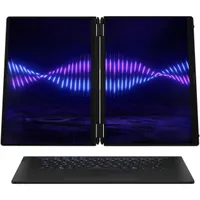
The ROG Zephyrus Duo is heavier than the average 16-inch gaming laptop at 6.17 pounds (2.8kg), but it's packing a full dual-screen setup within its CNC-milled aluminum borders. Like the Zenbook Duo, the two displays fold together like a normal notebook, sandwiching the removable keyboard.
Without the keyboard attached, you have two full 16-inch displays to work with. A built-in stand on the bottom of the chassis makes for a sturdy horizontal or vertical setup, and 320-degree hinges allow the PC to fold flat or into a tent mode when sharing or playing local co-op games.

The number of actual PC games that can do this isn't huge, but megahits like Portal 2, Stardew Valley, and It Takes Two might tempt you to try it out. Let me know your favorite local co-op PC game in the comments section.
The real utility of a dual-screen gaming laptop is having a full second screen for guides, podcasts, streams, controls — whatever. If it seems overkill, that's because it is for what's probably a majority of gamers. But it's so, so cool at the same time.

And just like the Zenbook Duo, the ROG Zephyrus Duo doesn't feel like a gimmick when you're using it outside of its standard notebook mode. It's truly useful to have a second display ready to go at all times, and it works just as well if you're holding the PC like a book, standing it up on a desk (vertically or horizontally), or laying it flat on a table.
Are the ROG Zephyrus Duo's features as premium as its design?

Everything about this PC is carefully designed, and I'm impressed with the overall quality. ASUS has truly made huge strides in engineering and presentation in recent years, and it's on full display here.
ASUS has truly made huge strides in engineering and presentation in recent years, and it's on full display here.
I'm reminded of this every time I open the lid. ASUS designed the hinges with two levels of torsion; the lid can be opened with one hand to a regular notebook display angle, before it grabs harder for more stability in dual-screen modes.

Without the keyboard attached, the bottom half of the chassis is relatively thin considering the hardware inside. On the left edge is a proprietary charging port, HDMI 2.1, USB-A 3.2 (Gen 2), Thunderbolt 4, and a 3.5mm audio combo jack.
The right edge includes secondary Thunderbolt 4 and USB-A 3.2 (Gen 2) ports, as well as a full-size UHS-II SD card reader. A lack of Ethernet without an adapter will irk some, but Wi-Fi 7 is crazy fast, assuming your router and ISP can keep up.


Audio from six speakers, each with 2W of output, is superb, and Dolby Atmos is included. Two speakers live on the bottom panel of the second display, two live near the center, and a couple are located in the hinge area.
ASUS managed to fit a 1080p webcam with IR for Windows Hello above the main display, and it does a good job if you're occasionally video conferencing.
Is the ROG Zephyrus Duo's detachable keyboard good for gaming?

The keyboard attaches to the bottom display with strong magnets, communicating and charging via POGO pins when "docked." When pulled apart, it immediately switches to Bluetooth.
It's rigid enough that it's no problem to use in my lap, and the larger deck makes it feel like a sort of base station. It's covered in an oil-resistant, soft-touch finish that's quite luxe.
Typing is surprisingly comfortable, owing to deep 1.7mm key travel, ample spacing, and a smooth finish on each keycap.
Typing is surprisingly comfortable, owing to deep 1.7mm key travel, ample spacing, and a smooth finish on each keycap. All keys belong to the same RGB zone, compatible with Aura Sync.
I wish the touchpad used haptics, but that's really my only qualm. The mechanical style is nevertheless tactile, and I appreciate the oversized area.
How did ASUS fit an RTX 5090 in the ROG Zephyrus Duo?

ASUS often uses the keyboard as an air intake on its gaming laptops, but with a second screen covering the entire bottom portion of the Zephyrus Duo, that isn't possible.
Instead, it has an oversized intake panel on the bottom of the PC to feed the fans inside. ASUS built a custom vapor chamber here to cover nearly 50% of the motherboard, and it uses a Graphite Nano insulation layer between the board and the OLED display.
I applaud ASUS for fitting an RTX 5090 mobile GPU inside a dual-screen laptop.
Something I've never seen before is an angled exhaust vent that doubles as a raised footing. It's joined by a much larger heatsink exhaust running along the entirety of the bottom half's rear edge.
In Turbo performance mode, the fans can get loud. I measured 61.2 decibels when pushing the system with Red Dead Redemption 2. In performance mode, noise drops by about 5 decibels.
NVIDIA RTX 5090 mobile performance — is it worth it?

I applaud ASUS for fitting an RTX 5090 mobile GPU inside a dual-screen laptop, but I stick by my opinion that it's not worth the upcharge compared to NVIDIA's lower-tier GPUs.
The 5090 mobile, no matter what PC it's in, only delivers about half the performance of its desktop counterpart. Although none of NVIDIA's mobile GPUs match up to the desktop options, the 5090 takes the biggest hit.
Overall, the RTX 5090 model seems more like a flex aimed at big spenders, especially considering ASUS doesn't offer an RTX 5080 model. Outside of gaming, high-end creators might be swayed to the 5090 combined with quality OLED displays. Otherwise, go with the RTX 5070 Ti model.
Benchmarking the ASUS ROG Zephyrus Duo
ASUS caps the RTX 5090 mobile GPU at 150W in Turbo and Manual modes. It falls back to 135W in Performance mode. I ran all benchmarks in Turbo mode, using the main display's native 2.8K resolution.
- Black Myth: Wukong — DLSS On, Frame Gen On, Ray Tracing Very High, Cinematic, 2.8K: 64 FPS (AVG), 35 FPS (MIN), 80 FPS (MAX)
- Red Dead Redemption 2 — DLSS Auto, Ultra, 2.8K: 75.68 FPS (AVG), 23.19 FPS (MIN), 137.42 FPS (MAX)
- Cyberpunk 2077 — Ray Tracing Overdrive, Path Tracing On, Frame Gen 2x, 2.8K: 75.28 FPS (AVG), 65.63 FPS (MIN), 85.67 FPS (MAX)
I also tested Red Dead Redemption 2 with the second screen enabled and streaming a YouTube video. Under the same settings, the average dropped by 5 FPS. That's not a huge performance hit for a very demanding game, which is great to see.
Does the ASUS ROG Zephyrus Duo get too hot to handle?


ASUS has clearly done a great job of balancing power within the laptop's limits. It's constantly adjusting power to the CPU and GPU, and AIDA64 showed no throttling in an extended 15-minute stress test. The RTX 5090 hit 76°C during the test, the hottest CPU core 92°C.
Toward the end of the stress test, I also used a FLIR camera to check external temperatures.
The keyboard, attached, reached about 40°C between the keys. With the screen removed, the bottom OLED display hit about 42°C. And on the bottom of the laptop, the exhaust hotspot hit about 54.7°C.
Keep in mind these are extreme measures. Nevertheless, if you want less heat, go with the RTX 5070 Ti GPU instead.
More ROG Zephyrus Duo benchmarks
I ran a series of more general synthetic benchmarks measuring productivity and gaming power. Here's how they compare to other laptops we've recently tested.


Although I don't have graphs for them, the 3DMark Fire Strike score came out to 34,496 and the Port Royal score to 12,230.
I'm still working on measuring battery life, and I plan to write a separate piece with deeper tests. What I can say right now is that the Core Ultra 9 386H "Panther Lake" chip seems very efficient when not gaming, sipping power even with two displays active.
The ROG Zephyrus Duo's dual 2.8K OLED displays are its best assets


ASUS uses two 16-inch OLED touch displays, each with a 16:10 aspect ratio. They have a crisp 2880x1800 (2.8K) resolution, a 120Hz maximum variable refresh rate, and a 0.2ms response time.
Only the main (top) display is equipped with NVIDIA G-Sync tech, which I don't mind since it's the screen that you'll be using most for gaming.
These results are suitable for creative work, and they make all games look incredible.
The OLED displays get super bright when HDR is enabled, pushing past 1,000 nits. Without HDR enabled, I tested 483 nits using my colorimeter.
I also tested color accuracy out of the box. The top screen managed 100% sRGB, 94% AdobeRGB, and 98% DCI-P3. The bottom screen hit 100% sRGB, 92% AdobeRGB, and 99% DCI-P3.
These results are suitable for creative work, and they make all games look incredible.
Should you buy the ASUS ROG Zephyrus Duo (2026)?

You should buy this if ...
✅ You're a gamer who always uses two screens and wants the same setup on the go.
✅ You're a creator who needs an RTX 5090 Laptop GPU and dual OLED screens at any time.
You should not buy this if ...
❌ You want to maximize a mobile RTX 5090's performance.
❌ You won't be using two displays simultaneously most of the time.

The ASUS ROG Zephyrus Duo is a one-of-a-kind gaming laptop that I'm sure a small cadre of gaming enthusiasts (and creators) will love.
Are there some drawbacks? Certainly. ASUS performed some engineering magic here to fit everything inside a relatively compact chassis, but the reality is that you can find better thermal capacity in single-screen gaming laptops.
The trade-off, of course, is the convenience of having two high-res OLED displays at your disposal everywhere you go.
The ASUS ROG Zephyrus Duo is a one-of-a-kind gaming laptop.
I doubt the ROG Zephyrus Duo will ever hit mainstream appeal, especially with its elevated price, but I doubt that was ASUS's goal in the first place.
Like Lenovo, it's not afraid to experiment to push the idea of gaming laptops forward, and that should be applauded.
If you have the budget and this sort of device suits your needs, I can say that you're going to have a ton of fun with the ROG Zephyrus Duo.

ASUS's first true dual-screen gaming laptop impressed me with its engineering, quality, and performance. It's not for everyone, but it achieves its goals and is a ton of fun to use.

Join us on Reddit at r/WindowsCentral to share your insights and discuss our latest news, reviews, and more.

