


The ASUS Zenbook A16 is a lightweight marvel, offering superb performance and efficiency from the Snapdragon X2 Elite Extreme chips. It's also priced competitively, and it's the PC I recommend checking out first.
Pros
- Competitive pricing
- Snapdragon X2 is the real deal in terms of performance and efficiency
- Solid feature set, lots of ports
- Considerably lighter
Cons
- Thicker than the S 16
- Might not want Windows on ARM

The Zenbook S 16 is thinner but heavier than the A16, and new models with the latest Ryzen AI 400 chips usually cost more. Still, it's a quality laptop, especially for those who use specialized apps that won't work with Windows on ARM.
Pros
- Super thin design
- Ryzen AI 400 chips are impressive
- Same primary feature set as the A16
- No worries about app compatibility for specialized users
Cons
- Heavier than the A16
- More expensive in most cases
ASUS recently launched its new Zenbook A16 with Qualcomm Snapdragon X2 Elite Extreme chips, and aside from being one of the lightest 16-inch laptops on the market, it's also a great way to gauge the newfound performance and efficiency.
ASUS also has a Zenbook S 16 paired with AMD Ryzen AI CPUs, and it shares a lot of similarities with the A16. Now that my colleague Ben Wilson has reviewed both PCs here at Windows Central, I've put together a comparison to help you choose the best laptop.
How do ASUS Zenbook A16 and Zenbook S 16 specs compare?
This specs table includes the new Zenbook A16 (UX3607) with Snapdragon X2 chips, as well as the Zenbook S 16 (UM5606) available with both Ryzen AI 300 and newer Ryzen AI 400 chips.
I expect the Zenbook S 16 with the older AMD CPUs will slowly disappear as models sell out, but it's still worth including here.
| Header Cell - Column 0 | ASUS Zenbook A16 (UX3607) |
ASUS Zenbook S 16 (UM5605) |
|---|---|---|
CPU |
Snapdragon X2 Elite Extreme (X2E-96) |
AMD Ryzen AI 7 350 |
RAM |
Up to 48GB LPDDR5x |
Up to 32GB LPDDR5x |
GPU |
Integrated |
Integrated |
SSD |
512GB, 1TB M.2 PCIe 4.0 NVMe (upgradeable) |
512GB, 1TB, 2TB M.2 PCIe 4.0 NVMe (upradeable) |
Camera |
1080p, IR for Windows Hello |
1080p, IR for Windows Hello |
Audio |
Six speakers |
Six speakers |
Displays |
16", OLED, 2880x1800, 120Hz, 500 nits (1,100 nits HDR), 100% DCI-P3, VESA DisplayHDR True Black 1000, touch or non-touch |
16", OLED, 2880x1800, 120Hz, 400-500 nits, (500-1200 nits HDR), 100% DCI-P3, VESA DisplayHDR True Black 500-1000, touch or non-touch |
Ports |
2x USB4, USB-A 3.2 (Gen 2), HDMI 2.1, SD 4.0 card reader, 3.5mm audio |
2x USB4, USB-A 3.2 (Gen 2), HDMI 2.1, SD 4.0 card reader, 3.5mm audio |
Wireless |
Wi-Fi 7, Bluetooth 5.4 |
Wi-Fi 7, Bluetooth 5.4 |
Battery |
70Wh |
78Wh |
Dimensions |
13.92 x 9.54 x 0.54-0.65 inches ( 35.35cm x 24.24cm x 1.38-1.65cm) |
13.92 x 9.57 x 0.47-0.51 inches (35.36cm x 24.30cm x 1.19-1.29cm) |
Weight |
2.65 pounds (1.2kg) |
3.31 pounds (1.5kg) |
Is the Zenbook A16 lighter than the Zenbook S 16?


A big part of the Zenbook A16's appeal is its lightweight magnesium alloy chassis that weighs just 2.65 pounds (1.2kg). Although the Zenbook S 16 certainly should not be considered heavy as far as 16-inch laptops go, it does weigh in at 3.31 pounds (1.5kg).
Both laptops use what ASUS calls "Ceraluminum," which is a ceramic-coated magnesium alloy that helps reduce smudges, fingerprints, and scratches.
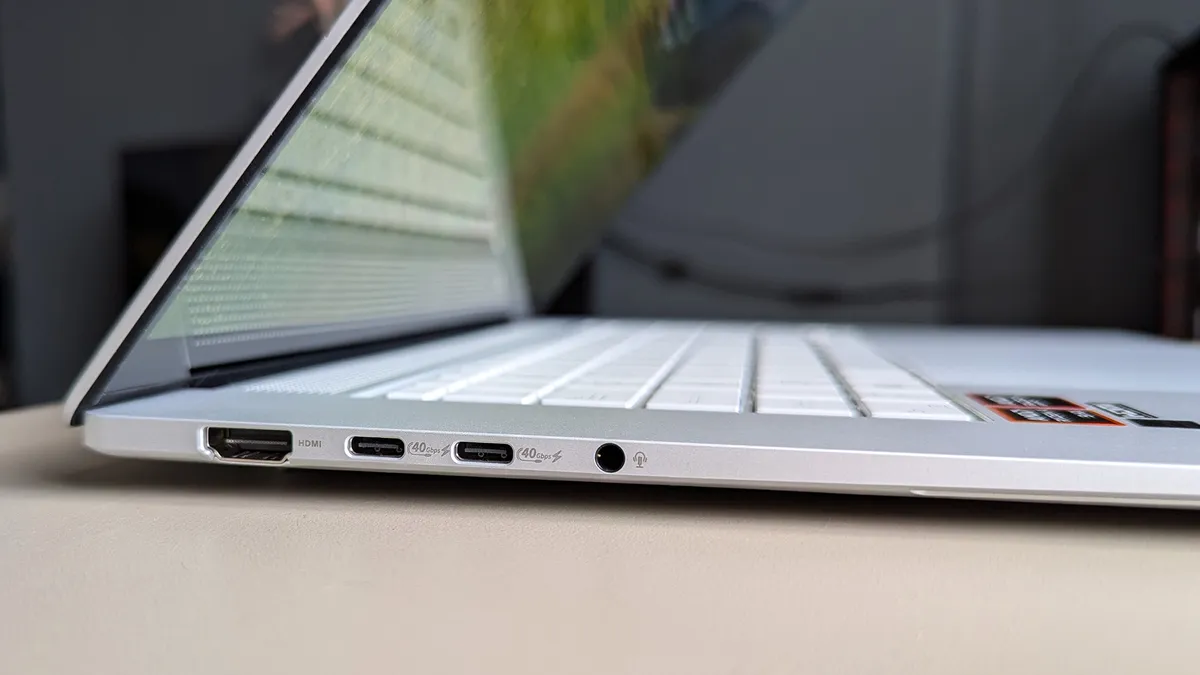

Despite the weight difference, the Zenbook S 16 is actually the thinner laptop, measuring 0.51 inches at its thickest point compared to 0.65 inches on the A16.
There's a fine line between reasonable and lightweight, and many casual onlookers see Apple's 15-inch MacBook at 1.51 kg as the benchmark. In that, ASUS went even further and somehow managed to make my 16-inch Zenbook A16 weigh just 1.2 kg.
Ben Wilson, Windows Central Senior Editor
Features across both laptops are quite similar. Both PCs offer Wi-Fi 7 and Bluetooth 5.4, both have six speakers and a 1080p webcam with IR for Windows Hello, and both offer a similar selection of ports.
Despite the thin designs, both laptops have dual USB4, USB-A 3.2 (Gen 2), HDMI 2.1, an SD 4.0 card reader, and a 3.5mm audio jack. Neither PC has a haptic touchpad, opting instead for a traditional mechanical pointer.
TL;DR: The Zenbook A16 is the lighter laptop, but it is slightly thicker than the Zenbook S 16. Features like camera, audio, and ports are so similar that your decision will likely come down to other factors.
Are there any major differences in display options?

Because the Zenbook S 16 is currently in flux between two generations, there are two display options to watch out for. The main difference between them is maximum brightness; older models top out at around 400 nits even with HDR enabled.
Newer Zenbook S 16 models with Ryzen AI 400 chips use what appears to be the same display as found in the A16, with peak HDR brightness of 1,100 nits and VESA DisplayHDR True Black 1000 certification. They're available in touch with pen support and non-touch options.
Content creators will be happy with the color-accurate panel, but preferably when working indoors, as the Zenbook S 16 isn't a great performer outdoors in natural sunlight.
Ben Wilson, Windows Central Senior Editor
These OLED screens otherwise offer a smooth 120Hz refresh rate, a fast 0.2ms response time, and a crisp 2880x1800 (2.8K) resolution. The screens offer 100% DCI-P3 color reproduction and have PANTONE validation, making them great for creative work.
TL;DR: Older Zenbook S 16 models with Ryzen AI 300 chips don't have as bright a display as the newer models or the Zenbook A16. If you want the best, go with one of the new laptops.
Snapdragon X2 efficiency and performance is evident

The Zenbook A16 we tested most recently has the Snapdragon X2 Elite Extreme (X2E-94) chip inside for Windows on ARM. This isn't the most powerful CPU that ASUS offers; you can opt for the X2E-96 chip instead if you want more power.
The Zenbook S 16 model we tested is also not using the most powerful AMD chip. We clocked the last-gen Ryzen AI 9 HX 370 for our benchmarks, but ASUS now offers up to a Ryzen AI 9 HX 470. On average, you can expect about an 8% performance uplift between generations.
Working with the numbers I have, it's clear that the new Snapdragon X2 Elite Extreme chip has a lot of power, blowing the Ryzen AI 9 HX 370 away in Geekbench and Cinebench scores.
| Header Cell - Column 0 | ASUS Zenbook A16 (Snapdragon X2 Elite Extreme (X2E-94) |
ASUS Zenbook S 16 (Ryzen AI 9 HX 370) |
|---|---|---|
Geekbench 6 (Single / Multi) |
3,806 / 22,872 |
2,428 / 12,274 |
Cinebench 2024 (Single / Multi) |
149 / 1,628 |
114 / 946 |
We still plan to do more Qualcomm Adreno GPU testing now that proper drivers are available. AMD's Radeon integrated GPU in the Ryzen AI chips is an impressive piece of hardware, and I suspect Snapdragon will have a hard time keeping up.
A note on app compatibility: Snapdragon chips require ARM64-based apps or emulation via Microsoft's Prism layer. This has become almost a non-issue for the average user, and unless you absolutely know that one of the apps you need to use won't work with Windows on ARM, I wouldn't let this differentiation stand in the way of your final purchase.

After using the Zenbook A16 regularly, we were able to grab a relatively accurate Windows 11 battery report. It showed an average of 16 hours of life from a charge when tackling a regular workflow. In PCMark 10's local video playback test, the A16 lasted 20 hours and 30 minutes.
For the Zenbook S 16, we ran PCMark 10's Modern Office rundown and saw 13 hours and 11 minutes of runtime. While these aren't exactly 1:1 comparisons, the 16 hours we saw from the A16 when hitting a regular workload shows off Qualcomm's efficiency.
TL;DR: If you want the best mix of power and efficiency, the Snapdragon-powered Zenbook A16 is the better choice. However, AMD's Ryzen AI 400 models aren't far behind, and you might have better luck with app compatibility in certain specialized cases.
ASUS Zenbook A16 vs. Zenbook S 16: Which should you choose?

The Zenbook A16 model we reviewed, with a Snapdragon X2 Elite Extreme (X2E-94) chip, 48GB of LPDDR5x RAM, and 1TB SSD, costs $1,699.99 at Best Buy. That's a fairly steep price for entry, but it does have a lot of memory, storage, and that gorgeous OLED display.
Comparatively, the Zenbook S 16 with last-gen Ryzen AI 9 365 CPU, 24GB of RAM, 1TB SSD, and a dimmer OLED display usually costs $1,499.99 but is often on sale due to its age.
👉 I compare the new ASUS Zenbook A16 to show how it dominates Apple's sleek notebook in key areas
Should you instead opt for a newer Zenbook S 16 model with Ryzen AI 9 465 CPU, 32GB of RAM, 1TB SSD, and OLED display, you're looking at about $1,899 at Best Buy.
That makes the Zenbook A16 a far better value with all things considered. My advice? Unless you absolutely need an AMD CPU or prefer a thin chassis over a light chassis, stick with the Zenbook A16. Both are great laptops, true, but you can get more PC for a lower price with the A16.
The ASUS Zenbook A16 is a lightweight marvel, offering superb performance and efficiency from the Snapdragon X2 Elite Extreme chips. It's also priced competitively, and it's the PC I recommend checking out first.
The Zenbook S 16 is thinner but heavier than the A16, and new models with the latest Ryzen AI 400 chips usually cost more. Still, it's a quality laptop, especially for those who use specialized apps that won't work with Windows on ARM.

Join us on Reddit at r/WindowsCentral to share your insights and discuss our latest news, reviews, and more.

