You probably heard that Apple unveiled its new MacBook Neo, and it's causing quite a stir with its more affordable $599 price and entry-level specs aimed at casual users and students.
However, there are still Windows laptops offering higher specs for your money, including a 23% discount on the ASUS Vivobook 14, now on sale for $579 at Best Buy — even lower than the Neo. Here's what you get:
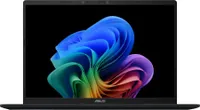
Why buy a Vivobook 14 over the MacBook Neo?

So, for starters, the ASUS Vivobook 14 is equipped with a spec bump that gives it an edge to handle productivity tasks in Windows over the newly announced MacBook Neo. It includes a (slightly) bigger 14-inch display versus the MacBook Neo's 13-inch, a larger memory capacity with 16GB of RAM over the Neo's 8GB, and doubling its storage to 512GB over Apple's 256GB.
Combine all this with Qualcomm's efficient Snapdragon X processor, and the Vivobook 14 can handle multitasking web browsing, media, and document work in Microsoft Office simultaneously.
What's more, the same processor inside the ASUS Vivobook 14 features an NPU rated at up to 45 TOPs, meaning it can run locally-processed AI tasks with Copilot+ PC certification, whether it's analyzing text, generating images, or improving compatible third-party apps. Other notable benefits include up to 29 hours of battery life (thanks to Windows on Snapdragon), a large touchpad with Smart Gestures, and an FHD IR Camera compatible with Windows Hello for face-recognition logins.

However, the MacBook Neo still has a couple of advantages over the ASUS Vivobook 14. One is a 500 nits max brightness compared to the Vivobook 14's 300 nits (around 250 is fine indoors), and the other is the MacBook's usual MSRP of $599.99 over the Vivobook 14's $749.99.
Still, the ASUS Vivobook 14's discount to $579 at Best Buy proves that not only can Windows laptops exist at such low prices, they can also do so without compromising their specs.
But who knows? If the MacBook Neo starts selling like Apple hopes, then perhaps it'll convince the competition of Windows OEMs to start creating more laptops at similar prices without needing a discount in the first place? If the memory crisis allows, anyway.
In the meantime, if you need a reliable, long-lasting laptop guaranteed to help you power through mountains of digital paperwork in the office, at home, or abroad, you can't go wrong with the ASUS Vivobook 14.
FAQ
What is the Vivobook 14 best used for?
The ASUS Vivobook 14 is best for productivity tasks, such as typing essays and reports, researching information online, editing images, or streaming videos. It generally isn't recommended for gaming, but it isn't impossible to run lightweight titles.
Does the ASUS Vivobook 14 support fast charging?
Yes, it can recharge up to 60% power in around 49 minutes when connected to a 65W or 90W USB-C charger.
What are the exact specs for its display?
The ASUS Vivobook 14 features a 14-inch LED display with 1900x1200 resolution, 60Hz refresh rate, and a max brightness of 300 nits, so it can display images and videos with high-quality colors and sharpness.

Join us on Reddit at r/WindowsCentral to share your insights and discuss our latest news, reviews, and more.