


Alienware's QD-OLED monitors are sought after by many PC gamers for their exceptional color and contrast, not to mention their premium performance. However, they don't usually come cheap, leaving a large tranche of PC gamers looking for more affordable options.
Dell recognized this market gap and has decided to fill it with the new Alienware AW2726DM. It's a 27-inch QD-OLED gaming monitor with a 2560x1440 (QHD) resolution, 240Hz refresh rate, 0.03ms response time, and FreeSync Premium support.
Those are some tasty specs for any monitor, but the key here is that it arrives with a $349.99 price tag. You can pick it up now directly from Dell.com or from BestBuy.com. Is this the new best way to land QD-OLED on a budget?
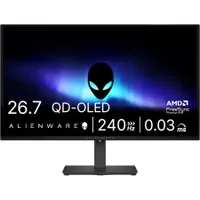
How does Alienware's new QD-OLED gaming monitor compare to other budget gaming options?


Alienware's new AW2726DM is easily the most affordable QD-OLED gaming monitor currently available. The next most affordable option is the Alienware AW2725D at $549.99, notably pushing the max refresh rate up to 280Hz with a few other differences.
Here's how the monitor specs compare.
| Row 0 - Cell 0 | Alienware AW2726DM |
Alienware AW2725D |
Size |
26.7 inches |
26.7 inches |
Panel |
QD-OLED, anti-reflective |
QD-OLED, anti-reflective |
Resolution |
2560 x 1440 (QHD) |
2560 x 1440 (QHD) |
Refresh rate / Response time |
240Hz / 0.03ms |
280Hz / 0.03ms |
Adaptive sync |
AMD FreeSync Premium, VESA AdaptiveSync |
AMD FreeSync Premium Pro, NVIDIA G-Sync compatible, VESA AdaptiveSync |
Brightness |
200 nits (SDR) |
250 nits (SDR) / 1,000 nits (HDR) |
Ports |
2x HDMI 2.1, 1x DisplayPort 1.4, 3.5mm audio out, lock slot |
2x HDMI 2.1, 1x DisplayPort 1.4, USB-B up, USB-A down, USB-C down, lock slot |
Alienware cuts costs by about $200 by removing official G-Sync Compatibility certification, dropping panel brightness and refresh rate just a bit, and removing some of the ports.
Regardless, the 240Hz refresh rate and 0.03ms response time, paired with a QHD resolution at 27 inches, should be a huge hit for PC gamers who want to take the QD-OLED plunge for incredible color and contrast.
Elsewhere, AOC's Q27GAZD is a 27-inch QD-OLED gaming monitor with QHD resolution, 240Hz refresh rate, 0.03ms response time, G-Sync compatibility, and a $379.99 price tag at Amazon.
Windows Central's take on Alienware's new budget QD-OLED gaming display
QD-OLED display tech is a superior version of OLED that leans into quantum dots (microscoping molecules that produce color when hit with light) to improve brightness levels without harming the exceptional color and contrast associated with OLED.
Having more monitors take advantage of this tech is always a good thing, but they've traditionally been priced too high for the average PC gamer to take advantage.
That's been slowly changing over time, and the fact that a big name like Alienware — which offers a three-year warranty with burn-in protection — is introducing a more affordable option shows how OLED is slowly becoming the new norm across the PC gaming industry.

Join us on Reddit at r/WindowsCentral to share your insights and discuss our latest news, reviews, and more.

