


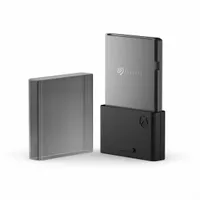
2026 is here, and it's jam-packed with some hotly anticipated and storage-hungry upcoming Xbox titles. To help prepare for their arrival, Amazon is hosting discounts for Seagate's Xbox Storage Expansion Cards for Xbox Series X|S.
These discounted prices include $139.99 for the 1TB cards, $221.98 for the 2TB cards, and $404.98 for the 4TB cards.
Why buy the Seagate Storage Expansion Cards?

The line-up for 2026's upcoming Xbox titles is stacked with heavy hitters like Resident Evil Requiem, Halo: Combat Evolved, Final Fantasy VII: Remake's Xbox port, 007: First Light, Monster Hunter Stories 3: Twisted Reflection, and much more.
As you can imagine, these AAA titles are going to require a ton of install space on your Xbox Series X|S to the point where you will be forced to uninstall some of your favorite games to make room for new ones.
With Seagate's Storage Expansion Cards, however, you won't have to deal with that. They'll add more space on top of your Xbox Series X|S's internal 1TB SSD while allowing you to play games directly from the cards, unlike traditional external SSDs, which can only store games.

Now granted, these cards are extremely expensive with high MSRPs for $159.99 (1TB), $259.99 (2TB), and $499.99 (4TB). However, I can assure you that they're well worth the investment.
I own one of these cards (the 1TB variant), and it has saved me hours of monotonous game storage management while allowing me to carry my games and save files to play at a friend's house on their Xbox in case we can't access Xbox Game Pass or Xbox Cloud Gaming.
What's more is that these contenders for some of the best Xbox accessories are sale, so you can get your hands the Seagate Storage Expansion Cards for the more affordable price tags of $139.99 at Amazon (1TB), the 2TB cards are available for $221.98 at Amazon (2TB), and $404.98 at Amazon (4TB).
Alternative discounts on the Seagate Expansion Card
Here are some alternative deals you can use in case Amazon's discounts expire or their stock runs out.
Best Buy
- $139.99 at Best Buy(was $159.99) for the 1TB card.
- $229.99 at Best Buy(was $259.99) for the 2TB card.
- $429.99 at Best Buy(was $499.99) for the 4TB card.
FAQs
Which consoles are these cards compatible with?
The Seagate Xbox Storage Expansion Card is only compatible with Xbox Series X|S.
How do I use this expansion card?
All you need to do is simply insert the Seagate Xbox Storage Expansion Card into an Xbox Series X|S's dedicated storage expansion card port located on the back of the console.
Can this be used on other Xbox consoles besides mine?
Yes, the Seagate Xbox Storage Expansion Card is a portable and hot-swappable device that allows the user to transport their game library to a friend's Xbox and use it by plugging it in and signing into their Xbox profile.

Follow Windows Central on Google News to keep our latest news, insights, and features at the top of your feeds!

