


Controllers come with all kinds of control schemes. Some have Hall Effect analog sticks to help snipe headshots in shooters, while others have retro D-Pads and 6-button layouts to help execute combos in fighting games.
The Turtle Beach Stealth Pivot, however, combines both of these types of controllers together into one package that's worth checking out more than ever now that it's on a 29% discount for $99.99 on Amazon.
Why is the Turtle Beach Stealth Pivot worth buying?

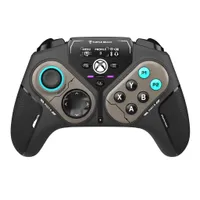
The Turtle Beach Stealth Pivot is one of the most fascinating Xbox controllers I've ever run into, as it can literally transform itself to better suit differing game genres.
Its main gimmick is that is the ability to swap between two controller modules without taking the controller apart. The default module set includes two Hall Effect analog sticks, a D-Pad, and four face buttons, while the alternate module set has a D-Pad and six face buttons (the two extra buttons are remappable).
Additionally, the Turtle Beach Stealth Pivot also includes two triggers with trigger stops, two shoulder buttons, and two extra back buttons that can be remapped.
Both module sets function flawlessly on Xbox, whether the controller is connected via wired or wireless, as I was able to execute actions in action-heavy games like Overwatch and Monster Hunter Wilds without any disruptive input lag or stick drift.

Other notable features of the Turtle Beach Stealth Pivot include a 3.5mm audio jack for gaming headsets, an ergonomic design that feels nice to hold and not strenuous on my hands, and a built-in command display so you can remap your controller's button functions on the fly or check social notifications.
The only major drawbacks of the Turtle Beach Stealth Pivot are its subpar polling rates of 125Hz (wireless)/165Hz (wired) when used on PC, and its stark MSRP of $139.99.
While it's unfortunate the former issue can't be fixed, the latter issue most certainly can, as Amazon has chopped by 29% to $99.99 on Amazon, giving its advanced tech a more justified price point.
So, if you're looking for a unique premium-level Xbox controller with responsive controls that can be altered to play almost any genre, then the Turtle Beach Stealth Pivot is an easy recommendation.
FAQs
How do I switch the control modules?
Unlock the module locks on the back of the controller, twist the analog sticks until they lock into a lower position, then push down until the alternate module set rotates into position, then relock the module locks to keep it in place.
Reverse the process to swap back to the default module set.
What platforms is the Turtle Beath Stealth Pivot compatible with?
This controller is compatible with Xbox Series X|S (wired USB-C), Windows PC (wired USB-C or 2.4Ghz wireless dongle), and mobile devices (Bluetooth).
A compatible wired USB-C cable and 2.4Ghz wireless dongle packaged with the Turtle Beach Stealth Pivot.
Why is having a 125Hz (wireless)/165Hz (wired) polling rate considered subpar for PC?
Polling rates determine the frequency at which a controller registers a player's input and report its to a console/computer. The higher the polling rate, the more responsive a controller's buttons will be when performing complex actions in a game.
Having a 125Hz (wireless)/165Hz (wired) is considered subpar by PC gaming standards, as most PC gaming controllers are expect to have a polling rate of between 500Hz-1000Hz as a mimimum standard.
Thankfully, this isn't much of an issue on consoles, as Xbox systems are capped to only allow 250Hz polling rates for controllers.

Join us on Reddit at r/WindowsCentral to share your insights and discuss our latest news, reviews, and more.

