


If you're an Apple family trying to share photos with Android-using grandparents, you've probably realized iCloud is a walled garden. I've recently discovered a workaround that allows me to share photos to a digital frame without any hassle or recurring subscription.
The amount of photos in my library skyrocketed as soon as I had a daughter. Each day presents a new smile, skill, or pose. I'm sure my wife and I have taken over 1,000 photos since our daughter was born, and my parents would gladly look at each one of them.
We send photos and videos through Telegram and WhatsApp and often video call my family that lives thousands of miles away, but my mom and dad wanted a way to see photos any time.
After a bit of research, I recommended the Pix-Star LUX frame to them, and it's already proven to be a great accessory. That same frame is now on sale for $20 off. I was going to do a post highlighting the frame regardless, but the discount is nice.
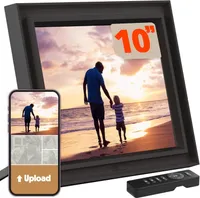
When first shopping for a digital picture frame, I assumed online retailers would be flooded with frames that integrate with iCloud. I was surprised to learn that was not the case. There are some frames that work with iCloud, such as those from Aura, but the process made me turn away from relying on iCloud for this project.
This isn't some hateful article against Apple, iCloud is great. I use iCloud, OneDrive, and physical storage to ensure my photos and videos are safe.
But some members of my family have Android devices or do not use iCloud, making Apple's cloud storage solution a poor choice for our digital picture frame. Researching picture frames opened my eyes to some other options that align better with my family.
Rather than have multiple different sources of photos feed into a frame, I just created a OneDrive folder and synced that to the Pix-Star frame.
My parents are happy with the frame and I update the source of photos regularly. We try to keep our baby's likeness off social media and the web, so I don't have any examples of her on display. But the Pix-Star frame syncs well and shows her beautifully in my parents' home.
If you don't use OneDrive, the frame supports:
- Google Photos, Dropbox, and Flickr
- Emailing photos directly to the frame
- USB and SD Card local storage
Since we keep our daughter off social media, this frame lets us share her "firsts" with her grandparents in real-time, 3,000+ miles away. It sits in their home, updates automatically a few times per day, and looks beautiful.

Join us on Reddit at r/WindowsCentral to share your insights and discuss our latest news, reviews, and more.

