If you want to look crisp on video calls and in meetings, you need to check out the current discount on the Logitech MX Brio Ultra HD 4K. The webcam offers excellent image quality and low-light performance, meaning you can look your best in less-than-ideal conditions.
A $30 discount on the Logitech MX Brio Ultra HD 4K cuts its price to the lowest we've ever seen, at least when referring to the "Graphite" model. The "Pale Gray" model briefly dropped to $161.99 in May, but this is the most affordable it's been in months.
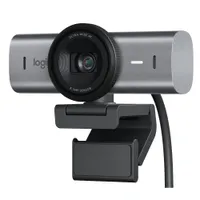
The Logitech MX Brio Ultra HD 4K tops our list of the best webcams. Its image quality and low-light performance make it a solid choice for those who sit at a desk that lacks perfect lighting. Logitech has made webcams for a long time and makes two of the best ones available in 2025.
In our Logitech MX Brio Ultra HD 4K review, Zachary Boddy said of the camera:
"I'm confident the Logitech MX Brio will neatly replace its predecessor, the Brio 4K, as the go-to recommendation for anyone who asks, "Which webcam should I buy?" and just wants the best webcam without thinking about it. It's a very good, straightforward webcam that exceeds the image quality and construction you can expect at $200, with a simple setup and easy-to-use software. Its lowlight performance is especially impressive and is perfect for anyone lacking great lighting in their setup."
While the Logitech MX Brio Ultra HD 4K excels in image quality and low-light performance, it lacks some advanced features, such as built-in background blur and auto framing.
If you need Windows Hello, you'll have to look elsewhere. The Logitech MX Brio Ultra HD 4K does not support the feature, meaning you cannot use the webcam for biometric login or authentication.
Its predecessor, the Logitech Brio 4K, supports Windows Hello. The newer model has superior image quality and low-light performance, but the original is still a nice webcam and supports Windows Hello. The Logitech Brio 4K is on sale for $169.99 at Best Buy.
Overall, the Logitech MX Brio Ultra HD 4K is an excellent choice for those that value ease of use, image quality, and low-light performance.
Enjoy our content? Make sure to set Windows Central as a preferred source in Google Search, and find out why you should so that you can stay up-to-date on the latest news, reviews, features, and more.
Alternative discounted configurations
The Logitech MX Brio Ultra HD 4K is available in two colors. The models are otherwise identical:
- Logitech MX Brio Ultra HD 4K (Pale Gray) — $169.99 at Amazon (was $199.99 at Amazon).
- Logitech Brio 4K (older model with Windows Hello support) — $169.99 at Best Buy (was $199.99)
Alternative retailers with discounts
Another retailer has discounted the Logitech MX Brio Ultra HD 4K as well:
- $169.99 at Best Buy (was $199.99).
FAQ
Does the Logitech MX Brio Ultra HD 4K support Windows Hello?
No. The Logitech MX Brio Ultra HD 4K does not support Windows Hello.
What is the resolution and framerate of the Logitech MX Brio Ultra HD 4K?
The Logitech MX Brio Ultra HD 4K supports 4K resolution at 30FPS or 1080p resolution at 60FPS.
What is the Field of View of the Logitech MX Brio Ultra HD 4K?
The Logitech MX Brio Ultra HD 4K can be adjusted between three presets for Field of View: 90°, 78°, and 65°.
What type of USB port does the Logitech MX Brio Ultra HD 4K need?
The Logitech MX Brio Ultra HD 4K connects through a USB-C port. A 1.5m USB-C to USB-C cable is included in the box.

Follow Windows Central on Google News to keep our latest news, insights, and features at the top of your feeds!