


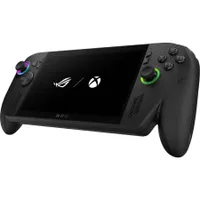
Xbox Insiders can get their hands on part of the next-gen Xbox, or at least what will likely be a feature on that device. A new feature that's available for testing on the Xbox Ally X captures highlights automatically as you play and then creates a highlight reel.
The feature, known as highlight reels, was announced in a blog post this week. But we already knew highlight reels was in internal testing thanks to a report by our Managing Editor Jez Corden.
Since the next-gen Xbox is essentially a PC optimized for console-style gaming, Microsoft and the Xbox team are hard at work on experiences for the device, including highlight reels.
That feature relies on the NPU of a device to automatically capture memorable moments from games. That happens without requiring you to leave your game or hop into a different app.
According to Corden's sources, the feature is set to release for the Xbox Ally X in the next few months, but you can test it now if you're an Xbox Insider.
During the preview phase, the highlight reels feature works with a small selection of games:
- Among Us
- Elden Ring
- Fortnite
- Forza Horizon 5
- Lies of P
- Overwatch
- Palworld
Notably, Elden Ring is not an Xbox Play Anywhere title and is not available through the Xbox app, suggesting the highlight reels feature will work with games from a range of launchers.
Corden's report explained that more games worked with highlight reels during internal testing, so we could see the list of supported games expand as the Xbox team seeks more feedback.
Since highlight reels requires an NPU, that suggests the next-gen Xbox will have that type of processor inside. NPUs are optimized for AI workloads. They handle certain types of tasks better than a CPU or a GPU. A growing number of PCs have NPUs inside, but the tech will be new to some gamers.
I'd argue the new feature is most interesting because of what it suggests about the next-gen Xbox, but it also works on the Xbox Ally X right now if you're an Insider. I'd love to hear your experiences with the feature in the comments.
How to become an Xbox Insider
Microsoft outlines the steps to join the Xbox Insider Program:
- Join the Xbox Insider Program if you haven’t already: Xbox Insider Home | Xbox Support
- Ensure recording settings are enabled.
- You can do this via Game Bar by navigating to Settings > More Settings > Widgets > Record in the background while playing a game.
- There are other ways you can change this setting:
- Via Gaming Copilot: Navigate to Gaming Copilot > Settings > Capture Settings > Navigate to Capture Settings in Widget
- Via Windows settings: Navigate to Settings > Gaming > Captures > Record what happened
- Jump into one of the supported games
- Gaming Copilot will capture clips of gaming moments while you play. At the end of your gameplay session, a highlight reel will automatically be created using these clips, which you can view and share via Game Highlights (Preview) within the game page of the Xbox PC app
- Be sure to try out the experience and take the survey in the Xbox Insider Hub!
💬 What do you think about AI in gaming?
AI is a controversial topic, but it could prove useful in gaming. Upscaling, frame generation, and performance could all see a boost because of AI, though we'll have to wait to see how things run in the real world.
Grabbing clips from gameplay and making highlight reels sounds like one of the more useful ways to integrate AI into gaming.
Do you think AI will greatly improve gaming over the next few years? Let us know in the comments!

Join us on Reddit at r/WindowsCentral to share your insights and discuss our latest news, reviews, and more.

