


Windows Central Verdict
While it has minor downsides, including an unbelievable heft that would have me too scared to place this weighty behemoth on any desk unless I was confident in its strength, the X50 is still fantastic. You'll have to provide your own fans, but this adorable beast runs like a fridge when you use every space. I know, top-mounted PSUs might seem weird, but it works here. Looks gorgeous with RGB innards, too.
Reasons to buy
- +
Cute and unique, it's an extravagant centerpiece
- +
Runs ultra cool with every fan slot utilized
- +
Side or front-mounted 360mm AIO options
Reasons to avoid
- -
Extremely heavy
- -
No fans included
Why you can trust Windows Central Our expert reviewers spend hours testing and comparing products and services so you can choose the best for you. Find out more about how we test.
I've been building desktop PCs for over a decade, and form rarely prioritized function when I was looking for cases. It's not like I wasn't tempted, but there were a few over the years that looked comically huge just for the sake of it. HYTE's work has nevertheless piqued my interest, particularly after I couldn't resist testing the absurd Y70 Touch and its case-mounted vertical touchscreen.
I mean, yeah, it was spacious and easy to build in, but that's mostly because it's the size of a common fish tank. Some lucky builders out there might have the space for a gigantic PC case, but our house isn't part of that collective. Fast forward to CES 2026, and our team caught a glimpse of the new HYTE X50 — a bubbly case with cat paws for feet. Now my wife wants it. She needs it.
Where can you buy the HYTE X50?

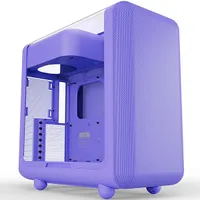
The X50 sells at HYTE.com for $159.99 (MSRP) and comes in six colors: Snow White, Pitch Black, Wild Cherry (Red), Matcha (Green), Strawberry Milk (Pink), and Taro Milk (Purple).
Price (MSRP): $159.99 at HYTE.com
Motherboard: E-ATX, ATX, MATX, ITX
PSU: Up to 223mm
GPU: Up to 430 x 160mm
Dimensions: 485 x 510 x 255 mm
Chassis: 1mm steel, ABS
Glass: 4mm laminated acoustic
Weight: 979g (2.15 lbs)
There's also the cheaper HYTE X50 Air for $129.99 alternative that ditches the curved glass panel for an all-over metallic grill, covered in dotted holes for increased airflow.
For other stores, you can pick up the HYTE X50 at Amazon in its array of colors, and Best Buy lists the X50 at the same price. Ditto for shoppers who prefer Newegg, which also carries the X50.
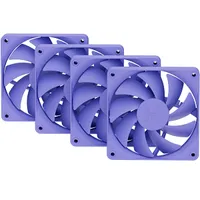
Essentially, your options for storefronts are wide, and availability is healthy, so you shouldn't have any problems buying the HYTE X50 once you've decided on the color. I'd also recommend picking up a 4-pack of FA12 case fans at HYTE.com since the case doesn't include any.

At the time of writing, there are HYTE FA12 listings on Amazon, but they're selling above MSRP. Best Buy doesn't appear to have the case fans available right now, and it's the same story at Newegg. Today, the best buying experience would be to pick up the case and its matching fans from HYTE.com. That way, you should have everything you need to build on the same day.
Is the HYTE X50 a good PC case?

At its core, the X50 is a wide, chunky case with a gigantic tempered glass panel that curves around its front side and over the top. That means you don't get top-mounting options for radiators attached to AIO liquid CPU coolers, but you're hardly lacking in airflow options elsewhere. There are fan mounts all up and down this thing.
You don't get top-mounting options for radiators, but you're hardly lacking in airflow options.
Setting up this sample in the same configuration we saw at CES would mean 3x 120mm intake fans on the floor, 3x more intake at the front, and 1x rear exhaust fan. That leaves the side grill open for a 360mm AIO radiator, for a total of 10 fans inside the case — 11 if you count the power supply, but that's splitting hairs. I'll dig out a trio of ARCTIC P12 fans to help this along.

Besides the cutesy paw-printed feet and the appreciated magnetic dust grill on the underside, the top-mounted power supply shroud stood out as a particularly curious addition. It's almost a throwback to retro cases and comes with some divisive side effects, like pulling air from the case into the PSU.
Then again, even at first glance, I could imagine the sheer pressure of a single 120mm exhaust fan blowing hot air out the back, so there shouldn't be much ambient warmth left to rise to the top anyway, and the PSU's own exhaust fan should handle its cooling well enough. I suppose we'll see soon enough.
Does the HYTE X50 have any issues?

On the top side, the X50 has a single USB-C 3.2 Gen 2x2 port and a duo of USB-A 3.2 Gen 1x1 ports, alongside a combo audio jack. That means you'll need to connect four headers to your monitor, one for each. They're mostly unassuming, though the USB-A ports are a little crunchy, as if they're ever-so-slightly too small for peripherals. Don't get me wrong, they work just fine.
The USB-A ports are a little crunchy, as if they're ever-so-slightly too small for peripherals.
Perhaps that's even better than having too loose, and your cabled devices accidentally become unplugged with a slight pull — just something to note. Otherwise, we get a "tactile mechanical" power switch (seems overkill, but sure) with an LED surround. Yep, it's a button. Clicks real nice, and lights up to let you know that everything is working.

The only genuine issue I had while building in the X50 was daisy-chaining HYTE's own FA12 Taro fans through the case to a convenient fan header. The fans come with a separate cable to link them together, but routing the top-most fan through any channel always left me slightly too short.
For that, it had to slip around the side of the old reliable be quiet! Light Loop 360 AIO cooler sample and find the first available opening. If you didn't look too closely, you wouldn't notice it, but it's the only imperfection I had during the entire process. Besides, a fan extension cable would solve it — hardly a big deal.
Should you buy the HYTE X50?


You should buy this if ...
✅ You want a unique, quirky case with great airflow
✅ You need extra space for multiple PCIe components
You should not buy this if ...
❌ You have a weak desk that won't handle heavy cases
❌ You prefer top-mounted cooling solutions
The HYTE X50 doesn't necessarily do anything wrong, and its cons are just a symptom of its subcategory — not a failure of design. It's the heaviest thing in the world, but most of that heft is in the curved glass, and I'd prefer it to be strong in the first place. Lacking an option for top-mounted AIO radiators is, again, just a style choice, and you get two 360mm options at the front anyway.
It's a gorgeous showpiece, with a cute and quirky secret hidden under its feet that you'll probably only see once in a blue moon. My wife loves the way it looks, and I love the way that it runs ice cold after loading it up with a wealth of case fans. Sure, HYTE could stand to discount its matching FA12 fans a little, but you aren't forced to use those anyway. I can't believe how much I like it.

That curved glass is 4mm thick and heavier than it looks, but it's part of the X50's charm, and I love it.

Follow Windows Central on Google News to keep our latest news, insights, and features at the top of your feeds!

