


The big Black Friday season may have wrapped up, but certain retailers still seem to be in a generous mood as the base model (white) Xbox Ally is currently $110 off, dropping it to $489.99 at Amazon.
Of course, it usually retails for $599.99, which is a steep ask for the entry model, but it is now available at a much more reasonable, well-suited price. It makes it a far more tempting option for anyone who wants to game on the go with a Windows-based handheld.
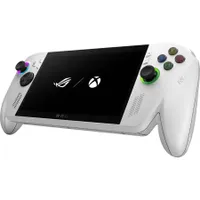
Is the Xbox Ally right for you?

Although it is not as powerful as the Xbox Ally X, the base model Xbox Ally still holds its own. Its performance sits close to the Steam Deck, a system with around 19,000 titles verified as Steam Deck-playable, which means the Xbox Ally should handle a large portion of those games too, although mileage will vary.
You also get three months of Game Pass Premium with a purchase of the Xbox Ally. This lets you access a service with more than 200 games available to download or play through the cloud, via the Xbox App. This gives you plenty of choice whether you are at home or on the move.
Enjoy our content? Make sure to set Windows Central as a preferred source in Google Search, and find out why you should so that you can stay up-to-date on the latest news, reviews, features, and more.
FAQ
What games can the Xbox Ally run?
The Xbox Ally can run any Windows-based PC title, including games from Steam, Epic, GOG, and the Xbox app. Performance varies by game, but most indie titles and older AAA releases run well with adjusted settings.
Can you use the Xbox Ally with an external monitor?
Yes. The Xbox Ally can connect to a monitor or TV through USB C, letting you use it like a compact Windows PC with a keyboard, mouse, or controller.
How much storage does the Xbox Ally have?
The Xbox Ally includes a 512 GB NVME SSD, and storage can be expanded through the MicroSD slot if you need more space for larger games.
Is the Xbox Ally good for cloud gaming?
Yes. The Xbox Ally supports cloud gaming through the Xbox app and other services like NVIDIA GeForce Now. It works best on a stable connection, and it is a useful option for longer playtime on demanding titles.
Is the Xbox Ally worth buying over the Steam Deck?
The Xbox Ally is a better fit if you want full Windows support, Game Pass access, and wider launcher compatibility. The Steam Deck may offer its own benefits, but the Xbox Ally provides broader compatibility thanks to its Windows-first design.
Is the Xbox Ally upgradeable?
Internal components like RAM are fixed, but the NVME SSD can be replaced at your own risk, and external accessories allow more storage or peripherals.

Follow Windows Central on Google News to keep our latest news, insights, and features at the top of your feeds!

