The team behind PowerToys is exploring a new feature that would enhance the Windows desktop with a new menu bar that spans the top of the display, offering glanceable system information, music controls, and more.
Microsoft describes this idea as an optional UI dock that's part of the Command Pallete feature in PowerToys. When enabled, it can be pinned to the top, left, right or even bottom of the display, and users can pin extensions that are already available as part of PowerToys, without any code changes.
"The dock can be enabled from Command Palette settings and pinned to any edge of the screen," says Microsoft senior software engineer, Niels Laute. "You’d be able to pin your favorite extensions to the dock for instant access, without opening Command Palette or interrupting their workflow. The goal is quick awareness for the things you want awareness for, below is one of the team’s favorite, active resource monitoring."
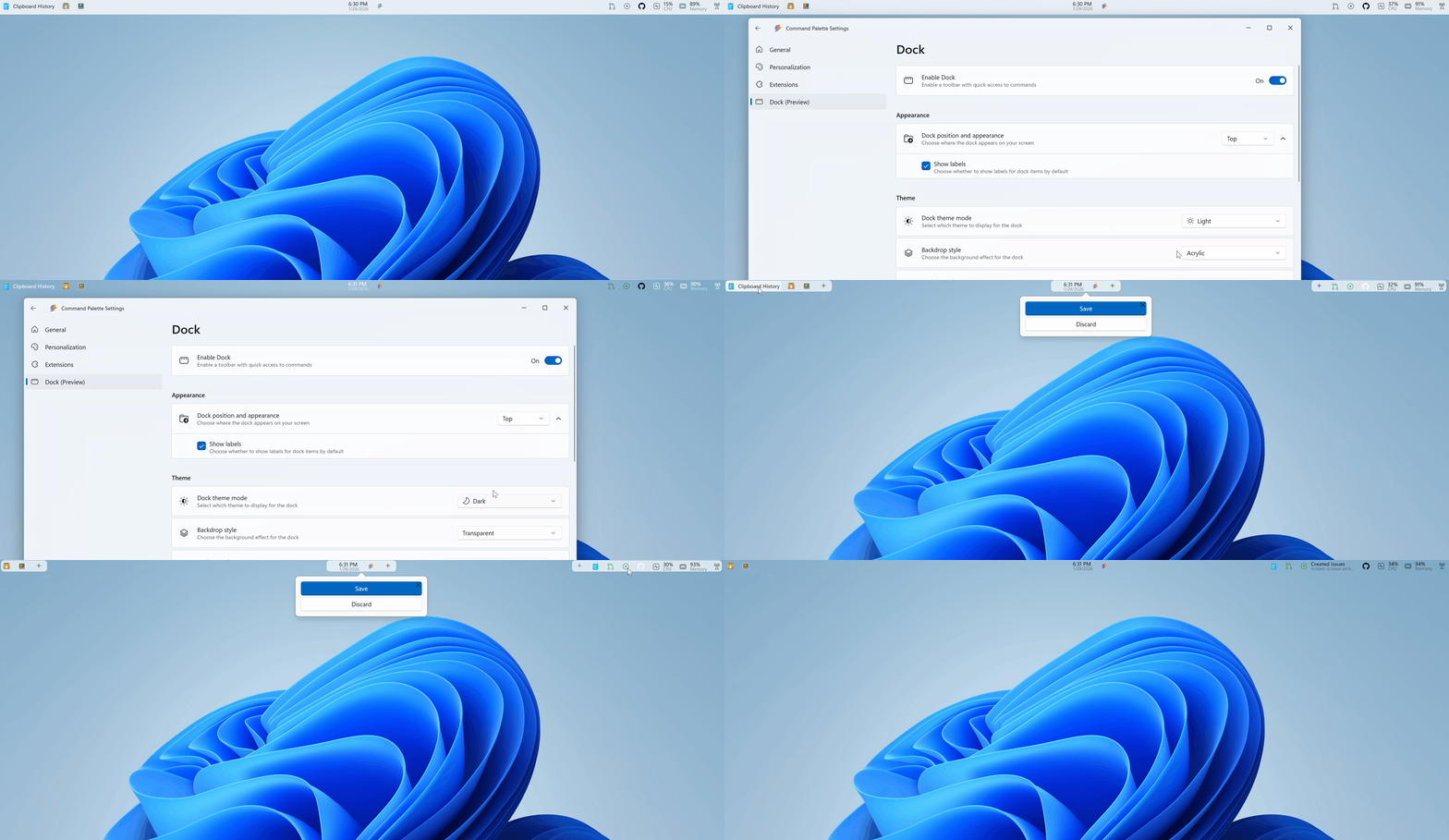
In its default configuration, the feature is very similar to the menu bar you might find on a Mac or Linux distro. It runs along the top of the display, and users can pin information such as RAM usage, CPU temps, app shortcuts, and more to it.
"The dock is designed to be highly configurable. It can be positioned on the top, left, right, or bottom edge of the screen, and extensions can be pinned to three distinct regions of the dock: start, center, and end. Users can also customize the visual appearance, including background, styling, and theme behavior."
The feature is currently in an early proof of concept stage, and hasn't been committed to ship just yet. Microsoft is gathering feedback on GitHub, and if it proves popular, it'll likely appear as an official feature in the coming weeks or months, so be sure to let Microsoft know if you like it!
In the meantime, developers can compile a dedicated branch where the feature is being tested to try it out now. It's not yet available in the mainline PowerToys release.
Follow Windows Central on Google News to keep our latest news, insights, and features at the top of your feeds!