


Dell's new XPS 13 for 2026, which was only just announced at Computex a couple of weeks ago, is now available to buy. Prices start at $599 for students and $699 for all other customers, making it a new top Windows option to go up against Apple's MacBook Neo.
This initial launch of the XPS 13 includes models with Intel Core Series 3 processors and a Sky colorway; models with more powerful Intel Core Ultra Series 3 processors and an additional Storm color option are expected to launch later this summer.
The new XPS 13, which is using model number DX13260, is so far only available at Dell.com, where the student discount is also readily available.
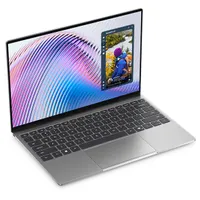
Hands on with the affordable new XPS 13 for 2026

Windows Central Senior Editor Zac Bowden and I each had a chance to go hands-on with the new XPS 13 at Computex. Zac had a lot more time to play around than I did, and he wrote about his first impressions.
The TL;DR? He couldn't believe how good it is in terms of design and pricing.
It's basically a flagship Windows laptop, complete with high-quality materials and build quality, an incredible 120Hz display, a great keyboard and trackpad, and good performance under the hood.
A few standout features include an ultra-thin aluminum chassis that weighs just 2.2 pounds (1kg), quad speakers with 8W of output and Dolby Atmos tuning, Wi-Fi 7 and Bluetooth 6, and a 1080p webcam with an IR sensor for Windows Hello.
The best feature might be its 13.4-inch display, featuring a 2.5K resolution, 120Hz variable refresh rate, Dolby Vision, anti-glare finish, 500 nits brightness, and 100% DCI-P3 color reproduction.

I spoke with Dell and Intel executives at Computex to find out more regarding the strategy behind the XPS 13.
The laptop was being designed well before Apple announced its MacBook Neo, so it's not like it was rushed out to compete. Dell sees the XPS 13 as a perfect student or "starter" device for those just getting into Windows, especially when it's available for as little as $599 with a student discount.

As with the Neo, there has been plenty of discussion regarding what 8GB of RAM feels like in a 2026 laptop. Many have argued that Windows 11 simply doesn't function on 8GB; however, that's simply not true.
I used a Windows 11 PC with 8GB of RAM recently to test the experience, and I had no issues handling the same tasks that students and more casual users would need on a daily basis.
The best part? Unlike the Neo, which has a hard 8GB ceiling, the XPS 13 can be configured with up to 16GB or 32GB (Core Ultra) of RAM.
How does the new XPS 13 compare to the MacBook Neo?

Zac also offered a brief comparison to the $599 MacBook Neo in his article, noting that Dell actually had Apple's laptop readily available next to each XPS 13 in the product showroom.
My jaw dropped when I placed the XPS 13 side by side with the MacBook Neo. It's like they are from entirely different worlds. The XPS 13 looks and feels like a flagship laptop, and that's probably because it is. Historically, XPS 13 has been an expensive laptop, costing well above $1,000 normally.
That's the thing about the new XPS 13. It doesn't feel like Dell has cut any corners to arrive at the $599/$699 introductory pricing, and the best part is that Dell offers plenty of additional configuration options for those who need more RAM, more storage, and more raw processing power.

On that note, it is worth highlighting the new XPS 13's launch cadence. These first models available now come with Intel's "Wildcat Lake" Core Series 3 chips. The more powerful "Panther Lake" Core Ultra Series 3 options are coming later this summer.
If you're interested in a deeper dive into the similarities and differences between the two laptops, be sure to check out my XPS 13 vs. MacBook Neo comparison.

Join us on Reddit at r/WindowsCentral to share your insights and discuss our latest news, reviews, and more.

