


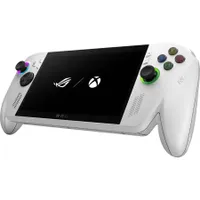
Valve better watch its back, for its greatest challenger has arrived — the Xbox Ally. Made in collaboration with Microsoft and ASUS ROG, this young gaming handheld is one of the hottest portable gaming consoles in a long while.
It has a satisfyingly consistent performance, a display with gorgeous visuals, comfy grips, a modest MSRP of $599.99, that's been reduced to $499.99 at Amazon for a limited time, and much more.
Why buy the Xbox Ally in 2026?

There are plenty of reasons as to why we believe the ASUS ROG Xbox Ally gives the Steam Deck a run for its money, and why you should consider purchasing one if you enjoy Xbox Cloud Gaming or portable gaming in general.
For starters, its performance is on par with the Steam Deck's, thanks to being built with the AMD Ryzen Z2 A processor. This allows it to run most AA games and all low-end indie titles at 60fps with 1080p resolution for smooth, enjoyable gameplay.
Additionally, the Xbox Ally's AMD Ryzen Z2 A allows it to stream Xbox games via Xbox Cloud Gaming and PC games via NVIDIA GeForce NOW strongly with little to no latency, so you don't have to worry about delayed inputs or lag.
Other standout features include responsive controls, ergonomic grips, a 7-inch IPS display with a 120Hz Variable Refresh Rate (VRR), and an efficient cooling system to prevent your console from overheating.

That being said, there are some drawbacks with the Xbox Ally to consider.
It has trouble running graphically intense titles like Cyberpunk 2077 and Forza Horizon 5 at high settings compared to the Xbox Ally X. It has only 512GB of storage, it has no HYPR-RX or AI enhancement support, and it has a short battery life of 2 hours for AAA titles/7 hours for indie & AA titles.
Fortunately, you can improve the Xbox Ally's storage capacity by upgrading it with the best microSD cards for Xbox Ally and Xbox Ally X.
Once you get over these shortcomings, the Xbox Ally is still an amazing Windows 11 gaming handheld for people who like to play on the cloud. If this console sounds enticing to you, you can pick it up right now for a 17% discount at $499.99 at Amazon.
Alternative Discount
If Amazon's discount shuts down or runs out of stock, Best Buy has an identical discount available now for $499.99 as a back-up option.
FAQ
What games can I play on the Xbox Ally?
As it has the Windows 11 OS, the Xbox Ally can play any game from the Steam, Epic Games Store, Xbox Game Pass, and GOG digital platforms. On top of that, the Xbox Play can play Xbox games with Xbox Play Anywhere support via cloud streaming and remote play from a player's main Xbox console.
Can I play games offline with the Xbox Ally?
Yes, you can install games and play them offline. However, you will need to connect to the internet to install the games and launch them while connected to the internet once before being able to play them offline.
Do I need Xbox Game Pass to play the Xbox Ally?
Xbox Game Pass is not required to use the Xbox Ally and play games with it, as this device has access to alternative gaming store platforms like Steam and GOG. However, you will need Xbox Game Pass to access the service's library and other Xbox-related features like Xbox Cloud Gaming and Xbox remote-play.

Follow Windows Central on Google News to keep our latest news, insights, and features at the top of your feeds!

