


It's March 31, which means it's World Backup Day, and I'm double-checking that all of my PC's most important files are safe, and encouraging you to do the same. There's no strict method for doing it in Windows 11; you could still burn a 700 MB CD or copy your smallest files to a 1.44 MB floppy disk if you really wanted to. Whatever works for you!
Of course, Microsoft offers its cloud-based OneDrive storage service, and I already pay for a Microsoft 365 Basic plan with 100GB of space. Google Drive also gives away 15GB for free, so I divide my files up by platform, depending on their type. For the most part, I prefer the OneDrive app on Android phones because it automatically backs up my photo gallery.
However, local storage will always be one step ahead of cloud services because you shouldn't lose access during any internet outage (at least in theory). For that reason, I was always tempted to try a NAS (Network Attached Storage) solution that stays within my home network, loaded with always-on hard drives as a sort of personal server.
Sure enough, UGREEN was willing to send me its affordable and capable NASync DH2300 system 3 months ago, and it didn't take me long to understand how people go down a slippery slope into full-blown homelabs, self-hosting everything. It's not like I wanted to save the entire Internet to an SSD, so would I even benefit from gigantic NAS-centric mechanical hard drives?
Well, it turns out that NAS enclosures don't really care what kind of drive you plug into them. As long as it's physically compatible, it seemed to work just fine with an everyday SATA drive that had been gathering dust in one of my storage drawers. Your mileage might vary, but I certainly didn't have any issues putting an ancient drive back into use. Still going strong.
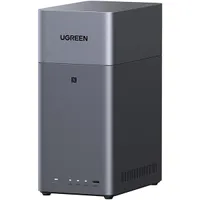

So, wait, what on Earth does a "NAS" actually do? To many casual PC users, it's just another weird-looking gadget with another acronym for a name. Well, it's quite similar to an external hard drive, except it can connect to multiple (if not all) devices on your home network simultaneously, whether on Wi-Fi or cable-connected LAN, depending on each model.
For example, the $180 UGREEN NASync DH2300 that I tested isn't wireless, but I prefer a hard-wired Ethernet connection to my router anyway. After that, any devices connected to my Wi-Fi can access folders and files on the NAS if I grant them the proper permissions. It sounds mildly complicated, but it really isn't. Everything can be controlled in an extremely simple dashboard.
It sounds mildly complicated, but it really isn't. Everything can be controlled in an extremely simple dashboard.
Being so straightforward, I can quickly open a browser tab in Microsoft Edge every few days, navigate to the NAS dashboard, and drag important files into the shared folders to back them up. It didn't take me long this morning to identify a few critical files and back them up over my network, so any potential (and hopefully unlikely) system failure wouldn't be so disastrous.
Still, you don't need a NAS to have physical backups. Anything works, whether it's a standard USB thumb drive or a dedicated external drive; it's a gesture you might thank yourself for later. So, please, back up your Windows 11 PC either in part or completely. Take a moment to safeguard your most important files and preserve those memories. Many won't have to spend a penny to do it!

Join us on Reddit at r/WindowsCentral to share your insights and discuss our latest news, reviews, and more.

