


Having 32GB in your laptop opens up its ability to multitask and take on demanding software. It's also a requirement that spans many areas of the market. There are average users who need a thin and light device with extra memory for heavy multitasking, there are gamers who need extra RAM for smooth frame rates, and there are professionals who require more memory in a resilient and secure frame.
My top pick right now out of all the laptops we've recently reviewed at Windows Central is the Surface Laptop 7, available in two display sizes to better fit your needs. However, there are plenty of other great laptops with at least 32GB of RAM to check out.
With RAM prices currently rising with no sign of slowing down, you'll want to invest sooner rather than later before laptop costs really get out of hand in 2026.
December 16, 2025: I added the Yoga Pro 9i 16 (Gen 10) and the Alienware 16 Area-51 as new options. All prices and retailers have been otherwise verified. — Cale Hunt
Best overall laptop with 32GB RAM
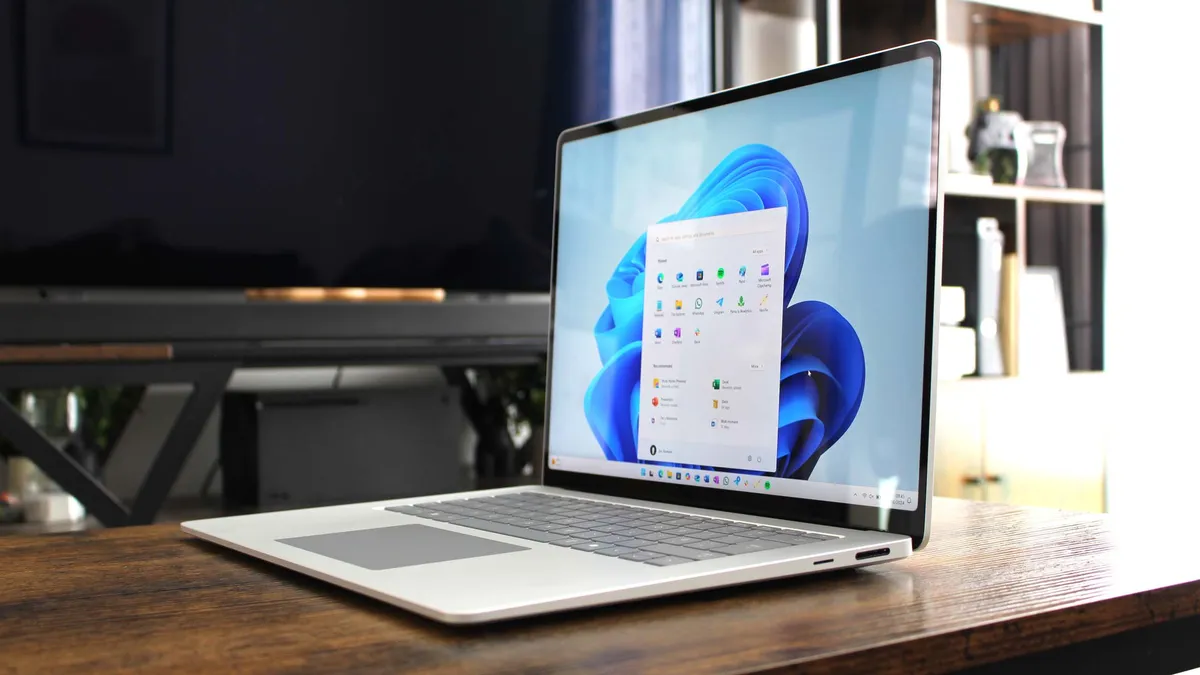

Microsoft’s Surface Laptop 7 was refreshed last year to include Qualcomm’s Snapdragon X Elite and X Plus ARM64 chips, heralding the start of the Copilot+ PC initiative. Along with snappy performance on or off the charger, the new Laptop 7 boasts true all-day battery life and a redesigned exterior.
Available in 13.8- and 15-inch sizes, both displays come with a smooth 120Hz refresh rate and plenty of pixel density (hitting a 2496x1664 resolution on the larger screen). Dolby Vision is included, and the displays can hit up to about 600 nits brightness.
Windows Central Senior Editor Zac Bowden reviewed the Surface Laptop 7, stating:
“Microsoft has done an incredible job with the Surface Laptop 7, right down to making the entire thing easily repairable. For example, magnets, instead of glue, keep the underside attached to the laptop. If you want to upgrade the storage in this laptop, it's a simple 10-minute job.
“The Surface Laptop 7 is the best thin and light Windows laptop you can buy on the market right now, and that entry-level $999 starting price is actually an incredible value, and that configuration is one I can seriously recommend for most people. That has never been the case with a Surface before, and that is commendable.”
Configuration options include up to 64GB of LPDDR5x RAM, up to a 1TB M.2 PCIe 4.0 NVMe SSD, and your choice of X Elite or X Plus System-on-Chip (SoC). Either way, you get 45 TOPS of power for local AI acceleration, including Copilot+ tools built into Windows 11. Models with 32GB of RAM start at about $2,000, but the Laptop 7 is frequently discounted.
👉 Read our full Surface Laptop 7 review
Runner-up laptop with 32GB RAM

Those in search of a more powerful PC should check out Lenovo's Yoga Pro 9i 16 (Gen 10). It's regarded as a top XPS and MacBook Pro alternative thanks to its hardware configs offering up to an Intel Core Ultra 9 285H CPU and an NVIDIA RTX 5070 Laptop GPU. Of course, it's also available with up to 64GB of LPDDR5x-8400 RAM and up to a 1TB M.2 PCIe 4.0 NVMe SSD.
The 16-inch display is a selling feature, coming at you with a Tandem OLED option that improves color and contrast beyond regular OLED. They're available with up to 3.2K resolution, and they hit 1,100 nits max in HDR content.
Port selection is geared towards creators and pros, with dual Thunderbolt 4, dual USB-A, and a full-size SD card slot. The keyboard is comfy, and it features a number pad.
Windows Central's Zachary Boddy reviewed the Yoga Pro 9i 16 (Gen 10), remarking:
"While Apple commits to minimalism and Dell pushes even more aggressively in that direction, Lenovo is delivering an equally capable laptop packed with features and ports — all while undercutting the competition on price. It's a shockingly practical laptop for productivity, creation, entertainment, and gaming."
Models with 32GB of RAM start at a reasonable $1,499 at Lenovo.
👉 Read our full Lenovo Yoga Pro 9i 16 (Gen 10) review
Best gaming laptop with 32GB RAM


The new Alienware 16 Area-51 "is a gamer's dream, due to its impressive performance, beautiful display, RGB touchpad, and Cherry MX mechanical keyboard," according to Windows Central's Rebecca Spear in her review.
It delivers "the smoothest gaming sessions [she's] ever had," and that's all thanks to the powerful hardware inside. Dell offers up to an NVIDIA RTX 5090 Laptop GPU, an Intel Core Ultra 9 275HX CPU, 64GB of DDR5-6400 RAM, and 12TB of M.2 PCIe 4.0 NVMe SSD storage.
The 16-inch display is stunning, and you can get up to a QHD+ resolution with a 240Hz refresh rate, 500 nits brightness, 3ms response time, and NVIDIA G-Sync/Advanced Optimus compatibility.
Love a classic gamer aesthetic? The Area-51 delivers with an RGB keyboard, RGB touchpad, and chassis RGB lighting. A model with 32GB of RAM currently starts at about $1,899.99 at Dell.
👉 Read our full Alienware 16 Area-51 review
Premium gaming laptop with 32GB RAM


Razer’s Blade 18 is now available in a refreshed 2025 model that includes an Intel Core Ultra 9 275HX CPU, up to 64GB of DDR5 RAM, and up to an NVIDIA RTX 5090 Laptop GPU.
It remains the premium gaming pick due to its sheer power and incredible design. If you’re looking for desktop-class performance in a mobile package, this is it. It has an outstanding keyboard and touchpad, the 5MP webcam with IR sensor works wonders, and top-firing speakers pump out quality audio.
Windows Central Senior Editor Ben Wilson reviewed the Blade 18 (2025), noting:
“Razer's new iteration of the Blade 18 (2025) is exactly what you expect it would be: an all-out showcase of the world's most powerful gaming laptop hardware. It's a weighty monster that'll crush any game you throw at it, as long as you're on AC power and have space to set it up and wear some headphones when you're playing, because the fans still get loud — tornado loud. You could happily settle for an 'entry-level' RTX 5070 Ti variant at a more sensible price, but you also could get the absolute best in the business with a 5090 if you really wanted to.”
The 18-inch IPS display comes standard with a QHD+ resolution and 240Hz refresh rate, but you can upgrade to a QHD+ mini-LED panel for perfect color and contrast. It even has a 300Hz refresh rate to better accommodate the monster performance hardware inside.
It’s also one of the only laptops on the market to feature Thunderbolt 5, opening up compatibility with the best Thunderbolt docks and accessories.
The Blade 18 certainly doesn’t come cheap, starting at about $3,500 before discounts. However, if you need top-end power in one of the best-built laptops, you can’t go wrong here.
👉 Read our full Razer Blade 18 (2025) review
Best 2-in-1 laptop with 32GB RAM
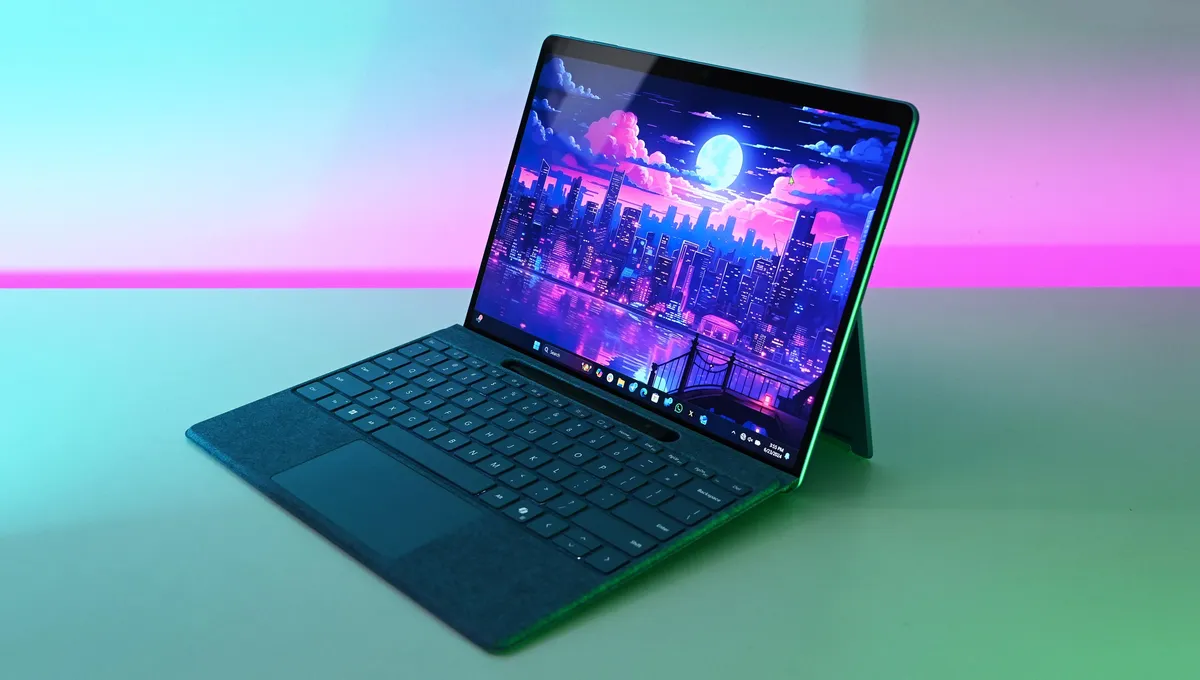
The Surface Pro 11 is Microsoft’s flagship 2-in-1 that sets the standard for the versatile form factor. It’s a sibling to the Surface Laptop 7, announced at the same time as one of the first-ever Copilot+ PCs. It runs on Qualcomm’s Snapdragon X Elite or X Plus SoC, complete with an NPU capable of 45 TOPS for Copilot+ tools. Microsoft includes up to 64GB of LPDDR5x RAM and up to a 1TB M.2 PCIe 4.0 NVMe SSD.
Qualcomm’s chips provide exceptional performance even when you’re running on battery power, which is impressive in its own right at about 10 hours of average life from a charge (climbing to 15 hours in certain situations).
Windows Central Editor-in-Chief Daniel Rubino tested and reviewed the Surface Pro 11, stating:
“The short version of this review is that the new Surface Pro 11 and Flex Keyboard are an outstanding combination that dramatically improves the Surface Pro line—only the original Surface Pro and Surface Pro 4 rival it in terms of impact. [...] Having witnessed the evolution of every Surface Pro version and yearning for a device that excels in performance and battery life akin to the best Windows laptops (and even MacBooks), Microsoft has undeniably nailed it with the Surface Pro 11, making it a strong recommendation.”
The Surface Pro 11 now comes with a 13-inch OLED touch display option for better color and contrast than ever before, but you can always default to IPS to save some money. Either way, you get a 120Hz refresh rate and Dolby Vision support.
Surface Pro 11 models with 32GB of RAM typically start at about $2,100, but you can often find deals on bundles with the device and a keyboard.
👉 Read our full Surface Pro 11 review
Best convertible laptop with 32GB RAM


Dell’s early-2025 laptop rebrand didn’t come as much of a surprise considering HP did the same thing in 2024. The OmniBook Ultra Flip 14 that I’m highlighting here is essentially a new version of the Spectre x360 14 that’s been retired. The OmniBook line isn’t quite as flashy as the Spectre, but it’s still built to a high standard and has plenty of appealing features.
The 14-inch touch display has a 2880x1800 resolution, OLED panel with outstanding color and contrast, 120Hz refresh rate, and up to 500 nits brightness. With 360-degree hinges, you can rotate it around all the way for use as a tablet.
Despite having a rather compact body, the OmniBook Ultra Flip 14 manages to keep cool under pressure. Not only that, it’s easy to get eight hours of real-world use before requiring a charge. And with AMD’s Ryzen AI 300 or Intel’s Core Ultra Series 2 chips inside, you get Copilot+ access on top of steady performance.
Windows Central Staff Writer Zachary Boddy reviewed the OmniBook Ultra Flip 14, remarking:
“The foundation upon which the OmniBook Ultra is built is rock solid. The AMD Ryzen AI 9 HX 375 is an absolutely fantastic chipset that is guaranteed to remain incredible for years into the AI PC revolution, and it lends a great deal of aid toward making this laptop long-lasting enough that you can rely on it to push through entire workdays without worry. The addition of Thunderbolt 4 ports soften one of the few remaining blows for those interested in an AMD-powered device, and the arrival of HP's Wolf Security platform on a consumer device is an underrated boon for everyone.”
AMD models with 32GB of RAM start at about $1,449, making them the more affordable option compared to Intel’s $1,700 starting price. Models are often discounted.
👉 Read our full HP OmniBook Ultra Flip 14 (2024) review
Best business laptop with 32GB RAM

Lenovo’s ThinkPad X1 Carbon has long been considered by our reviewers (including myself) to be one of the absolute best business laptops you can buy. The latest iteration, now in its 13th generation, is somehow thinner and lighter than its predecessors. Despite the slimmer look, the keyboard feels as good as ever and there are no concerns about durability.
Staff Writer Zachary Boddy took the X1 Carbon (Gen 13) for review and handed it a Windows Central Best Award, stating:
“I truly love the Lenovo ThinkPad X1 Carbon. Its design is an eccentric blend of the decades-old and instantly familiar industrial ruggedness of Lenovo's matte black enterprise fleet and an impossibly lightweight construction that still boasts industry-leading durability. In some ways it's a dreadfully boring laptop like the rest of the ThinkPad family, and in others this is one of the most exciting devices in Lenovo's entire lineup. The ThinkPad X1 Carbon (Gen 13) continues to push that vibe in the best possible way.”
Performance from the Core Ultra Series 2 mobile chips takes a slight hit due to the thermal constraints inside the thin PC, but you’re still getting more than enough power to handle day-to-day business-related tasks. It’s a Copilot+ PC thanks to Intel’s NPU inside, and Lenovo offers 32GB of LPDDR5x-8533MHz RAM with a 2TB M.2 PCIe 4.0 NVMe SSD as backup.
For a secure, mobile, and feature-laden business laptop like this, you can expect to pay about $2,179 to start. That does, of course, include 32GB of RAM.
👉 Read our full Lenovo ThinkPad X1 Carbon (Gen 13) review

Zac Bowden is the go-to source for all of the latest Windows news, and that includes laptops running the OS. With countless laptop reviews written, Zac has a clear idea of what's good and what's left behind.

With more than 8 years of experience testing and reviewing laptops, I have a clear idea of what features work for what users. I can offer clear buying advice that helps you land the perfect laptop.
Honorable mentions and recent reviews

Don't see a laptop that's exactly what you need in the list above? Here are a few more great laptops with 32GB of RAM to consider.
- HP OmniBook 5 14 (G1q): HP made the best value laptop of the year, with 32GB RAM models starting at less than $1,000. Toss in an OLED display and steady performance for a well-rounded system. 👉 Read the HP OmniBook 5 14 (G1q) review
- ASUS Zenbook A14 (2025): This laptop's "ceraluminum" chassis makes this one of the thinnest and lightest laptops ever, yet it doesn't suffer any creaking or hollow feel. It might not be as cut out for heavy work as the other options in this list (its Snapdragon X1 SoC instead focuses more on efficiency and snappiness), but it is available with up to 32GB of LPDDR5x RAM. 👉 Read the full ASUS Zenbook A14 (2025) review
- HP EliteBook X 14 (G1a): Need a compact business laptop with a high-end build quality, AMD Ryzen AI 9 HX CPU, and up to 64GB of LPDDR5x RAM? HP's new EliteBook should definitely be considered. 👉 Read the full HP EliteBook X 14 (G1a) review
- ASUS ROG Flow Z13: This 2-in-1 laptop takes the idea of a Surface Pro and turns it into a powerhouse thanks to the Ryzen AI MAX chip that can take system RAM to use for its integrated GPU. For that reason, it comes with up to 96GB of RAM. 👉 Read the full ASUS ROG Flow Z13 review
How we test laptops at Windows Central
At Windows Central, we take a personal approach to laptop reviews. Every laptop that comes our way for testing goes through a similar process, in which we adopt the PC for regular use.
This gives us a clear idea of what works well (and where the PC falters) during standard, everyday use. Webcam quality, speaker quality, typing feel, pointing accuracy, and port layout are all covered this way.
For the display, we use a colorimeter to accurately test color reproduction across sRGB, DCI-P3, and AdobeRGB gamuts, as well as brightness levels.
Performance hardware is measured using synthetic benchmarks, including Geekbench, Cinebench, CrossMark, CrystalDiskMark, PCMark, 3DMark, and more. This allows us to accurately compare speed and efficiency to other laptop we've recently tested.
System noise is also taken into account, measured with a decibel meter. And for thermal abilities, we check to see the hotspots on the laptop's frame with a FLIR camera.
👉 How we test and review laptops at Windows Central
Choosing the best laptop with 32GB of RAM for you
Countless Windows laptops are reviewed every year at Windows Central. In the hands of our experts, they're all put through the same rigorous testing period involving synthetic benchmarks, real-world performance analysis, and more.
The collection of laptop reviews that's always being updated on Windows Central makes my job easy. I can gather the top-rated models, check to see if they apply to what I'm writing about — in this case they must have at least 32GB of RAM — and balance the pros and cons to see if they deserve a spot in my roundup.
Having 32GB of RAM in a laptop can help with multitasking, gaming, and virtually any task that benefits from extra temporary storage. I generally don't recommend anyone buy a laptop these days without at least 16GB, and 32GB will only improve performance.
With that in mind, I'm recommending the Surface Laptop 7 as the top pick for most people. It's a Copilot+ PC using Qualcomm's Snapdragon X chips, which means you get outstanding performance on or off the charger. Qualcomm's ARM64 architecture also benefits battery life, and you can expect to go a full day without needing to plug in. Models with 32GB of RAM typically start at about $2,000, but they often go on sale.
The sibling Surface Pro 11, released alongside the Laptop 7 as one of the first Copilot+ PCs, can be seen as a more versatile alternative thanks to its 2-in-1 design. It's available with an OLED touch display, and it too can offer all-day battery life alongside steady performance. Models with 32GB of RAM usually start at about $2,100.
Gamers should check out the Alienware 16 Area-51 or Razer Blade 18, while professionals might be attracted to the security and durability that comes with the ThinkPad X1 Carbon (Gen 13). You can also consider the Lenovo Yoga Pro 9i 16 for an Ultrabook with discrete GPU, while HP's new OmniBook Ultra Flip 14 is your best option if you want a convertible PC.
Are laptop prices going to rise due to RAM shortages?
Yes, laptop prices are expected to continue rising in 2026 due to the ongoing DRAM shortage that is driving the price of RAM through the roof. If you want the best price possible, I recommend buying sooner rather than later.

Follow Windows Central on Google News to keep our latest news, insights, and features at the top of your feeds!

