The Logitech MX Keys S is my overall favorite for Windows users (and most people), thanks to its comfy typing, customization options, long battery life, and seamless connectivity with multiple devices. Your PC's keyboard can make or break your overall experience; without a great keyboard, you'll likely struggle to find many positives, making it crucial to choose a keyboard that perfectly matches your needs and preferences.
In that regard, everyone is different. That's why there are so many keyboards on the market, aiming to satisfy productivity masters, gamers, travelers, casual users, and beyond. The Windows Central team has spent hundreds of hours personally testing keyboards, and I'm confident that I've hand-picked a wide enough range of the best keyboards to suit most users.
February 4, 2026: Added Razer BlackWidow V4 Pro as best gaming keyboard, and expanded with useful information.
TL;DR: Summarizing our findings
Why you can trust Windows Central Our expert reviewers spend hours testing and comparing products and services so you can choose the best for you. Find out more about how we test.
- Wired or wireless?: Yes, a lot of chatter around keyboards seems to focus on mechanical switches, but your biggest decider will be whether or not you need to use your keyboard wirelessly. Always check first.
- Best for Windows – Logitech MX Keys S: Comfortable, portable, and long-lasting; Logitech still reigns supreme.
- Best mechanical – Keychron Q1 Pro: One of the best brands for mechanical switches, and the Q1 Pro is a winner in all aspects.
- Best for gaming – Razer BlackWidow V4 Pro: Expensive at MSRP, but a bargain if you find it with a discount; it has everything you could need.
- Best portable – Logitech Pebble Keys 2: Looks funky, but it has an incredible battery life and connects to multiple devices. No backlight, though.

My colleagues and I always strive to find the best keyboards possible; it only makes sense when you write thousands of words every week. With plenty of in-house reviews and hundreds of hours of testing at hand, I've collected the absolute best keyboards for all types of users.
Best keyboard for Windows


Logitech's MX Keys S — intended to be a perfect companion for one of the best mice around, the MX Master 3S — should be considered a top keyboard by most people who want wireless convenience and comfortable typing.
In their Logitech MX Keys S review, former Windows Central Staff Writer Zachary Boddy called it "a consistent, versatile, and feature-packed wireless keyboard," going on to note that "the design, typing experience, extra keys, and software are all centered around being productive."
The keyboard relies on a 2.4GHz Logi Bolt dongle or Bluetooth Low Energy to connect, and it can be set up to quickly and easily switch between up to three devices.
It's compatible with just about any OS, making it perfect for those who aren't sticking to Windows only. There are even some deep macro features should you wish to streamline your workflow.
The internal battery will last for days, even with the built-in backlight enabled, and it charges with USB-C. You can expect comfortable typing from the cupped keys, and the ability to carry it around with you anywhere will certainly appeal to those who are over having to deal with cables.
👀 Read our full Logitech MX Keys S review
Best mechanical keyboard
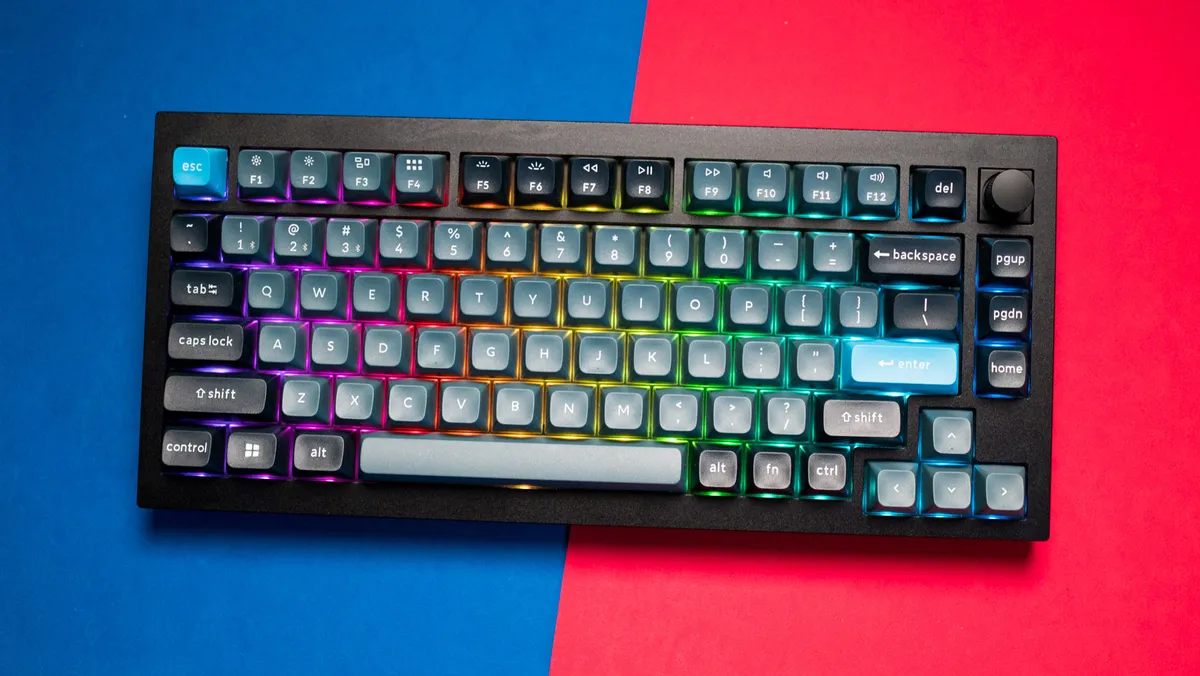
Mechanical keyboards have come back into vogue in recent years, and those who want a customizable board with high-end features should check out Keychron's Q1 Pro.
It's essentially the same as the non-Pro Q1, save that the Pro model adds Bluetooth 5.1 connectivity and a 4,000mAh battery to go along with the wired USB-C connection. The keyboard connects with up to three devices for quick switching, and it works across Windows, Linux, and macOS.
The keyboard's aluminum chassis is built extremely well, and it can be paired with three different types of Keychron's K Pro switches, depending on your preferences.
Switches are hot-swappable, they have KSA double-shot PBT keycaps, and there's even south-facing RGB lighting that can be customized to your liking. In his Keychron Q1 Pro review, Senior Editor Harish Jonnalagadda remarked:
"The gaskets around the polycarbonate plate combined with the addition of the silicone pads that are sandwiched between the top and bottom halves gives the Q1 Pro a unique typing feel."
The Keychron Q1 Pro can be purchased fully assembled if you aren't comfortable putting it together yourself. The only real downside is the battery life, which will need charging every few days.
If you can live with that and want extra wireless connectivity, this should be a top mechanical choice.
👀 Read our full Keychron Q1 Pro review
Best gaming keyboard

Razer has been crushing the gaming keyboard category for well over a decade; it's a standout brand that consistently offers some of the best. In that same breath, it'll also charge a premium for that benefit at MSRP, but its keyboards aren't immune to healthy discounts. If you see the BlackWidow V4 Pro on sale, you should consider it one of the easiest decisions of the year.
There are great options in its Huntsman range, but the BlackWidow is a no-compromise offering that has everything you'd need (if you have the space). Yes, this is a full-sized, wired mechanical keyboard with a numberpad, wrist cushion, and braided USB-C cables, so it's a big one. At least while it's dominating your desk, it looks gorgeous with Chroma RGB lighting.
The 'wired' part is important to remember, as this is the only keyboard on this list that isn't wireless. There are two cables, in fact, as one acts as a pass-through port for a USB-A input on the rear side, useful if you want to use a wireless mouse dongle and keep it relatively hidden.
Our Editor-in-Chief Daniel Rubino called it "a monstrous achievement in keyboarding," and it's easy to agree. Until there's a V5 (and I'm sure there probably will be), this still dominates as the top pick. Again, just keep your eyes peeled for discounts, particularly around big deal events.
👀 Read our full Razer BlackWidow V4 Pro review
Best portable keyboard

Logitech's MX Keys S is a great wireless option if you want a full package, including a number pad, but it might be too expensive or too much keyboard for your needs. That's where the Logitech Pebble Keys 2 K380s comes into play.
It's a compact keyboard without a number pad, making it super easy to slip into a backpack alongside your laptop. It's also a great little device to have around the living room for control over your TV-attached PC. Need something at your desk? It can also do a great job in a more traditional sense.
The Pebble Keys 2 K380s offers similar wireless connectivity as the MX Keys S, with a 2.4 GHz Logi Bolt receiver or Bluetooth options. It has Logitech's Easy-Switch button built in, allowing you to quickly switch between devices (even across different operating systems), and the two AAA batteries will last for months.
The round keys, a holdover from older models that we've used, are surprisingly comfortable even for long days of typing, and their silent nature won't annoy anyone around you. Be sure to give this one a second look if you'd like to spend less and still land a quality wireless keyboard.
👀 Read our full Logitech Pebble Keys 2 K380s review
Choosing the best keyboard

The broad selection of keyboards means you can usually get exactly what you need, but it also presents a number of pitfalls for everyday shoppers. Keyboards range from bargain bin options that verge on e-waste, all the way up to truly premium options for gaming or for comfortable office work.
There are even keyboards that give you a wide range of modding options, perfect for enthusiasts who enjoy tweaking switches and keycaps. Where to begin? It's important to first consider your budget and then move on to how you plan on using the keyboard.
Spending more will generally land you a wireless connection and a bunch of handy extra features, but a lot of people can get by with a keyboard well within the affordable realm. If you're looking for a great gaming keyboard, you'll especially want to consider switch types and overall performance to get an edge on the competition.
As with most things, consider your budget first. There's no point going into keyboard shopping without a price range in mind because, as you can see here, prices vary wildly from under $50 to well over $200. Nailing down a budget will make it easier to dismiss keyboards that aren't right for you before getting into the weeds with specs and features.
The other primary consideration needs to be what you're going to use it for most. Mechanical keyboards are easily the best feeling, but if you're never going to game, is the increased price and the additional noise worth it? Likewise, if you plan to game, you're not going to have a good time with a cheap Bluetooth keyboard with chiclet keys.
From there, you can start to consider a few more options. Always remember that the right keyboard for you is out there, waiting for you to find it.
How we test keyboards
As a team of writers, most of us at Windows Central test keyboards the obvious way: using them throughout our daily workflow. Naturally, more specific subcategories, like gaming keyboards, are tested with whatever genre they're advertised towards; if the brand professes they help with fast reactions in fast-action titles, then that's what we'll try.
Likewise, travel-friendly keyboards come with us when we venture out into the world, where aspects like their wireless battery life and portability can be properly tested. It's one of the most natural types of peripherals for us to test, and you can be sure that we'll share our honest opinions. After all, if they made our job harder, there's no way they'd make the cut.
Keyboard FAQ
Can wireless keyboards be used with a cable?
For the most part, yes. Some keyboards will only charge themselves when connected via USB, but they aren't as common. Always check the specifications of each keyboard before buying, but generally, this is a normal expectation.
Can PC keyboards connect to Xbox consoles?
Yes, the Xbox Series X|S can detect and utilize the basic USB protocol built into most wired keyboards, but wireless variants may vary depending on their dongle type. If you can use your keyboard with a cable, then you should expect to be able to use it with an Xbox console.
Can I use wireless keyboards with my smartphone?
It's device-dependent, but if your wireless keyboard has a Bluetooth setting, then most smartphones will happily connect and allow you to type with it. Again, you'll have to check with each manufacturer, but Bluetooth support is a sign that it should work.

Follow Windows Central on Google News to keep our latest news, insights, and features at the top of your feeds!