


Windows Central Verdict
Lenovo's first Arm-based Windows 11 mini PC is a winner, featuring a compact and premium design and plenty of ports, upgradable storage and networking, and a relatively affordable starting price with 32GB RAM and the base model Snapdragon X. It's the perfect all-rounder for most productivity tasks.
Reasons to buy
- +
Great compact design
- +
Premium chassis
- +
Plenty of ports
- +
Very quiet fan
- +
Includes a stand
- +
Great performance for everyday tasks
Reasons to avoid
- -
Configs are different depending on region
- -
No SD card reader
- -
Plastic top covering is a fingerprint magnet
- -
No Snapdragon X Elite option
- -
Isn't for gamers
Why you can trust Windows Central Our expert reviewers spend hours testing and comparing products and services so you can choose the best for you. Find out more about how we test.
I've been looking for a good, all-rounder Windows mini PC with an Arm processor ever since Qualcomm unveiled its Snapdragon X line of SoCs last year. It's taken a while, but we finally have one in the form of Lenovo's new IdeaCentre Mini X, powered by the base Snapdragon X, housed in a premium metal and plastic enclosure that's much like the older Mac Mini design, but with better upgradability and a more affordable price.
In fact, I might go so far as to say this is the best Arm-based Windows mini PC you can buy right now, with a large selection of ports, great performance for everyday tasks, and a premium build quality that you don't often find on mini PCs in this price range. It's certainly a contender for our roundup of best mini PCs.
I've been using the IdeaCentre Mini X as my primary desktop for the last two months, and this is my long-term review.

I've been reviewing Windows hardware for over a decade, and mini PCs are one of my favorite kinds of PC form factor you can buy right now. They're more powerful than ever, and I've reviewed enough of them to know which ones are good, and which ones are to avoid.
Enjoy our content? Make sure to set Windows Central as a preferred source in Google Search, and find out why you should so that you can stay up-to-date on the latest news, reviews, features, and more.
Price and specifications
The Lenovo IdeaCentre Mini X starts at $699 and comes with the Snapdragon X SoC, 32GB RAM, and 512GB SSD as standard. There's also an $899 model that comes with the slightly more powerful Snapdragon X Plus SoC, still with 32GB RAM and 512GB SSD storage, though I don't think this is necessary for most people.
Frustratingly, the configurations you're able to buy will likely depend heavily on either the region or retailer of choice. Not all models are available in all regions, so your pricing and spec options are likely to vary.
Specification |
Details |
|---|---|
Processor |
Snapdragon® X X1-26-100 (2.97 GHz) or Snapdragon® X Plus X1P-64-100 Processor (3.40 GHz) |
Operating System |
Windows 11 Home for ARM |
Graphics |
Integrated Qualcomm® Adreno™ GPU |
Memory |
32 GB LPDDR5X-8448MHz (Soldered) |
Storage |
256 GB, 512GB, or 1 TB SSD M.2 2280 PCIe Gen4 |
Connectivity |
Wi-Fi 7, Bluetooth® 5.2 |
Ports |
Front: USB-A, USB-C (10Gbps), Headphone/mic combo |
Cooling |
Dual-fan system with Intelligent Cooling Engine |
Dimensions |
42.6mm × 195.0mm × 191.0mm |
Weight |
Starting at 1.8kg |
Color |
Luna Grey |
Sustainability |
35% recycled materials, plastic-free packaging, ENERGY STAR® rated |
Design and ports

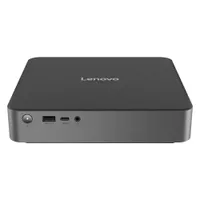
The IdeaCentre Mini X features a minimalist contemporary design that looks at home on any desk, under any monitor. It's a 195mm x 191mm box made out of a combination of aluminum and plastic. The sides of the device are aluminum, and the top and bottom panels are plastic, as they are removable.
The box itself looks and feels very premium, and I love how slim and low-profile it is compared to most other Windows mini PCs. It is on the heavier side, however, though that shouldn't matter much given it's a desktop PC that you're likely not going to be moving around much.
The grey and black color choice is also one I really like. It looks very clean, modern, and premium to touch. The top and bottom covers pop off, which allows access to the inside of the device, where you can swap out and replace components like SSD storage or Wi-Fi card. RAM is soldered, but storage is upgradable using a standard M.2 drive.

The IdeaCentre Mini X also comes with a stand included in the box, which lets you set the device up on its side if that's an orientation you prefer. For me, I prefer having it lying flat, but if you're tight for space, the included plastic stand makes propping it up on its side, so it stands tall is super easy and convenient to use.
Along the front of the device, we have one USB-A port, one USB-C port, a 3.5mm headphone jack, and a power button. Around the back, there's one Ethernet jack, three USB-A ports, one USB-C port, an HDMI 2.1 port, and a DisplayPort 1.4a. There are plenty of ports to go around, though I do wish there were one more USB-C port on the back for extra versatility.
The underside and back of the box are where your vents are located for thermal management. The device has a built-in fan, which helps keep the Snapdragon X cool under load. The fan itself is almost never audible, and for the first few days ,I really did think this was a fanless system. The only time I heard it spin up was under heavy load during benchmarking.
Performance

Lenovo offers the IdeaCentre Mini X in two SoC flavors, the Snapdragon X or Snapdragon X Plus. We received the base model Snapdragon X variant for review, and luckily, I found that this doesn't make it a slouch by any stretch of the imagination.
The base Snapdragon X SoC is great for everyday tasks and light creative work. Paired with the 32GB RAM that this system includes, it's a multitasking powerhouse, easily capable of handling multiple apps running all at once and switching between them without missing a beat.
In our benchmarks, we found the IdeaCentre Mini X lines up with the exact kind of performance you'd expect from an Arm-based mini PC in 2025. In Cinebench 2024, it earned a single-core score of 96 and a multi-core score of 687, putting it in line with Apple M1/M2 performance.

In Geekbench 6, it earned a single-core score of 2,137, a multi-core score of 10,828, and then 9,780 in the OpenCL GPU benchmark test. In CrossMark, it earned a score of 1,332, placing it alongside the Beelink SER5 Pro and Surface Studio 2+. It's a perfectly capable machine for most tasks, which is brilliant.
The only thing it's really not good at is gaming or high-intensity creative work that requires a GPU or a more powerful CPU to run smoothly. Because this is the base SoC, it only has 8 cores, four of which are performance cores, and so demanding tasks will take longer or be laggy as a result.
Again, for day-to-day tasks or light creative work, you won't notice any slowdowns. It's really perfect for office-based workflows, web browsing, email, Teams, and Slack, and media consumption tasks, with a bit of light Photoshop and video editing on the side if you need to get that done every so often.
Conclusion

Overall, I've really loved my time with the IdeaCentre Mini X. It's the Mac Mini of the Windows world I've been waiting for, albeit slightly on the larger side compared to the Mac Mini M4. Still, I think it looks great sitting on my desk, and it's cool and silent pretty much all of the time, meaning I forget it's even there.
It has enough ports to go around, and the ability to upgrade things like storage or Wi-Fi card down the line is also an extra nicety you don't always see on these kinds of PCs, so I'm glad Lenovo put in the extra effort to make that possible. The included stand is also a nice touch.
If I have any complaints, it's that I'd like to see more CPU options down the line. Lenovo currently makes Snapdragon X or Snapdragon X Plus variants, but I'd love to see a Snapdragon X Elite option too. I'd also like to see variants with less RAM, as for whatever reason, 32GB is the base amount. Not everyone needs that amount, and so a lot of people could save a few bucks if there were a 16GB variant too.
Ultimately, this is a great mini PC, one of the best in the Windows market currently. It looks great, performs well, and is actually quite affordable too. If you wait for sales, I bet you can grab one of these new for as little as $599. At that price, it's a no-brainer.

The Lenovo IdeaCentre Mini X might be the best Arm-based Windows-powered mini PC you can buy right now, featuring 32GB RAM, 512GB storage, and the incredible Snapdragon X SoC to boot. And it's all housed in a premium metal and plastic chassis that looks great and has plenty of ports.

Follow Windows Central on Google News to keep our latest news, insights, and features at the top of your feeds!

