


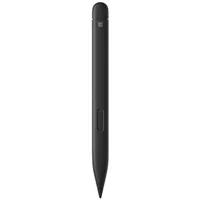
When Microsoft announced the Surface Pro 12 for Business and Surface Laptop 8 for Business, the company also snuck out an update to the Surface Slim Pen 2. That update adds support for Windows 11's new haptic feedback system.
That means you don't have to buy a laptop that starts at $1,949.99 to feel Windows 11 through haptics.
The Surface Slim Pen 2 has always had the hardware to provide haptic feedback, but the tactile signals have been limited to use in certain apps. A few Microsoft 365 apps support haptics, as do a few third-party inking apps.
Now, haptics is built directly into Windows 11. Back in April, Microsoft shipped a new feature that allows you to feel the operating system through subtle vibrations. The haptic feedback system, officially called "Haptic signals," integrates with the operating system and sends small vibrations when you perform certain tasks.

Our Senior Editor Zac Bowden spoke highly of Windows 11's haptics when testing the feature recently:
"If you do have a compatible device, prepare to be impressed with the implementation of this new system. It feels great, and makes using Windows 11 feel super satisfying. Haptic bumps are present across the OS; when dragging files in File Explorer, aligning objects in apps, and snapping app windows to the edges of your screen."
Haptic signals require specific hardware, and the list of supported devices is short. The Logitech MX Master 4 became the first mouse to support the feature with a recent update. The trackpad of the new Surface Laptop 8 for Business also works with Haptic signals.
That's the entire list at the moment, at least when it comes to trackpads. The Surface Flex Keyboard has not received the same treatment as the Surface Slim Pen 2 and lacks haptic support.
The Surface Slim Pen 2 integrating with Windows 11's new haptic feedback system means you can use the feature on older, and more affordable, Surface hardware.
Microsoft is shipping a software update to the Surface Slim Pen 2 that adds support for Windows 11 haptics.
If you don't have a Surface Slim Pen 2, you can pick one up through Best Buy at a discount. It's currently on sale for $106.99, down from $129.99.

Join us on Reddit at r/WindowsCentral to share your insights and discuss our latest news, reviews, and more.

