



What you need to know
- Kensington announced the Surface Go Docking Station.
- The docking station turns your Surface Go into a tiny desktop resembling the Surface Studio.
- The docking station has a plethora of ports, an optional Kensington lock, and a hinged design.
Kensington announced the Surface Go Docking station, which turns your Surface Go into a tiny desktop (via MSPU). Kensington's Surface Docking stations are a creative and attractive way to get the most out of your Surface device. They provide a wide range of ports to increase your device's versatility and feature a hinge that allows you to use the device at various angles.
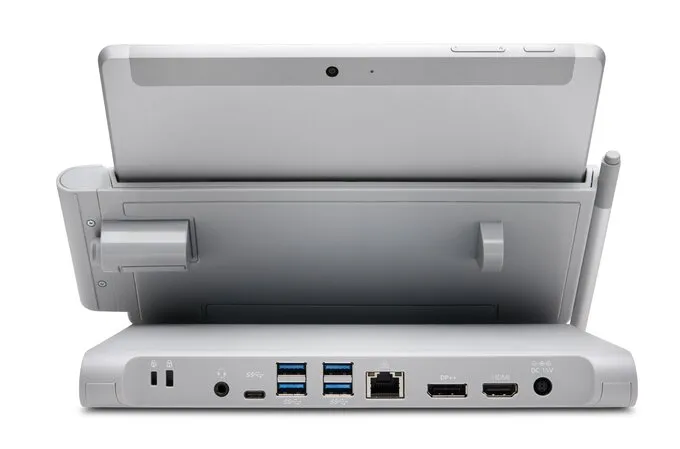
The Surface Go Docking Station has a similar design to the company's other Surface docking stations. It's a similar gray color to the Surface Studio and other Surface devices and has a hinge that lets you seamlessly move the device up and down. One notable difference is that the Surface Go Docking Station does not feature the same floating design of the Surface Pro Docking Station and the Surface Studio. The Surface Go Docking Station can tilt up and down, but can't raise and lower as it tilts.
The Surface Go Docking Station has 4 USB-A 3.1 ports (5V/0.9A), 1 USB-C 3.1 port for data synchronization (5V/3A), a 3.5mm combo audio jack, and a Gigabit Ethernet port. It also can come with an optional Kensington lock module for added security. You can connect the docking station to multiple monitors through DisplayPort++ or HDMI.


When our executive editor Daniel Rubino reviewed Kensington's docking station for the Surface Pro, he said, "I can say that it is the best accessory to date for the favorite 2-in-1." The Surface Go Docking Station doesn't feature an identical design, but it's similar enough to turn heads.
The Surface Go Docking Station is available for $350 on Kensington's website.

This docking station adds a plethora of ports to your Surface Go and makes it easy to connect to a desktop setup. It features a hinge that allows you to use the device comfortably at different angles.

