


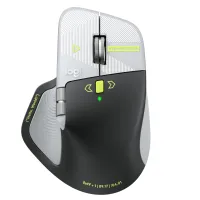
The Logitech MX Master 4 Developer Edition just started shipping, and I have one on my desk to try out. The mouse is an ode to developers covered with Easter eggs and nods to programming.
This mouse is one of the first to support Windows 11 haptics, which lets you feel Windows 11 through subtle physical feedback. That functionality is not exclusive to the developer edition, so you can take advantage of haptics if you prefer to grab the black or white versions of the Logitech MX Master 4.
I've only had the Logitech MX Master 4 Developer Edition for a bit, so I can't judge it fully. So far, the mouse has impressed me throughout full work days.
But one thing has stood out to me so far: this mouse is basically a fidget spinner. Its vertical scroll wheel can toggle between ratchet or smooth scrolling. You can even set the mouse to switch between those modes depending on force.
Your thumb rests just below a horizontal scroll wheel when using the mouse. That is also fun to spin when I'm bored. It also scrolls horizontally, but that's a feature I only use occasionally.
Add in a haptic side panel that buzzes when pressed and displays a ring of shortcuts, and you have a surprisingly great fidget tool for your desk.
Early impressions
This mouse is the first device I've used that supports Windows 11 haptics. That feature, which provides physical bumps when you perform certain actions, has been fun to play with.
I've used a Logitech MX mouse for years, but it's been the Logitech MX Vertical on my desk. That mouse is excellent, and I still recommend it to those who want an ergonomic mouse, but having used the Logitech MX Master 4, there are features I'd love to see Logitech bring over to its ergonomic line.
I've been surprised by how much I use the horizontal scroll wheel of the Logitech MX Master 4. I usually just hold Shift and use the vertical scroll wheel to navigate horizontally. But the horizontal scroll wheel is perfectly placed on the Logitech MX Master 4, making them easier to use and more comfortable.
The Logitech MX Master 4 has a bit more of a thunk than a click, which I prefer. I also like the matte plastic finish of the Logitech MX Master 4.
None of this is surprising since the Logitech MX Master 4 earned a near-perfect score from our friends at Tom's Guide. The version of the mouse I have is identical in terms of features and overall design. What makes it stand out are its Easter eggs, such as syntax annotations and markup tags that are laser-etched onto the mouse.
I've often said I can't go back to using a flat mouse since relying on the Logitech MX Vertical. I still prefer the vertical design of that mouse over the flatter layout of the Logitech MX Master 4, but I prefer the features and build of the latter. My perfect mouse would be a combination of the two.

Join us on Reddit at r/WindowsCentral to share your insights and discuss our latest news, reviews, and more.

