


Over the decades, I've used many Xbox controllers, yet not a single one of them felt right to play 2D side-scrollers due to their awkward placement of the D-Pad and their analog sticks causing unintentional input errors.
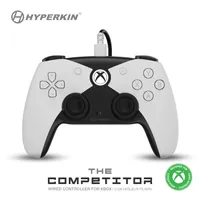
That is, until I came across the Hyperkin Competitor. This is an amazing Xbox controller that has a button layout better suited for 2D games and includes gameplay-enhancing features like Hall Effect analog sticks and Impulse Triggers, and it's now on sale for $42.49 at Amazon.
What's so special about the Hyperkin Competitor?

For many years, I thought there was no wired Xbox controller that could replace my beloved Razer Wolverine V2 Chroma, but boy was I glad to be proven wrong when I reviewed the Hyperkin Competitor.
This is one of the best Xbox controllers I've ever used. It's got a tough build, its design is very ergonomically comfortable, the controls feel so responsive and good to use, it has Impulse Trigger with haptic feedback that pleasantly increases immersion, and it has a couple of reprogrammable extra back buttons.
It also features Hall Effect sensors in its analog sticks to increase their input accuracy and durability, while preventing "stick drift" so your character doesn't move unintentionally in the wrong direction when your thumb's off the sticks.

My favorite part of the Hyperkin Competitor is its PlayStation 5-style segmented D-Pad and control scheme layout.
Controlling my character on a 2D plane in games like Hollow Knight: Silksong, Ninja Gaiden: Ragebound, and Double Dragon Gaiden: Rise of the Dragons, and performing complicated special moves in fighting games like Street Fighter 6 or Killer Instinct, felt so much better than using the Hyperkin Competitor's D-Pad compared to using a normal Xbox controller's D-Pad.
So, unless you're strongly against using wired-only or PlayStation-styled controllers, then I highly recommend the Hyperkin Competitor.
I guarantee you will not regret using it or getting one for your friends during Christmas, as it's now on sale for $42.49 at Amazon after having its $49.99 MSRP cut down by 15%.
Enjoy our content? Make sure to set Windows Central as a preferred source in Google Search, and find out why you should so that you can stay up-to-date on the latest news, reviews, features, and more.
FAQ
What platforms is the Hyperkin "Competitor" compatible with?
This Hyperkin Competitor is compatible with Xbox One, Xbox Series X|S, and PC (Windows 11).
Does the Hyperkin Competitor feature wireless connectivity?
The Hyperkin Competitor is purely a wired controller with no wireless or Bluetooth support.
What are Hall Effect analog sticks?
Hall Effect analog sticks have magnetic sensors to help them detect a player's thumb better.
In addition, the magnetic sensors improve the analog stick's durability so they can last longer, and they help safeguard them from "stick drift". This is a debilitating condition where an analog stick has become damaged to the point that it starts to move an in-game character without the player's input.
What are Impulse Triggers with haptic feedback?
These triggers contain tiny motors that provide precisely timed vibrations whenever you fire guns or drive cars to create a sense of immersion while playing racing games like Forza Horizon 5 or first-person shooters like Call of Duty: Black Ops 7.
How do I remap the Hyperkin Competitor extra back buttons?
To remap the Hyperkin Competitor's extra back button, hold the button labelled 'M' on the back of the controller. Then hold the extra back button you wish to remap for a few seconds, let go, then press the button you want to assign to it.

Follow Windows Central on Google News to keep our latest news, insights, and features at the top of your feeds!

