


Windows Central Verdict
Honeycomb already makes high-quality yokes that appeal to enthusiasts, and the Foxtrot finally joins them as a long-awaited flight stick that can appeal to a wide range of newcomers and experienced flight simulation fans. At full price, it has fierce competition from the likes of Turtle Beach and Thrustmaster, but reductions to $149.99 and below make it an extremely easy recommendation — it's smooth, sturdy, and straightforward.
Reasons to buy
- +
Stable but lightweight construction that stays flat on a desk
- +
Strong switches and chunky dials feel great
- +
Lightweight enough to quickly set up and take down
Reasons to avoid
- -
No analog levers for fine throttle control
- -
PC only, not compatible with Xbox or PlayStation
Why you can trust Windows Central Our expert reviewers spend hours testing and comparing products and services so you can choose the best for you. Find out more about how we test.
I got my hands on a prototype of the Foxtrot back in the summer of this year with Microsoft Flight Simulator 2020. A few months later, and I'm sitting down at my own desk with the real thing for a proper Honeycomb Aeronautical Foxtrot Aviation Stick review. TL;DR: It's still just as brilliant as it was back then.
My previous impression of Honeycomb was that of a brand appealing to a more serious flight simulation crowd with its Alpha Yoke and Bravo Throttle, and I've always been drawn more towards a flight stick rather than a yoke. Enter the Foxtrot, and a personal reevaluation of the manufacturer.
I'm still all about Microsoft Flight Simulator 2024, and Honeycomb advertises the Foxtrot with the game (and its predecessor) in mind for PC players, so it should be a perfect fit. It's launching on both sides of the Atlantic, and comes with a few things to consider before buying. Here's what I think.

I've been luring unsuspecting casual gamers into the world of simulation games for years, looking for the best entry-level hardware to sell them on the whole experience — and I actually play this stuff in my downtime.
Where can you buy the Honeycomb Foxtrot?

You can pick up the Honeycomb Foxtrot from its official store and third-party sellers around the world, with a couple that the brand itself doesn't explicitly list on its advertisements.
Price (MSRP): $199 at Amazon.com
Platform: Windows 10/11
Model: HC003363
Connection: USB-A to USB-C
Material: Metal, plastics
Dimensions: 40 x 13 x 27 cm
Weight: 835g (1.84 lbs)
As usual, the easiest option is to order the Foxtrot from Amazon.com and pay attention to the "Shipper / Seller" listing, checking for trusted sources.
While there is a Foxtrot listing on Amazon.co.uk, it remains "currently unavailable" in the United Kingdom at the time of writing.
Alternatively, you can pick up the Foxtrot from BestBuy.com in the United States, which could be tempting if you prefer in-person pickup. As for alternatives in the United Kingdom, the Foxtrot is planned to be sold at Argos.co.uk and Scan.co.uk, but hasn't appeared just yet.
Is the Honeycomb Foxtrot a good flight stick?


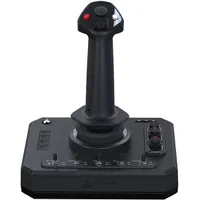
At a glance, the Foxtrot is primarily plastic, with metallic innards and a small but sturdy collection of dials that feel satisfying to twist and click into place before a virtual takeoff, two of which feature outer dials that rotate forever. The two-way switches along the bottom control the various lights on my plane, which certainly hit the spot when I'm preparing for a late-night flight.
Honeycomb offers downloadable control profiles for MSFS 2024, which provides a fantastically rapid setup process.
Further up the ambidextrous flight stick is a POV switch, which behaves similarly to a d-pad if you're more familiar with traditional joypads. Two chunky rocker switches join four standard buttons and a trigger, and the whole thing moves with smooth, linear resistance without a detent, so there's no clunk as it returns to the middle.
Finally, four blank buttons line the left side of the base, free to assign as whatever functions I need, while the top-right section holds standard menu buttons, and Honeycomb's logo highlights a "home" button in the top left. All the controls feel great, and the whole thing connects via a single USB-A-to-USB-C cable at the rear.

Also, a gesture I genuinely appreciate is that Honeycomb offers downloadable control profiles for Microsoft Flight Simulator 2024, which provides a fantastically rapid setup process. This is how all simulation manufacturers should do it. Of course, I understand the appeal of assigning each button yourself, and some are even left unused in these profiles, but it's a stellar gesture by the brand. You can connect the Foxtrot to MSFS 2024 and hit the runway immediately — I love that.
Does the Honeycomb Foxtrot have any issues?


Honeycomb includes a super-slim hex key that lets me adjust the stick's tension on the X and Y axes separately, which is great, but a carved-out storage slot underneath the base is desperately cramped, and I've struggled to ever attach it. Eventually, I gave up and stored the key in a safe place elsewhere. It's minor, and it didn't take me long to dial in a satisfying resistance, so I'm not concerned.
There's no Xbox compatibility, but that was never on the cards for the Foxtrot anyway. PC gamers only.
I imagine a common question will be about playing MSFS 2024 on consoles, and there's no Xbox compatibility, but that was never on the cards for the Foxtrot anyway. PC gamers only. To be sure, I plugged the stick into my Xbox Series X while the game was running, but it still doesn't detect anything.
Otherwise, a lack of analog inputs could be a deal-breaker for some enthusiasts who crave more subtle control over their instruments. However, I did see a prototype throttle unit when I met with Honeycomb earlier this year, so it's an issue that might be addressed with a later add-on. I use the left-side buttons to increase and decrease the throttle with digital presses, and it's fine.
Should you buy the Honeycomb Foxtrot?

✅ You should buy it if..
- You want a robust flight stick without losing space
- You're only playing flight simulators on PC
❌ You should not buy it if..
- You need analog throttles built into a single unit
I had a feeling that Honeycomb would earn an award from me after I tried a pre-release version of the Foxtrot in person, and I was right. This jumps to the top of my list as the best flight stick for Microsoft Flight Simulator for anyone who wants a no-nonsense option that can be placed on a desk and tidied away at a moment's notice.
There's an argument for built-in analog controls on HOTAS setups, but I personally don't take issue with digital inputs in MSFS. There'll always be external throttle quadrants available from multiple brands, including Honeycomb, but the Foxtrot is more about smooth flights and superior build quality — it's my new favorite.

Smooth and solid, the chunky switches and ambidextrous stick are comfortable, but more importantly, exciting to use after hours and hours.

Follow Windows Central on Google News to keep our latest news, insights, and features at the top of your feeds!

